
What Is YouTube Shorts? Format, Length, Monetization Basics
Short-form video has become the default way audiences consume content online. If you're an event organizer or marketer trying to maximize the reach of your video content, whether professionally produced or captured by attendees, you've likely wondered what is YouTube Shorts and whether it deserves a spot in your content strategy.
YouTube Shorts is YouTube's answer to TikTok and Instagram Reels: vertical videos up to 60 seconds designed for quick, mobile-first viewing. Since launching globally in 2021, Shorts has grown into a massive discovery engine, with over 70 billion daily views. For anyone working with user-generated content from events, conferences, or festivals, that's a significant opportunity to amplify authentic moments beyond the venue walls.
This guide breaks down everything you need to know about YouTube Shorts, from format specifications and duration limits to monetization options and growth strategies. Whether you're repurposing crowd-sourced clips collected through platforms like SureShot or creating original short-form content, you'll leave with a clear understanding of how Shorts works and how to make it work for you.
Why YouTube Shorts matter
Understanding what is YouTube Shorts goes beyond knowing it's a short video format. The platform has fundamentally shifted how creators and brands reach audiences on YouTube. Shorts now drives more than 30% of logged-in YouTube watch time, making it impossible to ignore if you want your content strategy to succeed in 2026. For event organizers working with user-generated content, Shorts offers a direct path to viral reach that traditional video uploads rarely achieve without significant promotion budgets.
Shorts reaches audiences who don't watch long-form content
YouTube's short-form feed attracts viewers who would never click on a 10-minute video. These users scroll the dedicated Shorts shelf looking for quick entertainment, education, or inspiration. Your event content gains access to millions of potential viewers who discover brands and communities through these bite-sized videos rather than traditional search or subscriptions. The vertical, mobile-first format matches how 78% of internet users consume content on their phones, making your festival highlights or conference moments immediately accessible without forcing viewers to rotate their screens or commit to extended watch time.
Shorts also performs exceptionally well with younger demographics under 35, who increasingly treat YouTube as a social discovery platform rather than just a search engine. You can reach entirely new audience segments who might scroll past your regular uploads but engage deeply with a 30-second highlight reel.
The algorithm favors Shorts for discovery
YouTube's recommendation system treats Shorts differently from regular uploads, giving your content exponentially more impressive opportunities. While traditional videos rely heavily on search terms, thumbnails, and existing subscriber bases, Shorts get pushed into discovery feeds based purely on engagement signals like watch time percentage, likes, and shares. A single compelling Short from your event can reach hundreds of thousands of viewers without any paid promotion, even if your channel has fewer than 100 subscribers.

Creators regularly report Shorts generating 10 to 50 times more views than their standard videos, often within the first 48 hours of upload.
The algorithm tests your Shorts with small viewer samples first, then amplifies content that performs well. This creates a meritocracy where authentic, engaging moments from your attendees can outperform polished corporate content simply by resonating with viewers.
User-generated Shorts build authenticity
Professional event videography serves its purpose, but attendee-captured moments carry inherent trust that staged content cannot replicate. When you collect video clips from people genuinely experiencing your festival or conference, those authentic reactions translate naturally into Shorts that feel real rather than promotional. Viewers scroll past obvious advertisements, but they stop for content that looks and feels like something a friend would share.
Platforms like SureShot help you gather these genuine moments at scale, creating a content library perfect for Shorts. Each attendee perspective offers unique angles and emotional authenticity that professional crews miss, giving you dozens of potential Shorts from a single event.
Shorts extends the lifecycle of event content
Events end, but your content strategy doesn't have to. Shorts allow you to repurpose highlights, key moments, and attendee reactions for weeks or months after your event concludes. You can maintain audience engagement between annual festivals by consistently releasing short clips that remind viewers why they attended and build anticipation for the next edition.
This extended content lifecycle also means your return on investment grows over time. Instead of one event recap video that gets modest views, you create 20 to 30 Shorts that collectively reach millions, each serving as an entry point for new community members. The cumulative effect builds long-term brand awareness and loyalty that traditional event marketing struggles to achieve.
How YouTube Shorts work in the YouTube app
YouTube integrated Shorts directly into its existing app rather than creating a separate application. When you open YouTube on your mobile device, you'll find a dedicated Shorts tab in the bottom navigation bar, positioned prominently between Home and the create button. This placement signals YouTube's strategic commitment to short-form content, making Shorts as accessible as your subscription feed or search.
The dedicated Shorts feed and discovery
The Shorts feed operates differently from your main YouTube homepage. You enter a vertical, full-screen viewing experience that loops continuously as you swipe up, similar to how TikTok's interface functions. Each Short autoplays as soon as it appears on your screen, removing friction between content pieces and encouraging extended browsing sessions that can last 20 to 30 minutes without conscious effort.
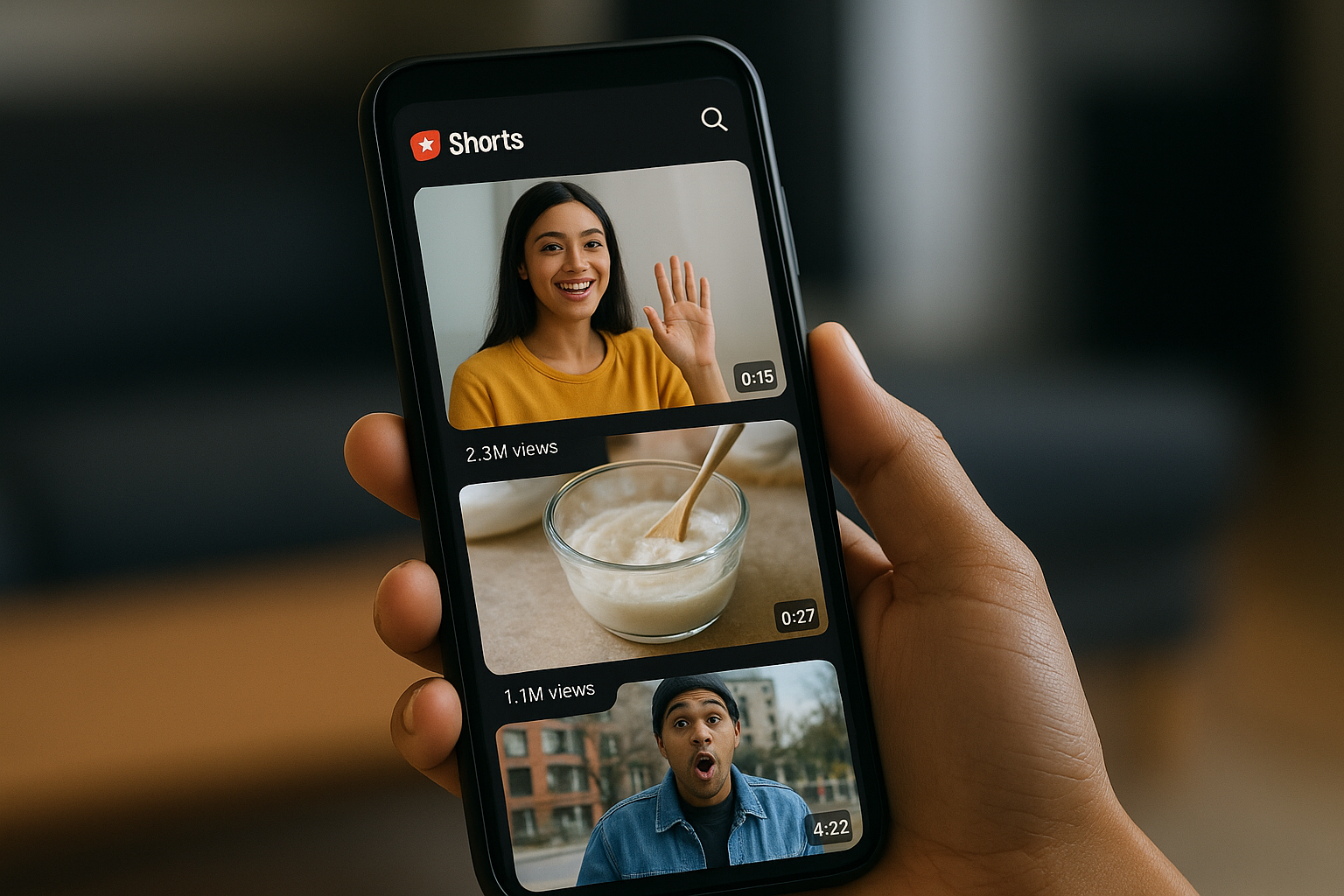
YouTube's algorithm powers this feed by analyzing your viewing history, engagement patterns, and the performance of individual Shorts across the platform. You don't need to subscribe to channels to see their Shorts in your feed. The system prioritizes content it predicts you'll enjoy based on behavioral signals rather than channel authority, which explains why small creators regularly appear alongside established accounts with millions of subscribers.
The Shorts feed exposes viewers to 10 times more creators per session compared to traditional YouTube browsing, creating unprecedented discovery opportunities for emerging voices and event content.
How viewers interact with Shorts
While watching a Short, you see familiar YouTube engagement options adapted for the vertical format. The like button, dislike option, comment section, and share function all appear on the right side of your screen, accessible without interrupting playback. You can tap the three-dot menu to access additional options like reporting content or hiding specific channels from your Shorts feed.
Engagement happens faster in Shorts than in regular videos. Viewers decide within three seconds whether to keep watching or swipe to the next clip, making the opening moment absolutely critical for retention. If you're working with event content collected through platforms like SureShot, understanding what is YouTube Shorts means recognizing this immediate decision point shapes which clips succeed.
Where Shorts appear beyond the dedicated feed
Shorts don't stay confined to their vertical feed. YouTube surfaces them throughout the app in a horizontal scrollable shelf on your homepage, in search results when relevant, and on channel pages alongside regular uploads. This multi-location distribution means your event Shorts can reach viewers who never actively open the Shorts tab but discover them while searching for related content or browsing their subscriptions. Desktop users also access Shorts through these placements, though the experience remains optimized for mobile viewing and vertical formats.
YouTube Shorts specs: length, format, file rules
YouTube enforces specific technical requirements for Shorts that differ from regular uploads. Understanding these specifications helps you prepare event content correctly before uploading, saving time on rejected uploads or reformatting. When you know what is YouTube Shorts from a technical perspective, you can optimize your attendee-captured videos during collection rather than fixing issues afterward.
Duration and timing limits
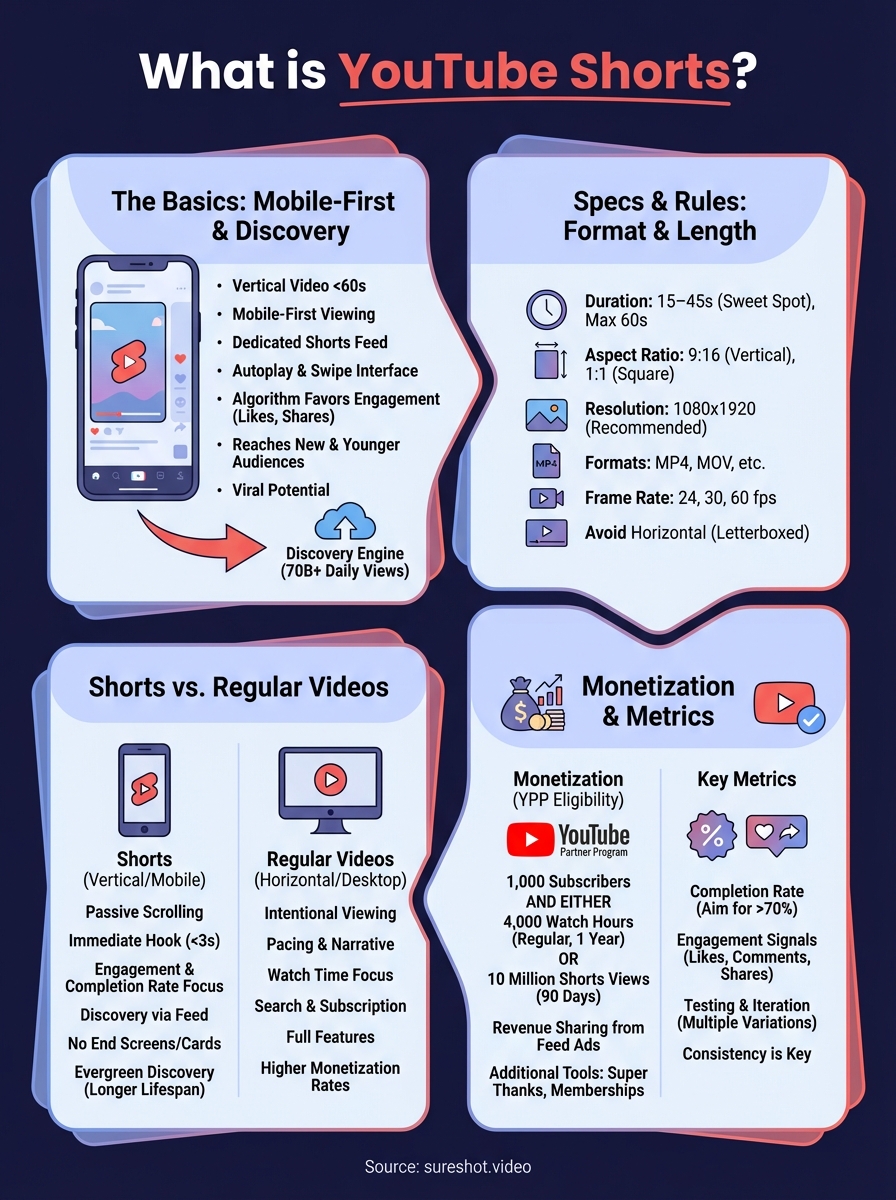
YouTube Shorts must run 60 seconds or less from start to finish. The platform automatically categorizes any vertical video under this threshold as a Short, though you can manually designate videos as Shorts during upload. Your content needs to capture attention and deliver value within this one-minute window, making editing critical for event clips that might originally run longer.
Most successful Shorts clock in between 15 and 45 seconds, the sweet spot where you maintain viewer attention without triggering early exits. You can upload videos shorter than 15 seconds, but they often feel abrupt and leave viewers wanting more context. For user-generated event content collected through platforms like SureShot, you'll find natural highlights typically fit this range without heavy editing.
Aspect ratio and orientation requirements
Shorts require vertical or square aspect ratios to display properly in the dedicated feed. The platform accepts 9:16 (vertical) or 1:1 (square) formats, with 9:16 being the native format that fills mobile screens completely. Horizontal videos technically qualify as Shorts if they're under 60 seconds, but they appear letterboxed with black bars that reduce visual impact and hurt engagement rates significantly.
Your aspect ratio choice affects how effectively you use screen real estate. Vertical 9:16 videos command full attention by eliminating distractions, while square 1:1 clips waste space on mobile devices where 78% of Shorts viewing happens.
Videos shot in vertical format generate 90% completion rates compared to 45% for horizontal content repurposed as Shorts, making native vertical footage essential for maximum impact.
File size and technical specifications
YouTube accepts Shorts in standard video formats including MP4, MOV, AVI, and WebM. You can upload files up to 256 GB or 12 hours in length, though Shorts obviously fall far below the duration limit. The platform recommends 1080×1920 resolution for 9:16 vertical videos, ensuring crisp playback on modern smartphones without unnecessary file bloat.
Frame rate flexibility allows you to upload content shot at 24, 30, or 60 frames per second, matching whatever your attendees captured on their devices. YouTube automatically processes uploads to optimize streaming quality, so you don't need to transcode files before uploading. Your main concern should be maintaining minimum 720p resolution to avoid pixelation that drives viewers away.
YouTube Shorts vs regular YouTube videos
YouTube Shorts and traditional YouTube videos serve different purposes within the same ecosystem, and understanding what is YouTube Shorts means recognizing these strategic differences. Both formats live on your channel, contribute to your overall view count, and reach audiences through YouTube's platform, but they function as distinct content types with separate algorithms, viewer expectations, and performance metrics. Your event content strategy should treat them as complementary rather than competing formats, each designed for specific audience behaviors and consumption patterns.
Format and viewing experience differences
Regular YouTube videos appear in horizontal 16:9 format and can run from a few minutes to several hours, giving you unlimited time to develop narratives, explain concepts, or document full event experiences. You control pacing through editing, and viewers actively choose to watch by clicking thumbnails and titles. Shorts flip this model entirely with vertical 9:16 videos limited to 60 seconds, autoplay functionality, and a swipe-based interface that mimics social media feeds.
The viewing context also changes dramatically between formats. Regular videos demand intentional engagement where viewers search for content, read descriptions, and often watch on larger screens or desktops. Shorts capture attention during passive scrolling sessions on mobile devices, where viewers browse without specific intent and decide within seconds whether to keep watching. Your event highlights might perform better as Shorts for discovery, while full panel discussions or keynote speeches belong in traditional uploads.
Algorithm and discovery mechanisms
YouTube's algorithm treats these formats as separate content ecosystems with different ranking factors. Regular videos rely heavily on search optimization, thumbnail click-through rates, and watch time duration measured in minutes. The system rewards videos that keep viewers engaged for extended periods and lead to additional session time across the platform.
Shorts prioritize percentage of video completed, immediate engagement signals, and swipe-away rates over absolute watch time. You can succeed with a 30-second Short that 80% of viewers watch completely, even though it generates less total watch time than a 10-minute video with 40% retention. This fundamental difference means the same event footage requires different editing approaches depending on which format you choose.
Channels that publish both Shorts and regular videos see 35% higher subscriber growth than those focusing exclusively on one format, as each type attracts distinct audience segments that complement overall channel performance.
Content strategy implications
Your approach to creating regular videos versus Shorts should reflect their different viewer expectations and success metrics. Regular uploads work best for comprehensive event recaps, speaker interviews, or educational content where viewers seek depth and context. You can include detailed descriptions, chapter markers, and end screens that drive traffic to registration pages or sponsor content.
Shorts demand immediate hooks within the first second, fast pacing throughout, and clear value delivery before the 60-second limit expires. You lose access to traditional YouTube features like end screens, detailed descriptions, and cards, making them pure discovery and engagement tools rather than direct conversion mechanisms. For event organizers collecting attendee footage through platforms like SureShot, you'll find natural Shorts material in authentic reactions, highlight moments, and atmosphere clips, while saving longer performances or sessions for standard uploads.
YouTube Shorts vs TikTok and Instagram Reels
YouTube Shorts entered a short-form video market already dominated by TikTok and Instagram Reels, creating direct competition for creators and brands trying to maximize their event content reach. While all three platforms share the vertical video format and 60-second duration limits, they operate within different ecosystems with distinct audiences, algorithms, and monetization models. Your choice of platform affects not just where your content appears, but how viewers discover it, engage with it, and whether it drives meaningful results for your event marketing goals.
Platform reach and audience differences
TikTok built its entire platform around short-form video, creating a dedicated user base of 1.6 billion active users who open the app specifically for this content type. The platform skews heavily toward users under 30, with 60% of its audience falling in the 16 to 24 age range. Instagram Reels reaches 2 billion monthly active Instagram users but competes for attention with Stories, feed posts, and direct messages within the same app, making it a feature rather than a core experience.
YouTube Shorts leverages the existing 2.7 billion YouTube user base, many of whom initially came to the platform for long-form content but now engage with both formats. This gives you access to older demographics and professional audiences who might never download TikTok but already use YouTube for research, education, and entertainment. Your event content reaches different audience segments on each platform, making cross-posting valuable for maximum coverage across age groups and viewing preferences.
Content format and feature variations
All three platforms support vertical 9:16 videos under 60 seconds, but their creation tools and editing features differ significantly. TikTok offers the most robust built-in editing suite with advanced effects, transitions, and sound libraries that make content creation possible entirely within the app. Instagram Reels integrates with Instagram's existing creative tools and filters, allowing seamless crossover with Stories and feed content.
YouTube Shorts provides basic editing capabilities but expects many creators to edit externally before uploading. However, Shorts automatically inherits your YouTube channel's authority, searchability, and evergreen discovery potential that TikTok and Reels lack. Your event clips uploaded as Shorts remain discoverable through YouTube search for months or years, while TikTok and Instagram content typically peaks within 48 hours then disappears into algorithm obscurity.
YouTube Shorts videos maintain 40% of their peak views for over 30 days, compared to just 5% for TikTok content, making Shorts the superior choice for evergreen event marketing that continues generating value long after your event ends.
Monetization and creator opportunities
TikTok's Creator Fund pays based on video views and engagement, but rates typically fall below $0.02 per 1,000 views, making it difficult to generate substantial income without millions of monthly views. Instagram Reels offers even less direct monetization, relying primarily on brand partnerships and sponsored content rather than platform-paid revenue.
YouTube Shorts feeds into the YouTube Partner Program, allowing creators who meet eligibility requirements to earn from ads shown between Shorts in the feed. Understanding what is YouTube Shorts means recognizing this integration with YouTube's broader monetization ecosystem, where successful Shorts drive subscribers who then watch your monetized long-form content. You also gain access to Super Thanks, channel memberships, and merchandise shelf features unavailable on competing platforms, creating multiple revenue streams from the same audience.
How to make and upload a YouTube Short
Creating and publishing Shorts requires less technical complexity than you might expect, whether you're starting from scratch or repurposing existing event footage. You have two primary methods for getting your content onto the platform: recording directly through YouTube's mobile app or uploading pre-recorded videos from your device. Both approaches work equally well, and your choice depends on whether you're creating original content on the spot or working with attendee-captured clips collected through platforms like SureShot.
Creating Shorts with the YouTube app
YouTube's mobile app includes a built-in camera and editing suite designed specifically for Shorts creation. You tap the plus icon in the bottom navigation, then select "Create a Short" to open the vertical camera interface. The app provides basic tools like speed controls, timers, and filters that help you capture polished content without external software, though the features remain simpler than TikTok's editing capabilities.
This native approach works best when you're documenting live moments at your event or creating quick response content. You can record multiple clips that automatically stitch together, add text overlays, and select from YouTube's licensed music library directly within the creation flow. Once you finish editing, you tap "Upload Short" and your content publishes immediately to your channel.
Uploading pre-recorded content as Shorts
Most event organizers work with existing video files captured by attendees rather than creating new content from scratch. You upload these through the standard YouTube upload interface, accessible from the plus icon or your desktop browser. YouTube automatically categorizes vertical videos under 60 seconds as Shorts, but you can also manually select "Short" during the upload process for square videos or to ensure proper classification.
Pre-recorded uploads give you complete editing control before publishing. You can use professional editing software to trim clips, adjust color grading, add captions, or combine multiple perspectives from different attendees into a single compelling Short. This method proves essential when you collect user-generated content systematically, as it allows for quality control and brand consistency across your event highlights.
Optimizing your upload settings
Your title and description significantly impact how viewers discover your Shorts through search and recommendations. You write clear, descriptive titles that include relevant keywords without clickbait exaggeration, keeping them under 60 characters for full mobile display. Descriptions provide context but matter less for Shorts than regular videos, so you focus on essential information and relevant hashtags like #Shorts, #EventName, or #YourBrand.
Adding #Shorts in your title or description ensures YouTube's algorithm properly identifies and distributes your content through the dedicated Shorts feed, even if automatic detection fails.
YouTube automatically generates a thumbnail from your video, but you can select a specific frame that best represents your content by scrubbing through the timeline during upload. You also choose visibility settings (public, unlisted, or private) and add your video to playlists for organization, though Shorts rely primarily on algorithmic distribution rather than playlist browsing for viewer discovery.
Monetization basics for YouTube Shorts
YouTube's monetization for Shorts differs significantly from traditional video advertising, though both systems reward creators for generating engagement. When you understand what is YouTube Shorts from a revenue perspective, you realize the platform treats short-form content as a separate monetization category with unique rules and payment structures. Event organizers working with user-generated content need to grasp these basics to evaluate whether Shorts revenue justifies the effort of collecting, editing, and publishing attendee footage beyond its marketing value.
YouTube Partner Program eligibility
You must meet specific thresholds before earning money from Shorts. YouTube requires 1,000 subscribers and either 4,000 watch hours from regular videos in the past year or 10 million Shorts views in the past 90 days. This dual pathway means you can qualify through Shorts performance alone without building a long-form content library, making the Partner Program more accessible for event-focused channels.
Once accepted, you earn from ads shown between Shorts in the viewer's feed rather than pre-roll or mid-roll ads within your content. YouTube pools all Shorts ad revenue, then distributes it among creators based on your share of total Shorts views. Your actual earnings depend on viewer location, advertiser demand, and the percentage of music-licensed content in your videos, as music rights holders claim a portion of revenue when you use their tracks.
Creators typically earn $0.01 to $0.06 per 1,000 Shorts views through the Partner Program, significantly lower than long-form video rates but achievable at much higher view volumes.
Additional income opportunities beyond ads
Revenue sharing represents just one monetization path. Shorts drive subscribers who later watch your monetized long-form content, creating indirect earnings that often exceed direct Shorts payments. Your event highlights serve as discovery tools that build audiences for full-length recap videos, sponsor integrations, or premium content offerings where you capture higher revenue per viewer.
You also gain access to Super Thanks, channel memberships, and merchandise shelf features once you join the Partner Program. Viewers can tip creators directly on Shorts they find valuable, and your channel page displays membership options and products regardless of which video type brought subscribers to your channel. Event organizers find this ecosystem approach more valuable than focusing solely on Shorts ad revenue, as authentic attendee content builds loyal communities willing to support through multiple revenue streams.
Strategic monetization for event content
Your primary Shorts goal likely centers on marketing reach and community building rather than immediate ad revenue. The platform rewards consistency, so publishing multiple Shorts weekly from your event footage keeps your channel active in the algorithm while building authority in your event niche. Revenue follows naturally as your subscriber base and view counts grow, transforming what started as promotional content into a sustainable income source that funds future event production and content creation efforts.
Metrics and optimization for Shorts
YouTube provides specific performance indicators for Shorts that differ from traditional video analytics, and tracking the right metrics helps you understand what resonates with viewers. When you grasp what is YouTube Shorts from a performance perspective, you realize the platform values watch-through rate and immediate engagement over absolute view counts or minutes watched. Your optimization efforts should focus on these unique signals rather than applying traditional YouTube video strategies to short-form content, as the algorithm rewards different behaviors in the Shorts feed.
Watch time percentage and average view duration
YouTube Studio displays how many viewers complete your entire Short rather than total minutes watched, making completion rate your most critical metric. You find this data in the "Reach" tab under your video analytics, where YouTube shows average percentage viewed alongside total views. Shorts that maintain 70% or higher completion rates signal quality to the algorithm, triggering broader distribution in the discovery feed.
Average view duration matters less for Shorts than regular videos because a 30-second Short with 80% completion outperforms a 60-second Short with 50% retention, even though the longer video generates more absolute watch time. Your goal becomes maximizing the percentage of viewers who watch until the final frame rather than increasing video length. Event content collected from attendees through platforms like SureShot naturally produces high-impact moments that viewers watch completely, giving you an advantage over creators struggling to maintain attention with manufactured content.
Shorts with completion rates above 75% receive three times the algorithmic promotion compared to videos under 50%, making retention optimization more valuable than view count growth.
Engagement metrics that matter
Likes, comments, and shares directly influence how aggressively YouTube promotes your Shorts beyond your existing subscriber base. You track these engagement signals in your analytics dashboard under the "Engagement" section, where you can compare performance across multiple Shorts to identify patterns. Videos that generate engagement from non-subscribers indicate strong viral potential, as the algorithm interprets this as content worth showing to broader audiences.
The relationship between views and engagement rates reveals content quality more accurately than either metric alone. You calculate engagement rate by dividing total interactions by total views, then multiplying by 100 for a percentage. Strong Shorts typically achieve 5% to 15% engagement rates depending on your niche and audience loyalty, with authentic event moments often outperforming scripted content due to their inherent shareability.
Testing and iteration strategies
Successful Shorts optimization requires consistent publishing and performance analysis rather than occasional uploads. You publish multiple variations of similar event content to test different hooks, lengths, and editing styles, then double down on formats that generate the strongest completion and engagement rates. YouTube rewards channels that maintain regular Shorts schedules, so you establish a publishing cadence that keeps your content flowing without sacrificing quality.
Your testing should focus on openings within the first three seconds, as this window determines whether viewers continue watching or swipe away. You experiment with starting Shorts at the climactic moment rather than building up to it, cutting unnecessary context that delays value delivery. Event footage offers natural testing opportunities because you typically collect dozens of perspectives on the same moment, allowing you to compare which angles, audio choices, or editing approaches resonate most strongly with your target audience.
Next steps
You now understand what is YouTube Shorts beyond just a simple definition of short-form video. The platform offers event organizers a powerful distribution channel for authentic attendee-captured moments that would otherwise sit unused in camera rolls. Your strategy should combine consistent Shorts publishing with quality user-generated content rather than expensive professional production that struggles to match the authenticity audiences demand.
The challenge lies in collecting video content from attendees at scale while maintaining quality control across submissions. SureShot solves this problem by providing dedicated event PINs, automated content review, and centralized management for crowd-sourced clips that become your Shorts library. Instead of manually requesting videos through social media or email, you gather authentic perspectives systematically throughout your event.
Start transforming your event attendees into content creators who amplify your reach organically. Book a demo with SureShot to see how simple video collection becomes when you give attendees the right tools and your marketing team gains access to authentic Shorts content that drives real engagement.