




What Is Instagram Reels? Features, Specs, & Best Practices
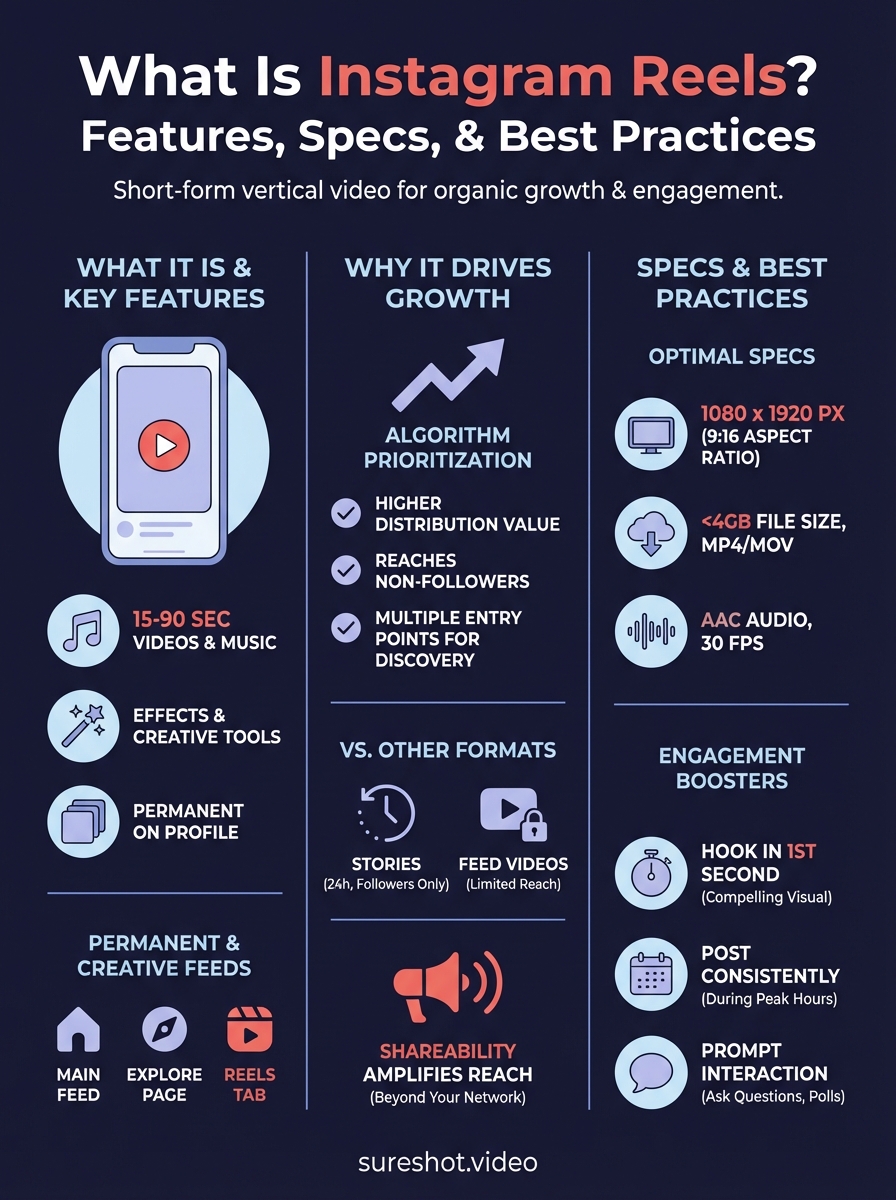
Instagram Reels is a short form video feature that lets you create and share 15 to 90 second videos with music, effects, and creative editing tools. Instagram launched Reels in 2020 as its answer to TikTok, giving you a way to produce engaging vertical content that appears in a dedicated feed, on your profile, and throughout the Explore page. You can layer audio tracks, add text overlays, apply filters, and adjust playback speed to craft videos that capture attention and drive engagement.
This guide breaks down everything you need to know about Instagram Reels, from recording your first video to understanding technical specs that ensure maximum quality. You'll learn why Reels generate more organic reach than standard posts, how they differ from Stories and IGTV, and what practices actually boost engagement. Whether you're promoting events, building brand awareness, or sharing highlights from your latest gathering, mastering Reels gives you a powerful tool to connect with your audience and expand your reach.
Why Instagram Reels drive organic growth
Instagram actively pushes Reels into feeds and discovery areas because the platform wants to compete with TikTok's dominance in short-form video. The algorithm treats Reels differently than standard photo posts or Stories, giving them greater visibility to users who don't already follow you. Your content can appear on the Explore page, in the dedicated Reels tab, and in your followers' main feeds, creating multiple touchpoints that drive discovery and engagement without paid promotion.
Algorithm prioritization favours video content
Instagram's algorithm assigns higher distribution value to Reels compared to static posts. The platform tracks how long viewers watch your video, whether they replay it, and if they share it with others. These signals tell Instagram your content deserves wider distribution. When you post a Reel, it enters a testing phase where Instagram shows it to a small audience segment. If engagement rates exceed specific thresholds, the algorithm expands your reach exponentially.
Understanding what is instagram reels and how its algorithm works gives you a major advantage in planning content that actually reaches new audiences.
Expanded discovery through multiple entry points
Your Reels appear in four distinct places: your profile grid, the main feed, the Reels tab, and the Explore page. This multi-surface distribution means viewers encounter your content through different browsing behaviors. Someone searching for event content might discover your Reel on Explore, while a follower sees it in their main feed. The Reels tab also features a continuous scroll that keeps viewers watching video after video, increasing the chance they stumble upon your content organically.
Shareability amplifies reach beyond your network
Reels include built-in sharing features that make it easy for viewers to send your video to friends via direct message or Stories. When someone shares your Reel, it introduces your brand to entirely new networks without any advertising spend. The video format itself encourages sharing because viewers can quickly consume and forward compelling content. Each share creates a ripple effect that expands your reach geometrically, as recipients may share with their own contacts. This organic amplification makes Reels particularly valuable for event organizers who want to maximise visibility and build anticipation around upcoming gatherings.
How to record and edit your first Reel
Creating your first Reel takes less than five minutes once you understand the basic workflow. The Instagram app provides built-in recording and editing tools that let you capture video directly within the platform or upload existing clips from your camera roll. You access the Reel creation interface by tapping the plus icon in the Instagram app and selecting "Reel" from the menu, which opens a vertical video editor with controls for recording, adding effects, and adjusting timing.
Capture video with multiple recording options
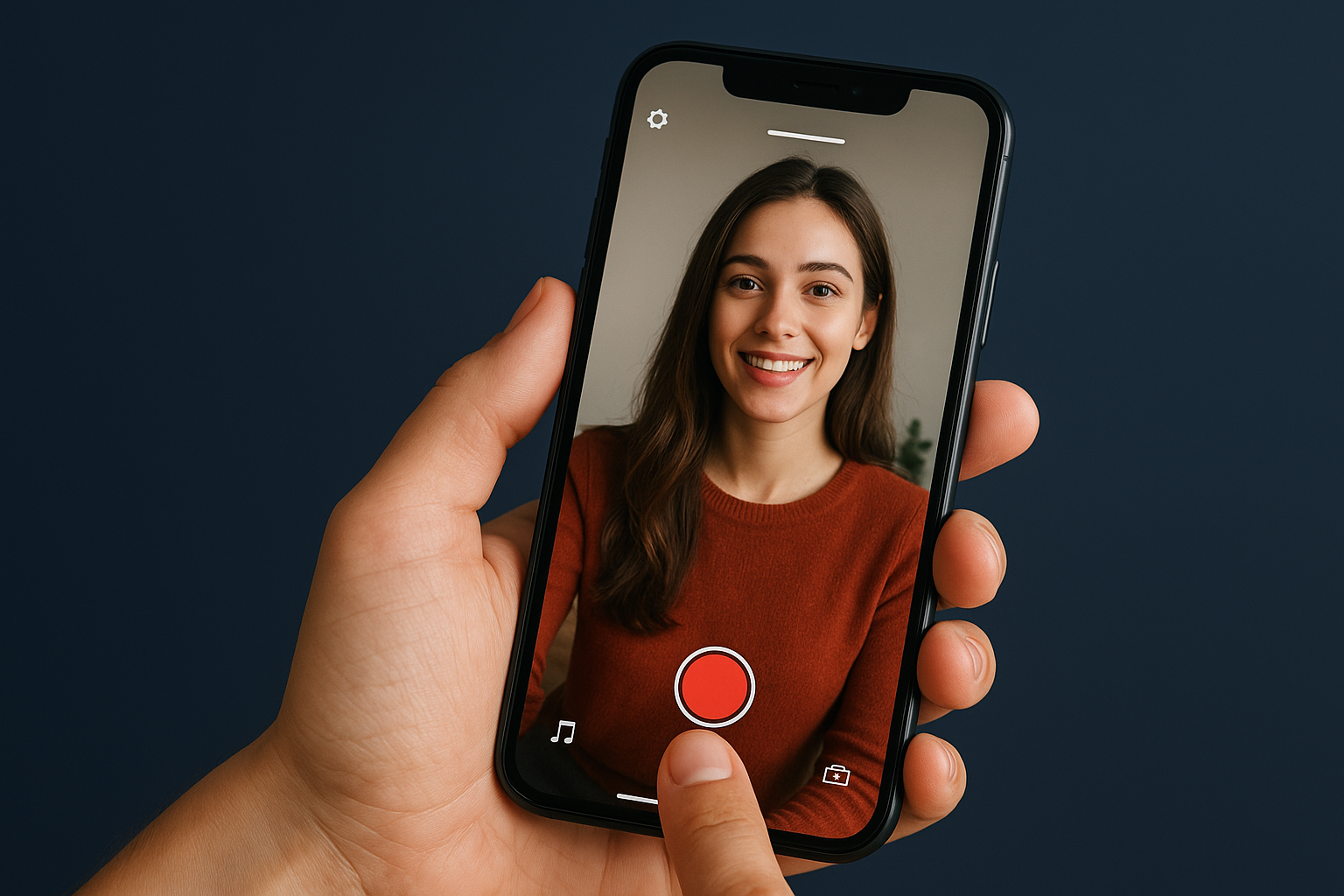
You can record Reels using the in-app camera by holding down the capture button for continuous recording or tapping it for individual clips. The interface shows a progress bar at the top that fills as you record, giving you visual feedback on how much time remains. Instagram lets you record multiple clips in one Reel, which you can delete or reorder before publishing. Alternatively, you upload pre-recorded videos from your phone's gallery by tapping the media icon in the bottom-left corner, allowing you to work with footage captured outside Instagram.
Apply effects and finalize your edit
After recording or uploading your clips, you add audio tracks by tapping the music icon and searching Instagram's licensed library. The editing interface lets you trim clips, adjust playback speed from 0.3x to 3x, and apply filters that match your brand aesthetic. You can overlay text by selecting the text tool, choosing font styles, and positioning captions where they won't obstruct key visual elements. Before posting, preview your Reel to ensure smooth transitions and check that audio syncs properly with your video.
Understanding what is instagram reels and mastering its editing tools gives you complete creative control without needing external software.
Technical specifications for optimal quality
Instagram enforces specific technical requirements that directly affect how your Reels display across devices and feeds. Meeting these specifications ensures your content appears sharp and professional rather than pixelated or cropped. Your video format, resolution, and file size all determine whether Instagram compresses your content or delivers it at full quality to viewers scrolling through their feeds.
Video resolution and aspect ratio requirements
Instagram Reels support a maximum resolution of 1080 x 1920 pixels, which corresponds to the standard 9:16 vertical aspect ratio. You can upload videos in other aspect ratios like 4:5 or 1:1, but Instagram automatically adds black bars or crops your footage to fit the vertical format. Recording at 1080p ensures your content fills the screen without quality loss, giving you the clearest possible presentation on both iOS and Android devices.
File size and format constraints
Your video file cannot exceed 4GB in size, though most Reels stay well below this limit due to the 90-second duration cap. Instagram accepts MP4 and MOV formats, which offer the best balance between quality and file size. Videos that exceed recommended specifications trigger heavy compression during upload, resulting in visible artifacts and reduced sharpness that hurt viewer engagement.
Understanding what is instagram reels technical requirements prevents quality loss and ensures your content competes effectively in feeds.
Audio and compression considerations
Instagram recommends using AAC audio codec at a bitrate of at least 128 kbps for clear sound quality. Higher bitrates up to 320 kbps preserve audio fidelity better, which matters when your Reel includes music or dialogue. Export your video at 30 frames per second using H.264 codec to match Instagram's processing pipeline and minimise additional compression after upload.
Differences between Reels and other formats
Instagram offers several video formats, each serving distinct purposes within your content strategy. Reels differ from Stories, feed videos, and IGTV in duration limits, discoverability, and permanence on your profile. Understanding what is instagram reels and how it compares to other formats helps you choose the right tool for each piece of content you create.
Stories vs Reels permanence and reach
Stories disappear after 24 hours unless you save them to highlights, while Reels remain on your profile permanently like standard posts. Instagram also limits Stories to 60 seconds per segment, though you can chain multiple segments together. The biggest difference lies in discoverability: Stories only reach your existing followers and appear in a chronological feed at the top of the app, while Reels surface to non-followers through the Explore page and dedicated Reels tab. Stories work best for time-sensitive updates or behind-the-scenes content, whereas Reels deliver long-term value through sustained visibility.
Feed videos and IGTV limitations
Standard feed videos allow 60-minute uploads but receive less algorithmic promotion than Reels. IGTV, which Instagram deprecated in favour of longer Reels, previously handled extended video content but lacked the discovery features built into Reels. Feed videos appear only in your followers' chronological feeds and on your profile grid, limiting their reach potential. Reels benefit from preferential algorithm treatment that pushes them beyond your follower base, making them the superior choice when you want to attract new audiences or maximise engagement on event content.
Choosing Reels over other formats gives you permanent visibility with built-in discovery advantages that Stories and feed videos cannot match.
Best practices for content engagement
Creating Reels that generate high engagement requires strategic choices about timing, content structure, and audience interaction. Instagram rewards videos that keep viewers watching until the end and prompt them to take action through likes, comments, or shares. Applying proven engagement tactics transforms your Reels from simple posts into performance assets that consistently reach new audiences and strengthen connections with existing followers.
Hook viewers within the first second
Your opening frame determines whether viewers scroll past or watch your entire Reel. Place your most compelling visual or statement in the first second before viewers decide to keep watching. Text overlays that pose questions, showcase unexpected moments, or promise valuable information work particularly well because they create immediate curiosity. Avoid slow introductions or lengthy setups that give viewers time to scroll away before reaching your actual content.
Understanding what is instagram reels engagement patterns means respecting the ultra-short attention span viewers bring to vertical video feeds.
Post consistently during peak activity windows
Instagram's algorithm favours accounts that maintain regular posting schedules, interpreting consistency as a signal of quality and reliability. Track when your followers engage most actively by checking Instagram Insights, then schedule your Reels to publish during those high-traffic windows. Most accounts see peak engagement during lunch hours (11 AM to 1 PM) and evenings (7 PM to 9 PM), though your specific audience may behave differently based on their routines and time zones.
Encourage interaction through strategic prompts
Reels that generate comments receive amplified distribution because Instagram interprets conversation as a strong engagement signal. Ask direct questions in your captions, create polls in follow-up Stories, or invite viewers to share their experiences in comments. Simple prompts like "Which event moment surprised you most?" or "Tag someone who needs to see this" transform passive viewers into active participants who boost your content's algorithmic performance.
Final thoughts on video strategy
Mastering what is instagram reels gives you a powerful distribution channel that reaches audiences beyond your existing follower base. The platform's algorithm prioritizes video content that keeps viewers engaged, making Reels your best option for organic growth without advertising spend. You gain permanent visibility on your profile, multiple discovery touchpoints through feeds and Explore, and built-in tools that simplify creation from capture to publication.
Event organizers who collect authentic video content from attendees unlock even greater potential. When you transform attendees into content creators, you multiply your reach through their networks while building stronger community connections. If you want to streamline how you gather, manage, and deploy event videos that fuel your Reels strategy, book a demo to see how SureShot helps event organizers turn every gathering into a content goldmine that drives sustained engagement across Instagram and beyond.


