
Scan QR to download the app

December 18, 2025

SureShot Video: Website, App, and How to Use It for UGC

SureShot Video: Website, App, and How to Use It for UGC

SureShot Video: Website, App, and How to Use It for UGC

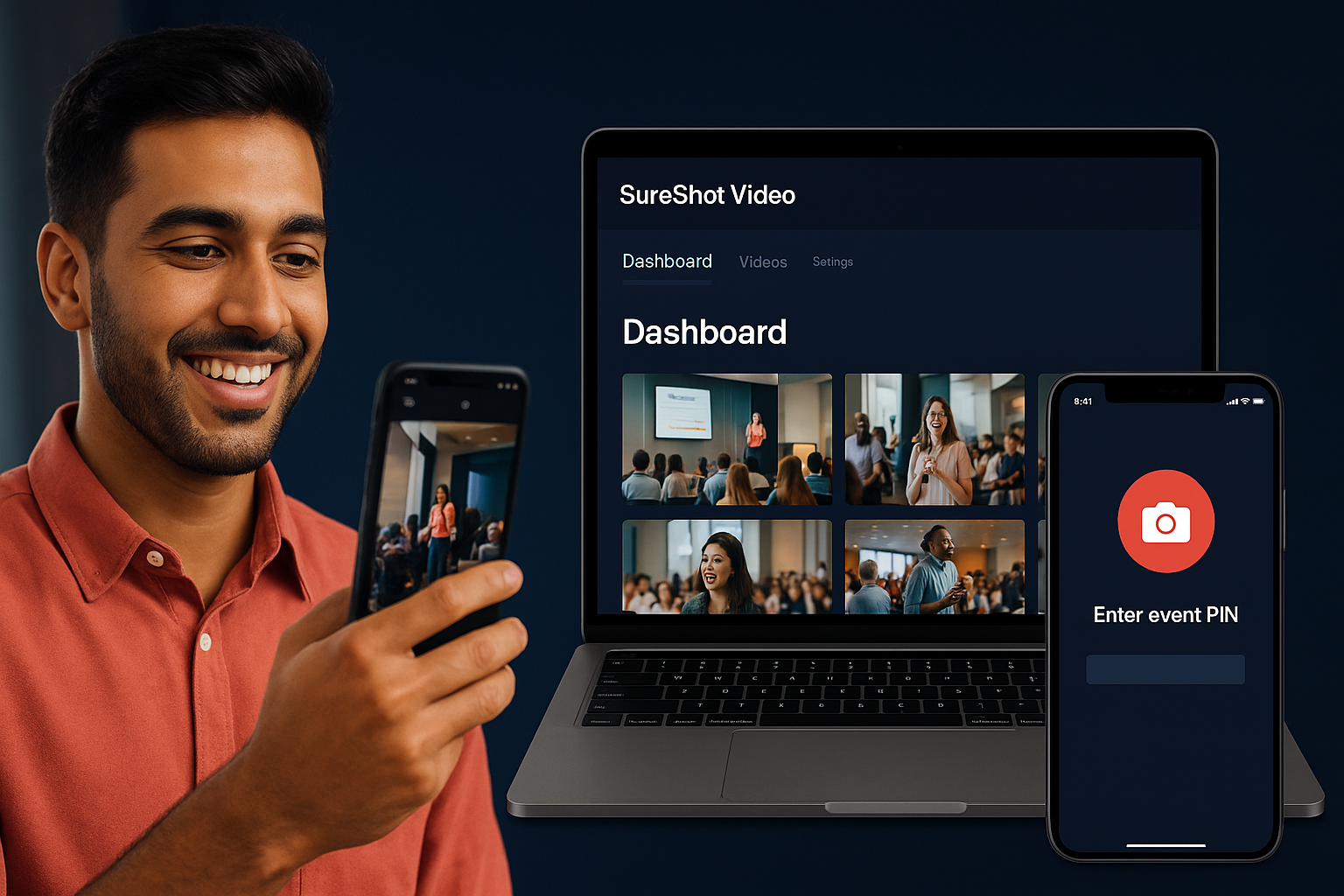
SureShot Video is a platform that helps event organizers collect authentic video content from attendees. Instead of hiring expensive camera crews, you can turn your audience into video creators. People at your event use the SureShot app to capture moments, and you get access to all that footage through an organized dashboard. The platform uses AI to help you sort through clips and find the best moments worth sharing.

This guide shows you everything you need to know about SureShot Video. You'll learn where to find the official website and app downloads, how the platform works for both organizers and attendees, and what features make it useful for capturing event content. We'll walk through the setup process, explain the key tools available in your organizer dashboard, and share practical tips for getting great results at your next event. Whether you run concerts, conferences, or other gatherings, you'll understand how to use this tool to build a library of genuine moments that your professional videographers might miss.

Why SureShot Video matters for event content

Your attendees already film your event on their phones. They capture raw reactions, spontaneous moments, and perspectives that professional crews miss. SureShot Video gives you a system to collect and use this content instead of letting it disappear into personal camera rolls. You gain access to dozens or hundreds of unique viewpoints from a single event, and your audience sees authentic footage created by people just like them.

Why SureShot Video matters for event content

Authenticity drives engagement

User-generated content performs better than polished marketing videos. People trust content from other attendees more than brand-produced material, and they engage with it at higher rates on social platforms. When you share clips that real fans captured, your audience connects with the genuine emotion and experience. The footage shows your event through honest eyes, not through a carefully controlled lens.

User-generated video content generates more shares and comments because viewers recognize themselves in the experience.

Cost and time advantages

Professional video production requires significant budget and planning. You need to hire crews, coordinate shooting schedules, and wait weeks for edited deliverables. SureShot video changes this by crowdsourcing your content creation. Attendees do the filming, AI helps you sort through submissions, and you get usable clips within hours instead of weeks. This approach cuts production costs while expanding your content library beyond what any single crew could capture.

How to get started with SureShot Video

Getting started with SureShot video requires different steps depending on your role. Event organizers need to create an account and set up their event on the platform, while attendees simply download the app and join with a PIN. The entire process takes less than five minutes for either role, and the platform guides you through each step with clear instructions.

How to get started with SureShot Video

For event organizers

You visit the official SureShot website at sureshot.video to create your organizer account. After signing up, you access the dashboard where you can create your first event. The setup process asks for basic details like event name, date, and location. Once you complete the form, the system generates a unique PIN that your attendees will use to access the event in the app.

Your event PIN is the key that connects attendee uploads to your dashboard, so share it clearly before and during your event.

For attendees

Attendees start by downloading the SureShot app from the Apple App Store for iOS devices. Android users can access the platform through a web interface until the Android app launches. After opening the app, you enter the event PIN that the organizer provided. This connects you to the specific event, and you can immediately start recording and uploading video clips from your phone.

Key features of the SureShot platform

The SureShot platform combines several tools that work together to simplify video collection and management. You get automated content review, organized clip storage, and clear licensing terms that let you use attendee footage without legal concerns. The system handles everything from initial uploads through final content selection, reducing the manual work you typically face when collecting videos from multiple sources.

AI-powered content curation

Artificial intelligence scans every uploaded clip to identify key moments and highlight-worthy content. The system analyzes video quality, detects faces, recognizes action, and flags clips that contain the most engaging footage. You save hours of manual review time because the AI pre-sorts submissions based on relevance and quality. Instead of watching hundreds of raw clips, you focus on the curated selection that the system recommends for your promotional needs.

AI assistance transforms content management from an overwhelming task into a streamlined workflow that respects your time.

Organizer dashboard and controls

Your organizer dashboard gives you complete oversight of all submitted content. You can view thumbnails of every clip, organize footage by timestamp or uploader, and download files for editing in your preferred software. The interface lets you customize event settings, monitor upload activity in real time, and manage multiple events from one central location. Access controls ensure that only authorized team members can view and download sensitive event content.

Organizer dashboard and controls

Content licensing and usage rights

SureShot video handles licensing automatically when attendees upload their clips. Users grant you permission to edit, share, and repurpose their submitted videos for event-related purposes. This licensing framework protects you from copyright issues while giving attendees clear terms about how their content gets used. You gain the rights you need for marketing, social media, and archival purposes without negotiating individual agreements with each contributor.

Best practices for using SureShot at events

Success with SureShot video depends on how you prepare and guide your attendees. You need clear communication before the event and active engagement during it to collect quality footage. The platform works best when you treat attendees as partners in content creation rather than passive audience members. Your preparation determines both the quantity and quality of submissions you receive.

Communicate the PIN clearly

Share your event PIN through multiple channels before people arrive. Include it in confirmation emails, display it prominently on screens at venue entrances, and announce it during opening remarks. Attendees need to download the app and join your event before they can start recording, so give them this information early. Repeat the PIN throughout your event because late arrivals miss initial announcements.

Communicate the PIN clearly

Early and frequent PIN communication ensures maximum participation and reduces technical support questions during your event.

Encourage participation throughout

Remind attendees to capture specific moments that matter to your event. Call out opportunities during transitions between speakers, performances, or activities. Tell them what you want to see, whether it's crowd reactions, behind-the-scenes moments, or keynote highlights. Active encouragement increases submissions because people forget to film when they're fully engaged in the experience.

Set content guidelines

Provide simple filming instructions that improve video quality. Ask attendees to hold phones horizontally, keep clips between 10 and 30 seconds, and focus on action rather than static shots. Clear guidelines help you receive usable footage instead of shaky, poorly framed submissions. Brief instructions take seconds to share but dramatically improve the content you collect.

Common questions about SureShot Video

You likely have questions about how SureShot video works in practice and what limitations you might face. Organizers often ask about platform compatibility, storage capacity, and data privacy before committing to the service. These concerns are valid because you need reliable technology that protects both your content and your attendees' information.

Does SureShot work on Android devices?

The dedicated SureShot app currently runs on iOS devices only through the Apple App Store. Android users can access the platform through a web-based interface that provides similar functionality for uploading and viewing content. You should inform attendees about this difference so they know which option to use based on their device type.

Android app development is underway, but web access ensures all attendees can participate regardless of phone type.

What happens to uploaded videos?

SureShot stores all uploaded content securely on its servers where only authorized organizers can access it. The platform maintains data protection compliance and encrypts video files during transfer and storage. Videos remain available for download through your organizer dashboard, and you control which clips get shared publicly or used for promotional purposes.

sureshot video infographic

Next steps with SureShot Video

You now understand how SureShot video transforms attendees into content creators for your events. The platform removes technical barriers by providing simple app access for participants and an organized dashboard for organizers. Your next event can generate authentic video content that costs less and engages audiences better than traditional production methods that require professional crews and extensive planning.

Start by creating your organizer account on the official website and setting up your first event with custom details. Test the system with a small gathering to understand the workflow before deploying it at larger events. Book a demo with our team to see how the platform works in detail and ask specific questions about your event needs and technical requirements.

