





You've probably noticed it. The polished, overproduced event videos that used to fill your feed are getting replaced by shaky phone clips from random people in the crowd. That's not a mistake. That's the point. Ugc video content has gone from "nice to have" to "the entire strategy" for event organisers who want content that spreads, feels real, and doesn't burn through their budget.
The thing is, most people still think user-generated content means running a hashtag campaign and hoping someone posts something decent. It doesn't work that way anymore. If you want ugc video content that's worth sharing, you need systems, not hope.
Why UGC Video Content Actually Matters
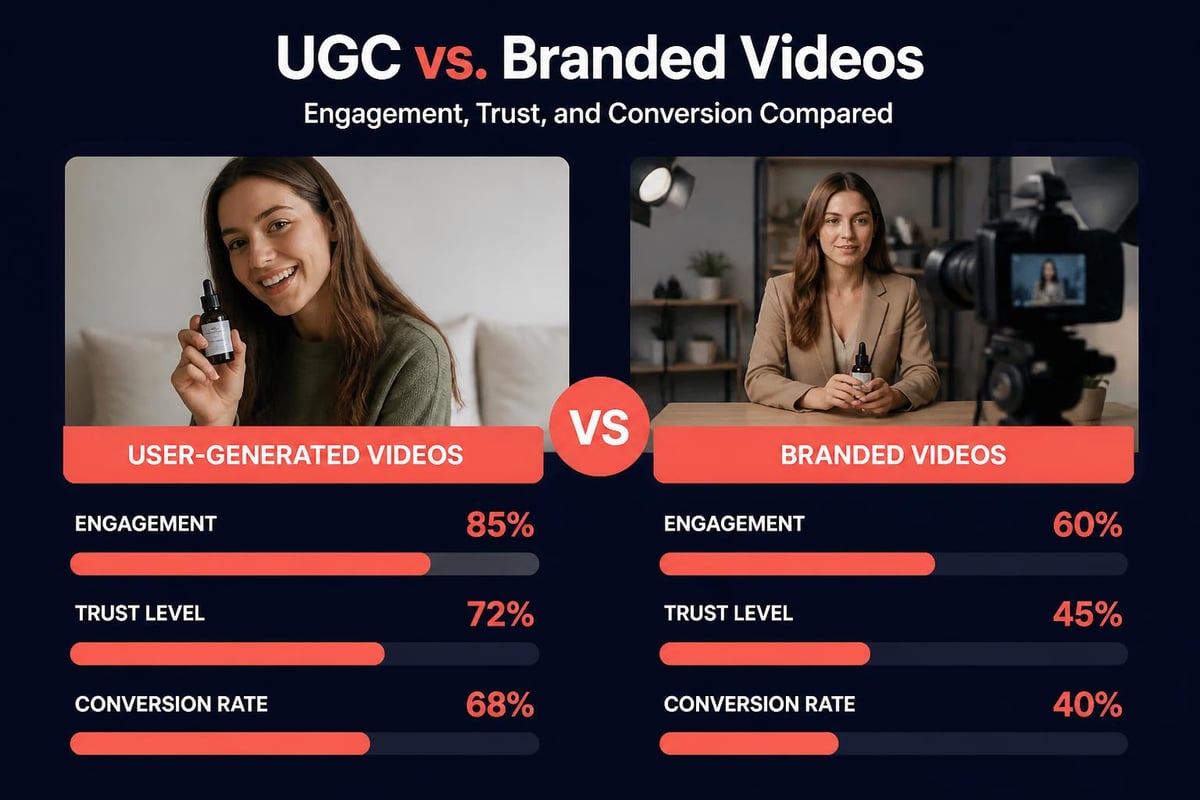
Let's start with the numbers, because they tell the real story. According to recent consumer research, user-generated content performs better than branded content in nearly every metric that matters. Higher engagement, better conversion rates, more shares.
The reason isn't complicated. People trust other people more than they trust brands. When someone films themselves at your event, they're not trying to sell anything. They're just capturing what actually happened. That authenticity cuts through in ways your marketing team's carefully crafted video never will.
Here's what changes when you build a proper ugc video content strategy:
- Production costs drop dramatically because attendees do the filming
- Content volume increases without hiring more videographers
- Social reach expands organically as creators share to their networks
- Authenticity improves because you're not controlling the narrative
- Event experience gets better when people feel part of the story
The last point matters more than people realise. When you turn attendees into storytellers, they engage differently with your event. They're not just consuming, they're creating.
What Actually Works for Collecting Videos
Right, so you want people filming at your event. How do you make that happen without relying on hashtags and prayers?
Make It Dead Simple
The biggest mistake is assuming people will figure it out. They won't. You need to make uploading videos easier than posting to Instagram.
Choosing the best UGC platform matters here. Look for something people can access without downloading another app they'll delete tomorrow. Web-based platforms work better than apps for one-time events.
Give People a Reason
"Share your experience" is vague. "Film the moment the headliner walks on stage" is specific. People need direction, not just permission.
Try this approach:
- Identify key moments in your event schedule worth capturing
- Communicate specific prompts before those moments happen
- Make submission instant so people don't forget
- Show their content on screens or socials during the event
- Follow up afterwards with highlights featuring their clips
When running successful UGC campaigns, the ones that work best have clear creative direction. "Film anything" gets you nothing. "Show us your reaction when..." gets you gold.
Think About the Tech Stack
You need platforms that handle mobile uploads without compressing everything into pixelated mush. Video format matters more than you'd think, especially when you're dealing with hundreds of uploads from different phones.
Here's what to prioritise in your tech:
| Feature | Why It Matters | What to Avoid |
|---|---|---|
| Mobile-first upload | 90% of UGC comes from phones | Desktop-only platforms |
| Instant processing | People won't wait | Slow queues that lose momentum |
| Consent management | GDPR isn't optional | Manual permission tracking |
| Auto-curation | You can't manually review 500 clips | Everything-or-nothing approaches |
| Cross-platform sharing | Content needs to spread | Closed systems |
Curating UGC Video Content Without Losing Your Mind
Here's where most people fall apart. You ask for videos, people send them, and suddenly you've got 300 clips of varying quality and you need to do something with them by tomorrow.
Video content curation is where AI actually helps instead of making things worse. You're not generating fake content. You're using smart tools to sort through real content faster than humans can.
What to Keep, What to Bin
Not every clip deserves to live. Quality matters, but authenticity matters more. A slightly shaky video of genuine excitement beats a perfectly stable shot of nothing happening.
Quick filtering rules that work:
- Keep anything with genuine reactions even if the framing is off
- Bin anything dark or inaudible unless the moment is incredible
- Prioritise variety over multiple angles of the same thing
- Look for unexpected moments that your pro crew missed
- Save vertical content separately for different platforms
That last bit is crucial. Most ugc video content comes in vertical because that's how people hold their phones. Don't try to convert horizontal video to vertical when you've already got native vertical content. Work with what people naturally create.
Speed Matters More Than Perfection
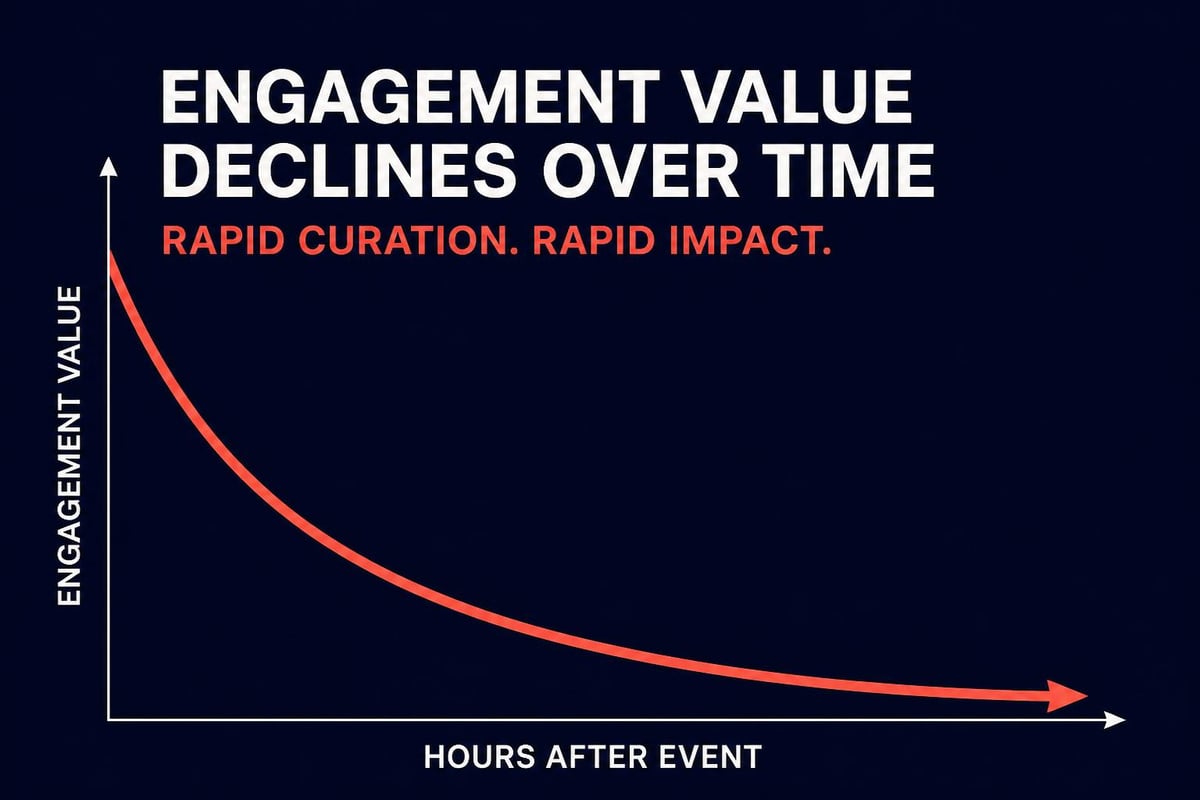
The lifecycle of event content is measured in hours, not days. If you're still curating clips a week after your event, you've already lost. Getting event content to social within 24 hours is the difference between trending and forgotten.
This means accepting "good enough". A compilation of authentic moments posted while people still care will outperform a perfectly edited highlight reel posted when everyone's moved on.
Distribution That Actually Spreads
Collecting and curating ugc video content is pointless if nobody sees it. The distribution strategy matters as much as the content itself.
Platform-Specific Approaches
Each platform wants something different. YouTube wants longer content. TikTok wants vertical. Facebook Reels sits somewhere in between. Don't try to post the same video everywhere.
Your editing workflow should produce:
- Short vertical clips for Instagram, TikTok, and Reels
- Compilation videos for YouTube and Facebook main feed
- Story-format sequences for Instagram and Snapchat
- Longer highlight reels for your website and email
The brilliant thing about ugc video content is volume. You've got enough raw material to cut different versions for different platforms without stretching anything thin.
Let Creators Do the Heavy Lifting
When someone films content at your event and uploads it to your platform, they're already invested. Make it easy for them to share it to their own socials too.
This is where earned media from UGC becomes powerful. You're not just getting content. You're getting distribution through networks you couldn't reach otherwise. Every person who shares becomes an extension of your marketing team, except they're more trusted and they work for free.
According to research on media consumption, user-generated content now accounts for 39% of weekly media hours consumed. That's not a trend. That's a fundamental shift in how people engage with content.
Making It Work at Scale
Running this for one event is manageable. Running it for dozens of events gets complicated fast. You need systems that scale without requiring more humans.
Automation That Helps
The right automation handles the boring stuff so you can focus on the creative decisions. Things like:
- Automatic consent collection when people upload
- Smart filtering that flags the best clips
- Template-based editing for quick turnarounds
- Scheduled posting across platforms
- Analytics tracking so you know what works
Automating event video curation isn't about removing humans from the process. It's about removing humans from the tedious bits so they can spend time on the parts that matter.
Building Templates That Work
Every event is different, but the structure can stay the same. Create templates for different event types and you'll move faster each time.
| Event Type | Content Focus | Ideal Length | Best Platforms |
|---|---|---|---|
| Music festivals | Crowd reactions, performances | 15-30 seconds | TikTok, Instagram Reels |
| Conferences | Key moments, speakers | 30-60 seconds | LinkedIn, YouTube Shorts |
| Sports events | Goals, celebrations | 10-20 seconds | Twitter, Instagram Stories |
| Brand activations | Product interactions | 15-45 seconds | Instagram, Facebook |
When creating videos from clips, working from proven templates means you're not reinventing the wheel every time. You're just adapting what already works.
What Nobody Tells You About UGC Rights
Here's the bit that trips people up. Someone films content at your event and uploads it to your platform. Who owns it? Who can use it? For how long?
Get this sorted upfront or deal with headaches later.
Clear Terms Matter
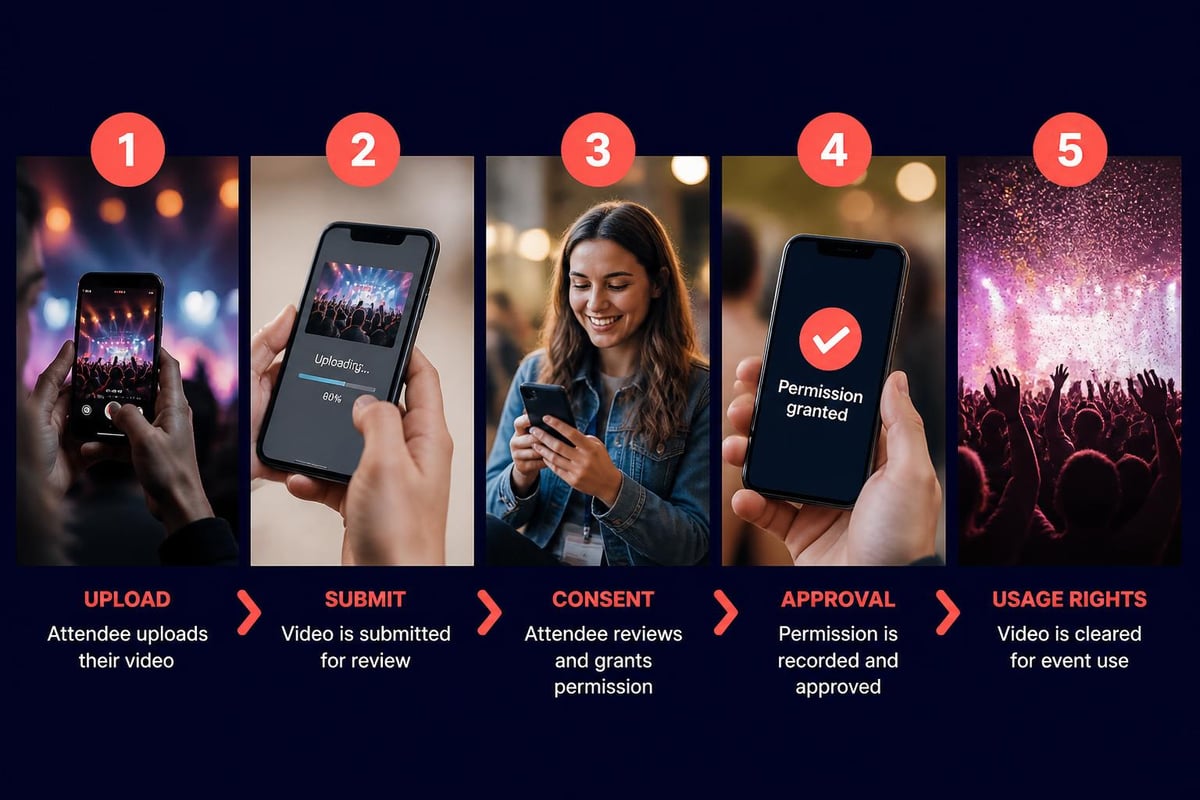
When people upload content, they need to know what you're doing with it. Not in 40 pages of legal text nobody reads. In plain language that takes 10 seconds to understand.
Your consent flow should cover:
- What you'll use their content for
- Where it might appear
- How long you can use it
- Whether they retain ownership
- How they can withdraw consent
Content licensing for events doesn't need to be complicated, but it does need to be clear. The more transparent you are, the more comfortable people feel contributing.
GDPR and Privacy Compliance
If you're operating in Europe, GDPR compliance for event videos isn't optional. You need explicit consent, you need to store it properly, and you need to honour deletion requests.
The good news is that modern platforms handle this automatically. The bad news is that if you're cobbling together your own solution with Google Forms and Dropbox, you're probably not compliant.
Real Numbers on UGC Performance
Let's talk about what ugc video content actually delivers when you do it properly. The latest statistics on user-generated content show some trends worth paying attention to.
Videos made by attendees get watched more than branded content. They get shared more. They convert better. But the real win is in production costs.
The Cost Comparison
Traditional event video production looks something like this:
- Hire professional crew: £2,000-5,000 per day
- Equipment rental: £500-1,500 per day
- Post-production editing: £1,000-3,000
- Total for a weekend event: £7,000-15,000
Compare that to crowdsourced event video:
- Platform costs: £200-500 per event
- Curation time: 2-4 hours
- Total cost: £300-700
You're getting more content, more authentic moments, and wider distribution for roughly 5% of the traditional cost. The maths isn't even close.
That's why understanding crowd footage vs camera crew trade-offs matters for your budget. You don't need to choose one or the other, but knowing where each approach delivers value helps you allocate resources better.
Platform Selection Criteria
Not all ugc video content platforms do the same thing. Some focus on collection, others on curation, some on distribution. You need to know what you're optimising for.
What to Look For
When evaluating platforms, these features separate the useful from the useless:
Collection capabilities:
- Mobile-first upload experience
- No app installation required
- Works on any device
- Handles large file sizes
- Supports vertical and horizontal content
Curation tools:
- AI-assisted filtering
- Quick preview and approval
- Batch processing
- Tag and category management
- Rights and consent tracking
Distribution features:
- Multi-platform export
- Format optimisation per platform
- Scheduled publishing
- Analytics and tracking
- Embed options for websites
The best content curation tools balance power with simplicity. You want features that help without requiring a manual to understand.
Future of UGC Video Content
The direction this is all heading is pretty clear. More content, created by more people, distributed across more platforms. The question isn't whether ugc video content will matter more. It's whether you'll have systems in place to handle it.
According to video content trends, short-form vertical video dominates consumption now. That plays perfectly into ugc video content strategies because that's how people naturally film on their phones.
The tools are getting better. AI helps with curation without replacing the human judgement needed to spot great moments. Platforms are getting easier to use. Making videos for social media gets simpler every year.
What doesn't change is the need for authenticity. People can spot manufactured content instantly. The reason ugc video content works is because it's real. Keep that at the centre of your strategy and the tactics will follow.
Where Event Video is Heading
The shift from professional crews to crowd-sourced content isn't complete yet, but it's accelerating. Events that figure out how to harness their attendees as content creators will have advantages that traditional approaches can't match.
Volume, authenticity, distribution, cost. Those four factors combined make ugc video content the obvious choice for most event scenarios. There's still a place for professional crews capturing headline moments, but the bulk of your content library should come from the people actually experiencing your event.
That's the insight most event organisers are still missing. Your attendees are already filming. Your job is to give them an easy way to share it with you, curate it quickly, and get it out into the world while people still care.
Getting ugc video content right means having the systems to collect, curate, and distribute authentic moments while they still matter. If you're running events and want to turn your attendees into your content team, SureShot ApS provides the platform to make that happen without the usual headaches. Simple upload, smart curation, instant distribution. That's it.


