




9 Best Video Content Creation Software Tools for 2026
Video has become the dominant format for engagement across every platform. Whether you're creating tutorials, promotional clips, or event highlights, finding the best video content creation software matters more than ever. The right tool can cut your production time in half while dramatically improving output quality.
But here's the challenge: video creation needs vary wildly. A YouTube creator editing vlogs has different requirements than an event organizer compiling attendee footage. Some need advanced effects and motion graphics. Others need simple, fast workflows that prioritise efficiency over complexity.
At SureShot, we help event organizers collect and curate user-generated video content from their attendees, which means we see firsthand how different video tools fit into real production workflows. Some of our clients combine crowd-sourced footage with polished edits created in dedicated software. This dual approach has shaped our understanding of what actually matters when selecting a video creation tool. In this guide, we've compiled nine standout options that cover everything from professional-grade editors to accessible platforms designed for quick turnaround, helping you find the exact fit for your workflow, budget, and skill level.
1. SureShot
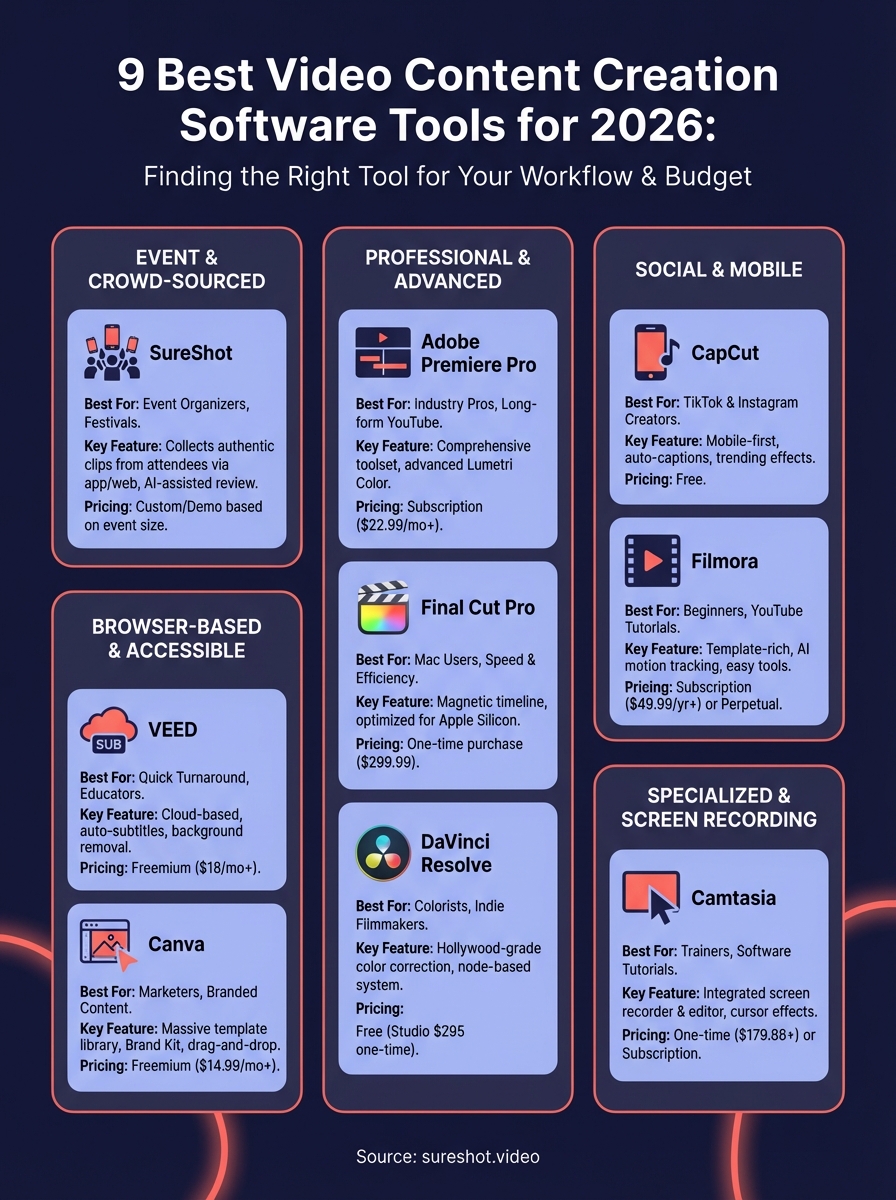
SureShot takes a fundamentally different approach to video content creation by turning your event attendees into a distributed production team. Instead of relying solely on professional videographers or editing hours of footage yourself, you collect authentic video clips directly from the people experiencing your event. This crowd-sourced model gives you access to perspectives and moments that traditional production crews would miss entirely.

What it is and how it works
SureShot operates as a mobile-first collection platform where attendees upload video clips through a dedicated iOS app or web interface for Android users. You create an event in the dashboard, generate a unique PIN code, and share it with your attendees. They capture moments throughout your event and submit clips directly to your centralized library. The platform handles all the technical complexity of ingestion, storage, and organization while you maintain full control over how the content gets used.
Standout features for content creation
The AI-assisted review system automatically scans uploaded clips to identify key moments, eliminating the tedious manual sorting process that normally consumes hours after an event ends. You receive licensed content ready for commercial use, since attendees grant permissions during upload. This solves the legal headaches that often come with user-generated content. The platform also aggregates diverse perspectives from across your venue, giving you coverage that would require a dozen camera operators to replicate through traditional methods.
SureShot transforms attendees from passive viewers into active storytellers, creating both content and community simultaneously.
Where it falls short
SureShot doesn't include built-in editing capabilities, so you'll need separate software to polish the clips before publication. The platform focuses exclusively on collection and curation rather than post-production. You also depend on attendee participation, meaning events with less engaged audiences might yield fewer submissions than you'd prefer.
Who should use it
Event organizers running festivals, concerts, conferences, and sports events find the most value here. You'll benefit most if you're spending significant budget on professional video production or struggling to capture authentic moments from multiple viewpoints. Marketing teams looking to boost social media reach through genuine attendee content should also consider this option.
Pricing and plan notes
SureShot offers custom pricing based on event size and feature requirements. You'll find detailed information and can request a demo directly through their website to discuss your specific needs.
2. Adobe Premiere Pro
Adobe Premiere Pro stands as the industry-standard editing platform used by professional filmmakers, YouTubers, and content agencies worldwide. You get access to a non-linear editing system that handles everything from quick social clips to feature-length productions, all within the same interface.
What it is and how it works
Premiere Pro operates as a timeline-based editor where you arrange video clips, audio tracks, graphics, and effects across multiple layers. You import your raw footage into project bins, drag clips to the timeline, and apply cuts, transitions, and adjustments using a comprehensive toolset built for precision. The software integrates directly with other Adobe Creative Cloud applications, letting you pull motion graphics from After Effects or colour-grade in Premiere itself.
Standout features for content creation
The multi-format support handles virtually any video codec without transcoding, saving hours of preprocessing time. You gain access to advanced colour correction tools including Lumetri Colour panels that rival dedicated grading software. The platform also includes built-in speech-to-text for automatic caption generation and powerful audio mixing capabilities through the Essential Sound panel.
Where it falls short
Premiere Pro demands a steep learning curve that can overwhelm beginners looking for quick results. You'll also need a powerful computer with substantial RAM and GPU capabilities, as the software consumes significant system resources during rendering.
Who should use it
Professional video editors, content creators producing long-form YouTube content, and marketing teams needing broadcast-quality output benefit most from this platform.
Pricing and plan notes
Adobe offers Premiere Pro through a subscription model starting at $22.99 monthly for individuals, with bundled Creative Cloud options available at higher price points.
3. Final Cut Pro
Final Cut Pro represents Apple's answer to professional video editing, offering a Mac-exclusive platform built specifically for Apple's hardware ecosystem. You work within a redesigned interface that breaks from traditional timeline conventions, delivering faster rendering speeds and smoother playback than many cross-platform alternatives.
What it is and how it works
Final Cut Pro uses a magnetic timeline that eliminates track-based editing in favour of a clip-based approach where video elements automatically snap together without leaving gaps. You import media into libraries, organise clips using keywords and ratings, then arrange them on the timeline using Apple's trackless system. The software optimises itself for Apple Silicon processors, taking full advantage of the unified memory architecture found in M-series chips.
Standout features for content creation
The background rendering engine processes effects and transitions while you continue editing, eliminating the frustrating wait times that plague other editors. You gain access to multicam editing that handles up to 64 camera angles simultaneously, perfect for event coverage or interview-heavy content. The platform also includes robust colour grading tools and built-in motion graphics through the Motion integration.
Final Cut Pro's magnetic timeline transforms editing from a puzzle of tracks and gaps into a fluid, intuitive process.
Where it falls short
Final Cut Pro locks you into the Apple ecosystem entirely, requiring macOS and offering no Windows compatibility. You'll also face limited third-party plugin support compared to Premiere Pro's massive library.
Who should use it
Mac users producing YouTube content, documentaries, or promotional videos who prioritise speed and want software optimised for their hardware should consider this option.
Pricing and plan notes
Apple sells Final Cut Pro as a one-time purchase at $299.99 through the Mac App Store, with no subscription fees required.
4. DaVinci Resolve
DaVinci Resolve delivers professional-grade editing and colour correction in a single package that competes directly with software costing thousands more. You access the same tools used in Hollywood productions while paying nothing for the core platform, making it one of the most powerful free options among the best video content creation software available today.

What it is and how it works
DaVinci Resolve combines a full-featured non-linear editor with industry-leading colour grading panels, visual effects tools, and audio post-production capabilities. You work across multiple pages (Edit, Colour, Fairlight, Fusion) that each handle specific aspects of production. The software uses a node-based colour grading system that gives you unprecedented control over image quality, while the editing page functions similarly to traditional timeline editors you already know.
Standout features for content creation
The colour grading capabilities surpass nearly every competitor at any price point, giving you access to professional HDR workflows and advanced correction tools. You benefit from built-in collaboration features that let teams work on the same project simultaneously across a network. The platform also includes Fusion for motion graphics and Fairlight for advanced audio mixing, eliminating the need for separate applications.
DaVinci Resolve proves that professional video tools no longer require professional budgets.
Where it falls short
DaVinci Resolve demands significant computing power and a learning curve steeper than beginner-friendly editors. The free version also limits you to 4K rendering maximum and lacks certain neural engine features reserved for the paid Studio version.
Who should use it
Colorists, independent filmmakers, and serious content creators who need broadcast-quality output without subscription costs should use this platform.
Pricing and plan notes
Blackmagic Design offers DaVinci Resolve as a free download with professional features included, while the Studio version costs a one-time payment of $295.
5. CapCut
CapCut brings mobile-first video editing to creators focused on social media platforms, particularly TikTok and Instagram. ByteDance, the company behind TikTok, built this free editing tool specifically for the vertical video format and fast-paced content that dominates modern social feeds.
What it is and how it works
CapCut operates as a template-driven editor where you select pre-made styles, drop in your clips, and adjust timing through an intuitive timeline. You access the app primarily on mobile devices, though a desktop version now exists for creators who prefer larger screens. The interface uses drag-and-drop simplicity that removes technical barriers entirely.
Standout features for content creation
The auto-caption feature generates accurate subtitles in seconds, saving hours of manual typing. You gain instant access to trending effects and transitions that match current TikTok and Instagram trends, keeping your content visually relevant. The platform also includes a massive royalty-free music library and direct export options to social platforms without leaving the app.
CapCut eliminates the gap between editing and posting, streamlining social media workflows to minutes instead of hours.
Where it falls short
CapCut lacks advanced colour grading tools and multi-track audio mixing capabilities found in professional editors. The mobile-first approach also means you work with limited screen real estate when handling complex edits.
Who should use it
Social media creators, TikTok influencers, and Instagram content producers who prioritise speed and platform-specific features benefit most from this tool.
Pricing and plan notes
ByteDance offers CapCut as a completely free download on iOS, Android, and desktop platforms, with optional in-app purchases for premium effects and templates.
6. Filmora
Wondershare Filmora bridges the gap between beginner-friendly editors and professional platforms, offering a middle ground that prioritizes ease of use without sacrificing creative control. You access a template-rich environment designed specifically for YouTube creators, small business owners, and hobbyists who need polished results without mastering complex workflows.
What it is and how it works
Filmora functions as a traditional timeline editor with drag-and-drop simplicity at its core. You import your footage into the media library, arrange clips on multiple video and audio tracks, then apply effects and transitions from an extensive built-in collection. The interface uses intuitive icons and clear labelling that make discovering features straightforward, even if you've never opened video editing software before.
Standout features for content creation
The AI-powered motion tracking lets you attach graphics and effects to moving objects without manual keyframing, saving substantial time on dynamic content. You benefit from auto-reframe capabilities that intelligently crop horizontal footage into vertical or square formats for social media. Filmora also includes audio ducking, green screen removal, and speed ramping tools that typically require expensive plugins in other editors.
Filmora proves you don't need professional software to create professional-looking content.
Where it falls short
Filmora lacks the advanced colour grading precision found in higher-tier editors, limiting your ability to match specific brand colours perfectly. Some built-in effects also feel dated or overly stylized, requiring careful selection to avoid amateurish results.
Who should use it
YouTube creators, small business marketers, and educators producing tutorial content find this platform hits the sweet spot between capability and accessibility.
Pricing and plan notes
Wondershare offers Filmora through annual subscriptions starting at $49.99 or perpetual licences at $79.99, with quarterly updates included in both options.
7. VEED
VEED operates entirely in your web browser, eliminating download requirements and letting you edit from any device with an internet connection. The platform targets creators who need quick turnaround times for social media content, offering AI-powered tools that automate tedious tasks like subtitle generation and background removal.
What it is and how it works
VEED functions as a cloud-based video editor where you upload footage directly to the platform's servers and edit through your browser window. You access a simplified timeline interface that handles basic cuts, transitions, and text overlays without requiring technical knowledge. The platform stores your projects in the cloud, meaning you can start editing on your laptop and continue seamlessly on your tablet or phone.
Standout features for content creation
The automatic subtitle generation supports over 100 languages with impressive accuracy, eliminating hours of manual typing. You gain access to one-click background removal for talking-head videos without needing green screens. VEED also includes built-in stock footage, music libraries, and direct export options to social platforms that streamline the publishing process.
VEED transforms your browser into a complete editing suite, removing the hardware barriers that block entry-level creators.
Where it falls short
VEED lacks the advanced colour grading precision found in desktop editors, limiting your control over image quality. The browser-based approach also means you depend on stable internet connections for smooth editing sessions.
Who should use it
Social media managers, educators creating online course content, and small business owners who need fast video production benefit most from this platform.
Pricing and plan notes
VEED offers a free tier with watermarks and paid plans starting at $18 monthly for basic features, scaling up to $59 monthly for professional tools.
8. Camtasia
Camtasia specializes in screen recording and tutorial creation, serving educators, software trainers, and business professionals who need to demonstrate processes visually. TechSmith built this platform specifically for instructional video production, prioritising clarity and ease of use over cinematic effects or complex colour grading.
What it is and how it works
Camtasia combines a screen recorder with a simplified video editor in one integrated package. You capture your screen activity, webcam footage, or both simultaneously, then edit the recording in a timeline-based interface that handles basic cuts, annotations, and transitions. The software uses a track-based system similar to traditional editors but strips away advanced features to keep the learning curve gentle.
Standout features for content creation
The cursor effects and zoom capabilities highlight specific screen areas during demonstrations, making complex processes easier for viewers to follow. You access built-in quiz and interactive elements that transform passive videos into engaging learning experiences. Camtasia also includes automatic caption generation and audio enhancement tools that clean up microphone recordings without requiring external software.
Camtasia removes the technical barriers between subject matter experts and polished instructional content.
Where it falls short
Camtasia lacks the creative effects libraries found in social media editors, limiting your ability to create trendy content. The platform also struggles with multi-camera editing workflows, making it less suitable for interview-based or event coverage projects.
Who should use it
Software trainers, online course creators, and corporate training departments producing tutorial content benefit most from this platform.
Pricing and plan notes
TechSmith offers Camtasia as a one-time purchase at $179.88 or through subscription plans starting at $179.88 annually with free updates included.
9. Canva
Canva extends beyond static graphics into video editing territory, offering a browser-based platform that simplifies video creation through templates and drag-and-drop functionality. You access a massive library of pre-designed layouts specifically built for social media dimensions, making this among the best video content creation software options for marketers who need consistent brand aesthetics across multiple formats.
What it is and how it works
The platform operates as a web-based design system where you select video templates, customise elements through an intuitive interface, and export finished clips directly. You work with a timeline that handles basic animations and transitions while maintaining drag-and-drop simplicity. Projects store in the cloud, letting you switch between devices seamlessly.
Standout features for content creation
The template library spans thousands of options for every social platform, giving you professional starting points that require minimal customization. You gain access to Brand Kit functionality that maintains consistent colours, fonts, and logos across video projects automatically. Stock footage, music tracks, and real-time team collaboration round out the feature set.
Canva transforms design skills into video production capabilities without requiring you to learn traditional editing software.
Where it falls short
This platform lacks advanced editing capabilities like multi-track audio mixing or precision colour grading found in dedicated video editors. You'll also face limited timeline control compared to professional software, making complex workflows frustrating.
Who should use it
Social media marketers producing branded content, small business owners creating promotional videos, and non-profit organizations building awareness campaigns benefit most from this accessible platform.
Pricing and plan notes
Canva offers a free tier with basic features and paid Pro plans starting at $14.99 monthly for individuals, with team options available at higher price points.
Final take
Selecting the best video content creation software depends entirely on your specific workflow requirements and production goals. Professional editors working on feature-length projects need the precision of Premiere Pro or Final Cut Pro, while social media creators benefit from the speed and templates found in CapCut or VEED. Budget constraints also play a role, with DaVinci Resolve offering professional capabilities at zero cost.
Event organizers face a unique challenge that traditional editing software doesn't address: collecting authentic video content from attendees. SureShot solves this problem by turning your audience into a distributed production team, giving you access to perspectives and moments that professional crews miss entirely. Book a 30-minute demo to see how crowd-sourced video collection can transform your event marketing strategy while dramatically reducing production costs.


