

Best Content Curation Software: 15 Free & Paid Picks (2026)
You know the drill. Hours spent scrolling through feeds, hunting for content your audience will actually care about. You bookmark articles you never revisit. You lose track of great pieces because they're scattered across a dozen tabs. Meanwhile, your content calendar sits half empty, and you're stuck choosing between posting mediocre content or posting nothing at all.
This guide breaks down 15 content curation tools that actually solve these problems. You'll see what each platform does well, where it falls short, how much it costs, and which alternatives make sense if it's not quite right. We've included free options for tight budgets and smart tools that handle the heavy lifting. By the end, you'll know exactly which software fits your workflow, whether you're curating for social media, newsletters, blogs, or events.
1. SureShot
SureShot takes a different approach to content curation by focusing specifically on user-generated video content from live events. Instead of pulling articles or social posts from across the web, you collect authentic video moments directly from your attendees. This makes it particularly valuable if you run festivals, concerts, conferences, or any event where crowd perspectives matter more than professional footage alone.
Overview and strongest use cases
You'll find SureShot most useful when you need authentic event footage at scale without hiring a full production crew. Event organisers use the platform to transform attendees into content creators, giving them an easy way to upload clips via mobile app or web interface. Your attendees capture the energy, reactions, and moments that professional cameras often miss. The platform works best for music festivals, sports events, corporate conferences, and large gatherings where you want multiple perspectives rather than a single broadcast angle.
Core curation features
The system gives you a centralised dashboard where you manage event creation, generate unique access PINs, and review all incoming video clips. Attendees upload content through a dedicated iOS app or web interface for Android users. You control which clips make it into your final library through a review process that helps you identify the most valuable moments. The platform handles content licensing automatically, so you get clear rights to use, edit, and share submitted videos for promotional purposes.
Smart tools and automation capabilities
SureShot's built-in tools automatically organise uploaded clips to surface key moments and highlight the most engaging content. This automated review cuts down the hours you'd otherwise spend watching hundreds of raw clips manually. The system identifies meaningful segments based on audio, visual activity, and duration, letting you focus on curation decisions rather than grunt work.
"Built-in tools automatically organise uploaded clips to identify key moments and assist in content curation, saving time for organisers."
Pros, cons, and best alternatives
You get authentic content that resonates better than polished marketing videos, plus significant cost savings compared to professional production. The platform builds stronger community engagement because attendees become active participants. However, you're limited to video content only, which doesn't help if you need articles, images, or text-based curation. Consider Flockler if you need broader social media content types, or ContentStudio for traditional article and post curation.
Pricing and plan structure
SureShot offers custom pricing based on event size and feature requirements. You'll need to contact their team directly for a quote tailored to your specific needs, which typically includes the number of expected attendees and video storage requirements.
2. Curata
Curata positions itself as an enterprise-grade content marketing platform that combines content discovery with distribution tools. You get a system that learns your content preferences over time, filtering out noise while surfacing articles, blog posts, and social content that match your specific needs. The platform works particularly well for marketing teams managing multiple channels and contributors who need a unified workflow from discovery to publication.

Overview and strongest use cases
You'll find Curata most valuable when you're running complex content marketing programs across blogs, newsletters, and social media channels. Marketing directors and content managers use it to coordinate campaigns across teams, especially when you need to blend curated third-party content with original pieces. The platform shines in B2B environments where thought leadership and industry expertise matter, helping you contextualise external content rather than just resharing it.
Core curation features
The system gives you machine learning algorithms that scan hundreds of sources based on topics and keywords you define. You can organise discovered content into custom feeds, add your own commentary or context, and schedule everything through an editorial calendar that tracks contributors and deadlines. Curata includes built-in templates for newsletters and blog posts, making it faster to package curated content into polished formats.
AI and automation capabilities
Curata's learning engine improves over time as you approve or reject suggested content. The system tracks which sources and topics perform well, automatically adjusting future recommendations to match your demonstrated preferences. This adaptive filtering saves you from manually tweaking search parameters every few weeks.
"Curata offers customised pricing on request, making it best for teams that need organising and contextualising content quickly."
Pros, cons, and best alternatives
You get deep customisation options and strong integration with marketing automation platforms like HubSpot and Marketo. The platform handles both curation and distribution in one place. However, you'll face a steep learning curve and higher costs than simpler tools. Consider ContentStudio for more straightforward social media curation, or Feedly if you primarily need RSS-based discovery without heavy distribution features.
Pricing and plan structure
Curata requires you to contact their sales team for custom pricing based on your team size, content volume, and integration needs. Expect enterprise-level costs that typically start in the thousands annually, making it more suitable for established marketing departments than solo creators or small teams.
3. Scoop.it
Scoop.it builds content curation around the concept of creating topic-focused online magazines. You discover, organise, and share content through customisable boards that function like digital publications. The platform serves as one of the best content curation software options for marketers and thought leaders who want to establish expertise in specific niches while maintaining a professional, branded presentation.
Overview and strongest use cases
You'll find Scoop.it most effective when you're building thought leadership in a specific industry or topic area. Content marketers, consultants, and subject matter experts use it to create curated magazines that position them as go-to resources. The platform works particularly well for B2B marketing teams who need to demonstrate industry knowledge through regular content sharing. You can maintain multiple topic boards simultaneously, making it useful when you cover several related subjects or serve different audience segments.
Core curation features
The system provides browser extensions that let you clip content from any webpage directly into your topic boards. You get full control over layout customisation, including the ability to add images, rewrite headlines, and include your own commentary. Scoop.it automatically maintains source attribution with built-in links back to original content, protecting you from licensing issues. Community members can suggest content for your boards, turning curation into a collaborative process.
AI and automation capabilities
Scoop.it delivers automated content suggestions based on the topics and keywords you define for each board. The platform monitors web sources continuously, surfacing relevant articles that match your focus areas. You review these suggestions and approve what fits, creating a semi-automated workflow that balances efficiency with editorial control.
"Scoop.it's advanced content engine monitors global sources to find and curate relevant third-party content."
Pros, cons, and best alternatives
You benefit from strong visual presentation and the ability to build branded content hubs. The magazine format makes your curated content more engaging than simple link lists. However, the platform emphasises public sharing over private curation, which may not suit internal team workflows. Consider Feedly for more private, RSS-focused curation, or ContentStudio if you need tighter social media scheduling integration.
Pricing and plan structure
Scoop.it offers a free plan with basic features and public boards. Paid plans start around $17 per month for additional customisation, analytics, and the ability to remove Scoop.it branding from your content boards.
4. BuzzSumo
BuzzSumo functions as a content research and discovery engine that identifies the most shared and engaged content across social media platforms. You track what's gaining traction in your industry by seeing real performance metrics like shares, likes, and engagement rates. This makes BuzzSumo one of the best content curation software options for marketers who need data-driven proof that content resonates before they share it.
Overview and strongest use cases
You'll get the most value from BuzzSumo when you need to identify trending topics and understand what content formats perform best in your niche. Content strategists and social media managers use it to find high-performing articles before competitors do, giving you first-mover advantage when sharing valuable resources. The platform works particularly well for competitive analysis, letting you monitor what content drives engagement for other brands in your space.
Core curation features
The system lets you search by keyword, domain, or author to surface top-performing content across specified timeframes. You apply filters for date range, country, language, and content type to narrow results precisely. BuzzSumo displays engagement metrics from major platforms including Facebook, Twitter, Pinterest, and Reddit. You can compare up to four searches side by side, making it easier to spot patterns in what drives shares versus what falls flat.
AI and automation capabilities
BuzzSumo provides automated alerts that notify you when specific keywords, domains, or competitors publish new content. The platform tracks performance trends over time, helping you identify emerging topics before they peak. This monitoring runs continuously in the background, so you discover shareable content without manual checking.
"BuzzSumo searches social media platforms for the best-performing content on any topic, measuring success by calculating the number of shares and likes."
Pros, cons, and best alternatives
You gain deep performance insights and strong integration with scheduling tools like Hootsuite and Buffer. The data helps you curate content backed by proof of engagement. However, you'll pay premium pricing for access to comprehensive features. Consider ContentStudio for combined discovery and scheduling, or Feedly if you prioritise RSS feeds over social metrics.
Pricing and plan structure
BuzzSumo starts at $79 per month for individual users, with higher tiers offering additional searches, alerts, and team collaboration features. You get a 30-day free trial to test the platform before committing to paid plans.
5. Feedly
Feedly operates as an AI-powered RSS reader that centralises content from blogs, news sites, newsletters, and social media into customisable feeds. You filter thousands of sources down to exactly what matters for your work, making it one of the best content curation software options for professionals who need to stay current across multiple topics. The platform particularly suits content researchers, marketers, and analysts who monitor industry trends, competitor activity, or specific subject areas on a daily basis.
Overview and strongest use cases
You'll find Feedly most valuable when you need to track multiple information sources without switching between dozens of tabs or bookmarks. Content strategists and researchers use it to monitor industry publications, thought leaders, and competitor blogs from one unified interface. The platform works particularly well for teams that need shared visibility into emerging trends, letting you create collaborative boards where everyone contributes relevant finds. Feedly handles everything from broad topic monitoring to narrow keyword tracking, giving you flexibility whether you're researching a single campaign or maintaining ongoing market intelligence.
Core curation features
The system lets you organise sources into custom feeds based on topics, projects, or client accounts. You tag articles for easy retrieval, highlight important passages, and save content to topical boards. Feedly connects with Google Alerts to surface mentions of your specified keywords. The clean reading interface adjusts text sizes and viewing modes to match your preferences, while integrations with tools like Evernote, Slack, and OneNote let you push saved content directly into your existing workflows.
AI and automation capabilities
Feedly's AI assistant Leo learns your preferences and automatically prioritises content that matches your demonstrated interests. The system filters out noise while surfacing articles on topics, events, and trends you care about. This adaptive prioritisation means your most important feeds appear first, saving you from scrolling through hundreds of unread items.
"Feedly's AI-powered content recommendation engine sources content intelligently from across the web, then prioritises the topics, events, and trends that are important to you."
Pros, cons, and best alternatives
You benefit from powerful RSS aggregation combined with intelligent filtering that improves over time. The platform integrates with major productivity tools and supports team collaboration through shared boards. However, Feedly focuses primarily on text-based content discovery rather than distribution or scheduling. Consider ContentStudio if you need scheduling alongside curation, or BuzzSumo when social engagement metrics matter more than RSS feeds.
Pricing and plan structure
Feedly offers a free plan with basic features and limited sources. Paid plans start at $6 per month for individuals, with Pro and Team tiers adding advanced AI features, unlimited sources, team collaboration, and priority support.
6. ContentStudio
ContentStudio combines content discovery with social media management into a single platform. You handle everything from finding trending articles to scheduling posts across multiple social accounts without juggling separate tools. This integration makes ContentStudio one of the best content curation software options for social media managers and marketing teams who need both curation and distribution in one workflow.

Overview and strongest use cases
You'll find ContentStudio most effective when managing multiple social media accounts for clients or brands. Social media managers use it to discover trending content, plan campaigns through an editorial calendar, and publish across platforms from one dashboard. The platform works particularly well for agencies handling several clients or brands maintaining presence on Facebook, Twitter, LinkedIn, Instagram, and other major networks simultaneously.
Core curation features
The system provides content discovery tools that surface trending articles and posts based on your specified topics and keywords. You access a built-in composer that lets you customise suggested content with your own commentary before scheduling. ContentStudio includes an editorial calendar where you plan campaigns, assign tasks to team members, and track content across all connected accounts. The platform handles multi-account management, letting you switch between client profiles without logging in and out repeatedly.
AI and automation capabilities
ContentStudio uses automated content discovery to continuously monitor sources and surface articles that match your defined interests. The platform suggests optimal posting times based on your audience engagement patterns, helping you schedule content when it will reach the most people. This automation reduces the manual work of finding and timing posts.
"ContentStudio allows you to schedule content distribution precisely, managing multiple social media accounts from one location."
Pros, cons, and best alternatives
You get unified curation and distribution with strong multi-account management. The editorial calendar streamlines team collaboration. However, the platform focuses heavily on social media rather than broader content types like newsletters or blogs. Consider Hootsuite for more established social media management, or Feedly if RSS feeds matter more than social scheduling.
Pricing and plan structure
ContentStudio starts at $25 per user per month, with higher tiers adding more social accounts, team members, and advanced analytics. You get a 14-day free trial to test features before committing to a paid plan.
7. UpContent
UpContent specialises in collaborative content curation where teams work together to discover and approve content. You get a crawler that monitors hundreds of thousands of publishers, surfacing articles that match your defined topics. The platform prioritises team workflows over individual curation, making it particularly useful when multiple people need to review and approve content before it goes live.
Overview and strongest use cases
You'll find UpContent most valuable when you need multiple team members to participate in content discovery and approval. Marketing teams use it to establish clear workflows where some people discover content, others review it, and final approvers ensure everything meets brand standards. The platform works particularly well for organisations with compliance requirements or quality standards that demand multiple eyes on content before publication.
Core curation features
The system provides approval workflows that route discovered content through your team hierarchy. You create custom filters to narrow content by relevance, influence, shareability, or recency. UpContent displays results in a card-based layout that makes visual scanning faster than traditional list views. The platform lets you place curated content directly on website pages, not just social media channels.
AI and automation capabilities
UpContent's machine learning adapts to your approval patterns, surfacing content that matches what your team has historically accepted. The crawler runs continuously in the background, collecting content hands-free while you focus on curation decisions rather than discovery work.
"Automation allows you to collect content hands-free, with machine learning bringing the best content to the surface."
Pros, cons, and best alternatives
You benefit from strong team collaboration and workflow management that most other platforms lack. The platform handles both discovery and website integration. However, pricing information remains unclear without contacting sales. Consider ContentStudio for simpler social-focused curation, or Curata when you need more extensive marketing platform integrations.
Pricing and plan structure
UpContent requires you to contact their team for custom pricing based on your organisation size and feature requirements. This approach typically indicates enterprise-level costs rather than straightforward monthly subscriptions.
8. Quuu
Quuu delivers automated social media content sharing through hand-curated suggestions rather than pure algorithmic discovery. You get content that human curators have already vetted for quality and relevance, then the platform automatically shares it to your social media accounts. This hybrid approach makes Quuu particularly valuable for social media managers who want to maintain active feeds without spending hours searching for shareable content.
Overview and strongest use cases
You'll find Quuu most effective when you need to fill social media gaps between your original posts. Small business owners and solo marketers use it to maintain consistent social presence without dedicating full days to content discovery. The platform works particularly well for maintaining brand visibility on Twitter, Facebook, and LinkedIn when you're focused on other priorities.
Core curation features
The system provides category-based suggestions where you select interests and Quuu delivers relevant content throughout each day. You control automation levels by choosing manual approval or allowing automatic posting. Integration with Buffer and Hootsuite means content flows directly into your existing scheduling workflow. The platform includes Quuu Promote, letting you push your own content to other users' feeds for broader reach.
AI and automation capabilities
Quuu combines human curation with automated distribution, where editors pre-screen content before algorithms match it to your selected categories. The platform tracks which shared content drives engagement, helping refine future suggestions based on your audience response patterns.
"Quuu offers hand-curated content suggestions based on selected interests and categories, ensuring that your social media channels are filled with content that resonates with your audience."
Pros, cons, and best alternatives
You benefit from quality-controlled content without manual vetting, plus tight integration with major scheduling tools. However, Quuu focuses exclusively on social media rather than broader content curation needs. Consider ContentStudio for more comprehensive social management, or Feedly when you need RSS-based discovery.
Pricing and plan structure
Quuu starts at $19.79 per month for basic social automation. Higher tiers add more daily suggestions, additional social accounts, and priority content selection.
9. Hootsuite
Hootsuite operates as a comprehensive social media management platform that includes content discovery alongside scheduling, monitoring, and analytics. You manage all major social networks from one dashboard, making it one of the best content curation software options for businesses and agencies handling multiple accounts and team members. The platform combines curation with robust management features that go beyond simple content sharing.
Overview and strongest use cases
You'll find Hootsuite most valuable when managing enterprise-level social media operations across multiple brands or clients. Marketing teams use it to coordinate social campaigns, assign tasks to team members, and maintain consistent presence on Facebook, Twitter, Instagram, LinkedIn, and other major platforms. The platform works particularly well for organisations requiring approval workflows and detailed performance reporting across all social channels simultaneously.
Core curation features
The system provides content discovery tools through integrations like Talkwalker and Feedly that surface relevant articles and posts. You access streams that monitor hashtags, mentions, and keywords across networks, helping you identify shareable content from your industry. Hootsuite includes a centralised content library where teams store approved assets and schedule posts across all connected accounts from a unified calendar.
AI and automation capabilities
Hootsuite delivers automated scheduling suggestions based on when your audience shows highest engagement. The platform monitors conversations and trends in real time, helping you identify timely content opportunities. Analytics track performance across all channels, showing which curated content drives the most interaction.
Pros, cons, and best alternatives
You benefit from mature platform features and strong team collaboration tools with detailed approval chains. The all-in-one approach reduces tool switching. However, you'll face steep pricing and a complex interface that requires training time.
"HootSuite's team collaboration features allow for streamlined workflow and approval processes, making it suitable for businesses of all sizes."
Consider ContentStudio for simpler social management at lower costs, or Quuu when you prioritise automated content suggestions over management features.
Pricing and plan structure
Hootsuite starts at $99 per month for professional plans supporting multiple users and social accounts. Enterprise pricing requires custom quotes based on your organisation size and feature requirements.
10. WP RSS Aggregator
WP RSS Aggregator functions as a WordPress-specific plugin that automates importing RSS feeds directly into your website. You pull content from unlimited sources and convert feed items into published posts without manual copying and pasting. This makes it one of the best content curation software options for WordPress site owners running news aggregators, niche content hubs, or industry resource centres.

Overview and strongest use cases
You'll find WP RSS Aggregator most effective when building content-rich WordPress sites that aggregate information from multiple sources. Publishers and bloggers use it to maintain active websites that automatically update with fresh content from industry feeds. The platform works particularly well for niche aggregator sites where you want to become a central hub for specific topics by pulling together the best content from scattered sources.
Core curation features
The system lets you import content from unlimited RSS sources and automatically converts feed items into WordPress posts through the Feed-to-Post feature. You get keyword filtering that includes or excludes content based on specific terms, ensuring only relevant articles appear on your site. Built-in source attribution maintains proper crediting with links back to original publishers.
AI and automation capabilities
WP RSS Aggregator handles automated posting schedules once you configure your preferences, keeping your content fresh without constant monitoring. The keyword filtering acts as intelligent content selection, though it relies on rule-based logic rather than machine learning.
Pros, cons, and best alternatives
You benefit from deep WordPress integration and unlimited source management at a reasonable price point. However, you're limited to RSS feeds only, missing social media content. Consider Feedly for broader content discovery, or ContentStudio when you need social media scheduling alongside curation.
"WP RSS Aggregator enables you to pull content from an unlimited number of sources, ensuring a rich and diverse content stream."
Pricing and plan structure
WP RSS Aggregator starts at $79 per year for core features including Feed-to-Post conversion, keyword filtering, and automated scheduling. Higher tiers add additional functionality for growing WordPress sites.
11. Anders Pink
Anders Pink shifts away from traditional content curation by focusing specifically on learning and development environments. You get an AI-powered platform that automatically curates educational content tied to specific skills and competencies. This specialised approach makes Anders Pink one of the best content curation software options for training departments, educational institutions, and HR teams who need to deliver continuous learning experiences rather than marketing content.
Overview and strongest use cases
You'll find Anders Pink most valuable when building skills-based learning programs for employees or students. Learning and development managers use it to maintain current training resources without manually searching for new materials. The platform works particularly well for organisations with defined competency frameworks where you need content mapped to specific job roles or skill sets.
Core curation features
The system creates automated briefings that focus on specific topics or skills you define. You get content automatically categorised against your existing skills taxonomy or industry frameworks. Anders Pink delivers regular updates to keep learning materials current without constant manual intervention.
AI and automation capabilities
Anders Pink's AI engine monitors sources continuously and maps discovered content to your defined skill areas. The platform learns which content types work best for different learning objectives, refining suggestions over time based on learner engagement patterns.
"Anders Pink uses artificial intelligence to automatically curate learning content from across the web with custom briefings focused on specific skills or topics."
Pros, cons, and best alternatives
You benefit from skills-based content mapping that traditional curation tools don't provide. However, the platform serves a narrow use case focused on learning rather than marketing. Consider Feedly for broader content discovery, or Curata when you need marketing-focused curation.
Pricing and plan structure
Anders Pink requires you to contact their sales team for custom pricing based on your organisation size and learning program requirements.
12. Flockler
Flockler specialises in user-generated content aggregation from social media platforms, displaying posts, images, and videos on your website or digital screens. You collect content from Facebook, Instagram, YouTube, Twitter, and TikTok into visual displays like social walls, grids, and carousels. This makes Flockler one of the best content curation software options for brands running UGC campaigns or events needing live social feeds.
Overview and strongest use cases
You'll find Flockler most effective when you need to display social proof on product pages or create engaging social walls for events. Marketing teams use it to run user-generated content competitions that encourage customers to share branded content. The platform works particularly well for events, retail websites, and conferences where live social feeds add energy and authenticity.
Core curation features
The system automatically gathers social media mentions and hashtag content from major platforms into organised feeds. You create unlimited social walls, slideshows, and carousels with automatic content updates that require no manual refreshing. Flockler provides moderation tools that let you filter content before it appears publicly on your displays.
AI and automation capabilities
Flockler uses automated feed monitoring that continuously pulls new content matching your specified hashtags or accounts. The platform handles content updates in real time without manual intervention, though it relies more on rule-based filtering than machine learning.
"You can create social walls or slideshows with automated feeds to enhance any event."
Pros, cons, and best alternatives
You benefit from cross-device compatibility and strong visual presentation options for social content. However, the platform focuses exclusively on social media rather than articles or blogs. Consider ContentStudio for broader content curation, or SureShot when video content from event attendees matters more than public social feeds.
Pricing and plan structure
Flockler starts at $94 per month with unlimited displays and automated feeds. You get a 14-day free trial to test features before committing to paid plans.
13. Flipboard
Flipboard transforms content curation into a visual magazine experience where you create personalised collections of articles, images, and videos. You organise content into digital magazines that look polished and professional, making it one of the best content curation software options for visual storytellers and personal content curators who value aesthetics as much as information.

Overview and strongest use cases
You'll find Flipboard most effective for personal content discovery and visual organisation rather than team collaboration. Content enthusiasts and individual creators use it to build topic-focused magazines that they share with specific audiences. The platform works particularly well when you want to curate content that looks good alongside performing well, making it suitable for lifestyle topics, design inspiration, or visual industries.
Core curation features
The system lets you create unlimited magazines organised by topics or themes you define. You subscribe to blogs, news sources, and social media accounts, pulling their content into your curated feeds. Flipboard's browser extension makes clipping content from any website quick and straightforward. The visual layout automatically formats articles, images, and videos into an attractive magazine-style presentation.
AI and automation capabilities
Flipboard uses machine learning to recommend content based on your reading behaviour and the magazines you create. Smart Magazines automatically populate with content matching your defined interests, reducing manual curation work.
"Flipboard brings you a range of curated content with a magazine-like interface that's visually appealing."
Pros, cons, and best alternatives
You benefit from beautiful visual presentation and simple content organisation without learning curves. However, Flipboard focuses on personal curation rather than team workflows or publishing tools. Consider Feedly for more robust RSS management, or ContentStudio when you need social scheduling alongside curation.
Pricing and plan structure
Flipboard is completely free with no paid tiers or premium features required.
14. Pocket
Pocket operates as a personal content library where you save articles, videos, and web content for later reading. You bookmark anything interesting during browsing sessions, then access it across all your devices whenever you have time. This simple approach makes Pocket one of the best content curation software options for individual professionals who need to organise research and reading materials rather than curate content for public sharing.
Overview and strongest use cases
You'll find Pocket most valuable for personal knowledge management rather than team collaboration or content marketing. Researchers, students, and professionals use it to build reading lists they can access offline on phones, tablets, or computers. The platform works particularly well when you want to save content during busy workdays and catch up during commutes or downtime.
Core curation features
The system provides a one-click save button through browser extensions and mobile apps that capture web content instantly. You organise saved items with tags and highlight passages that matter most. Pocket's text-to-speech feature converts written articles into audio, letting you listen while driving or exercising.
AI and automation capabilities
Pocket delivers automated content recommendations based on your save history and reading patterns. The platform suggests articles that align with your demonstrated interests, helping you discover content beyond your usual sources.
"Pocket shows a list of content that's a good match for you, with recommendations based on your save history."
Pros, cons, and best alternatives
You benefit from clean reading interfaces and reliable syncing across devices. However, Pocket focuses on personal curation rather than team workflows or public sharing. Consider Feedly for RSS-based discovery, or Flipboard when visual organisation matters more than text-focused reading.
Pricing and plan structure
Pocket offers a free version with core saving and tagging features. Premium plans start at $3.74 per month, adding permanent library storage, advanced search, and suggested tags.
15. Diigo
Diigo functions as a web annotation and bookmarking tool that lets you highlight, tag, and save content directly on web pages. You capture research and articles with sticky notes and screenshots that automatically sync to your cloud library. This makes Diigo one of the best content curation software options for educators, researchers, and students who need to annotate sources and build collaborative knowledge bases rather than simply collecting links.
Overview and strongest use cases
You'll find Diigo most valuable when you need to annotate and discuss content with groups rather than just bookmark it. Educators use it to create shared reading experiences where students highlight passages and leave comments directly on articles. The platform works particularly well for academic research projects where teams need to collect sources, mark key findings, and maintain organised references across multiple contributors.
Core curation features
The system provides on-page highlighting and sticky notes that persist when you revisit web pages. You tag and save resources with built-in screenshot tools that capture visual data instantly. Diigo creates a cloud-based library accessible from any device, organising content through both tagging and list structures. Group repositories let your team access, search, and browse curated content collectively.
AI and automation capabilities
Diigo relies on manual organisation rather than AI-driven recommendations. The platform automates saving and syncing of your annotations and highlights but leaves content discovery to your manual searches.
"You can build a group knowledge repository for your class so that every student can easily access, search, and browse the curated content."
Pros, cons, and best alternatives
You benefit from powerful annotation features and strong group collaboration that most bookmarking tools lack. However, Diigo focuses on personal and educational curation rather than marketing workflows. Consider Pocket for simpler personal saving, or Feedly when you need RSS-based discovery alongside bookmarking.
Pricing and plan structure
Diigo offers a free basic plan with core features. Premium plans add advanced search, unlimited highlights, and enhanced storage at competitive pricing for educational users.
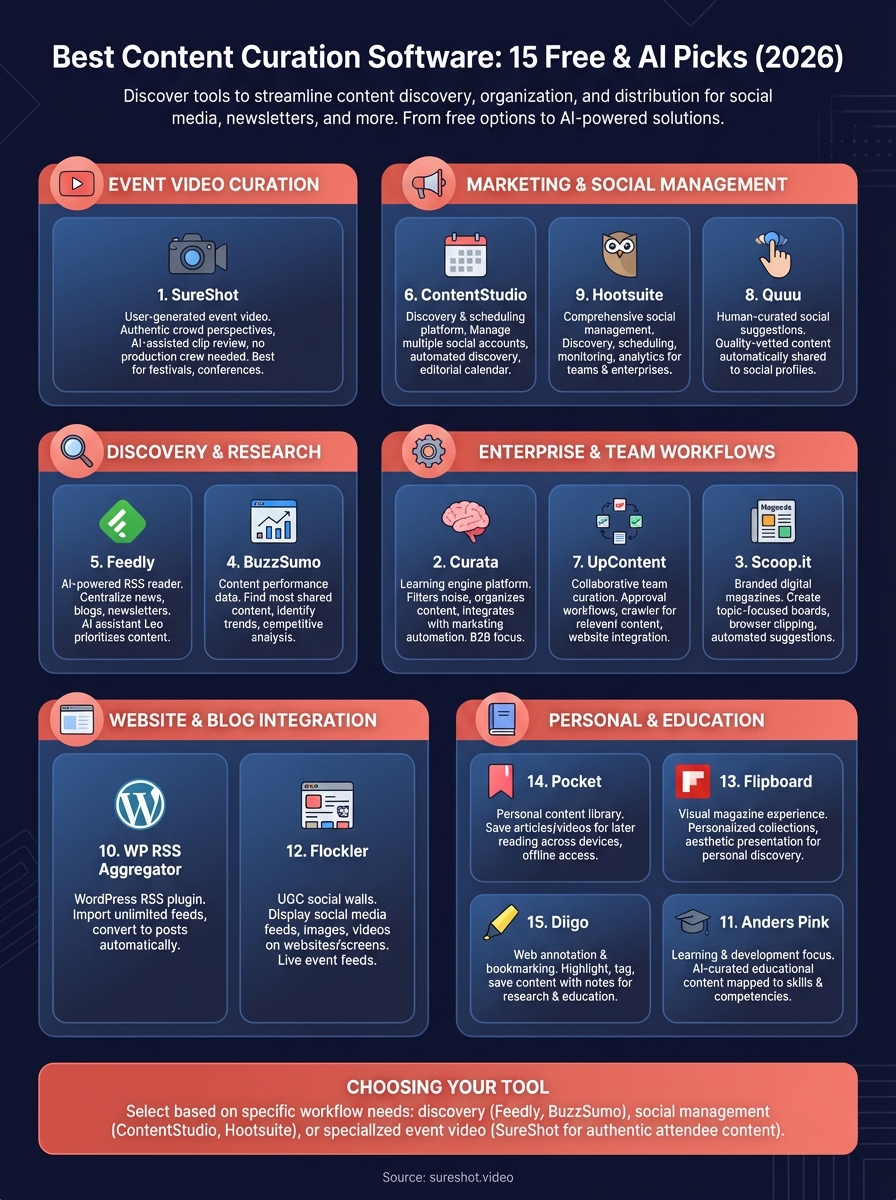
Choosing your tool
The right choice depends on your specific workflow needs rather than feature lists alone. You need Feedly or BuzzSumo when discovering articles matters most. ContentStudio or Hootsuite fit teams managing multiple social accounts with scheduling needs. WordPress site owners get better value from WP RSS Aggregator than general-purpose platforms.
Event organisers face different challenges because you need authentic video content from attendees rather than curated articles. Traditional content curation software won't capture the crowd perspective that makes your events compelling. SureShot solves this by transforming attendees into content creators who upload video moments you control and own. You skip production crews while collecting genuine footage that resonates better than polished marketing. The platform handles everything from collection to smart review, letting you focus on choosing the best clips. If you run festivals, concerts, conferences, or any gathering where attendee perspectives matter, book a demo with SureShot to see how user-generated video changes your content strategy.