
Apple App Privacy Details: How To Read And Disclose Data
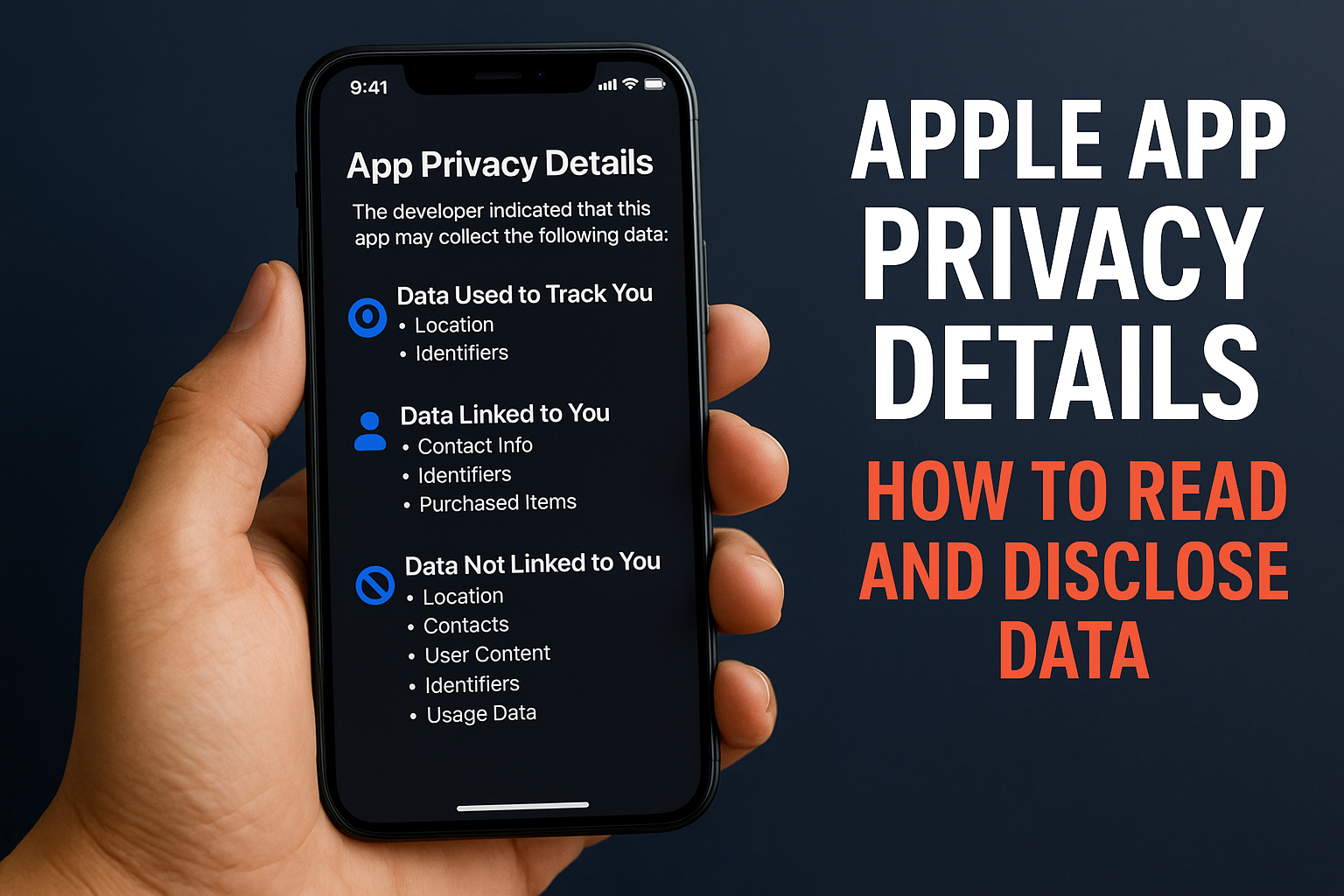
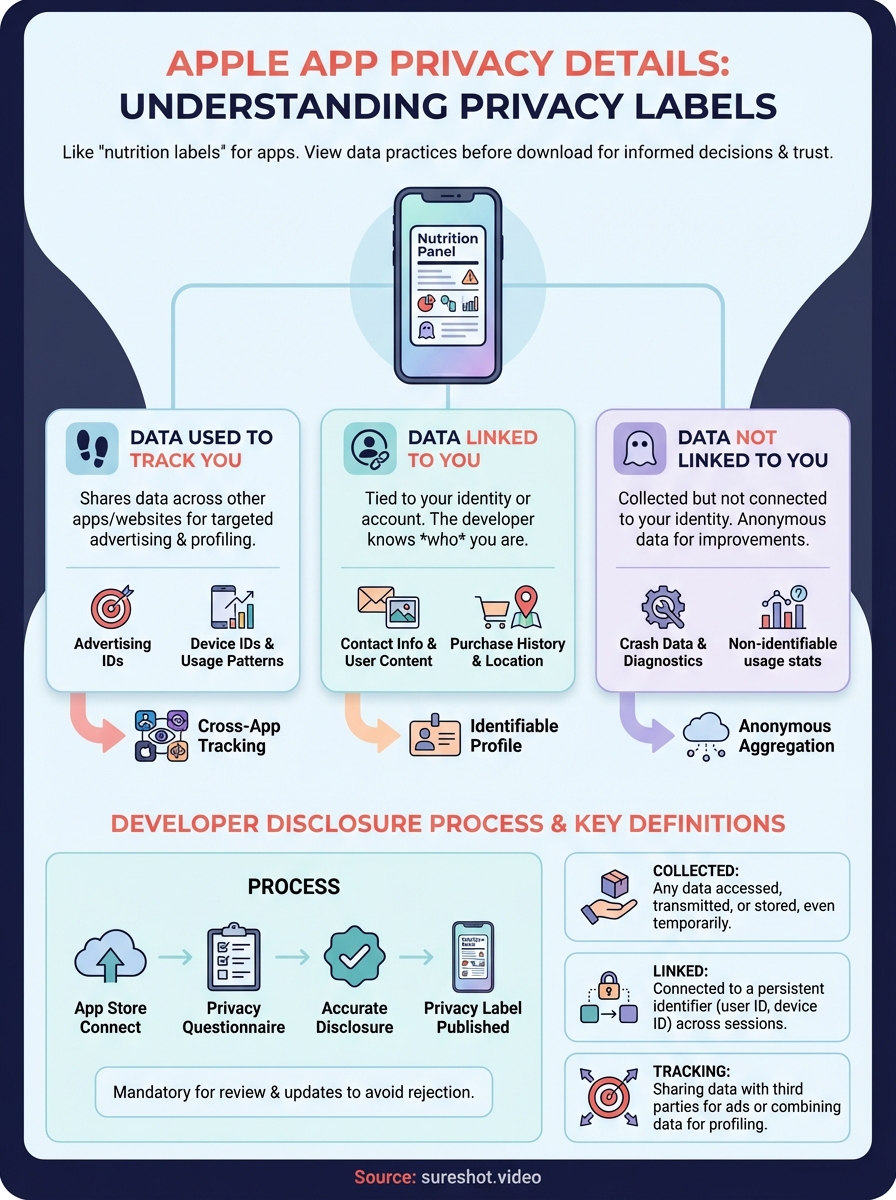
Apple app privacy details are labels that show what data an app collects before you download it. These privacy labels appear on every App Store product page and break down data types, usage practices, and tracking methods in a format Apple calls "Privacy Nutrition Labels." Think of them as ingredient lists for apps. They tell you exactly what information an app gathers, whether it links that data to your identity, and if it shares your data with third parties for tracking purposes.
This article walks you through reading privacy labels as a user and submitting accurate disclosures as a developer. You'll learn how to interpret the three main sections on any privacy label, understand Apple's specific definitions for collected, linked, and tracking data, and avoid common mistakes that get apps rejected during review. Whether you're choosing apps for your event business or preparing your own app submission, you'll finish with a clear understanding of how Apple's privacy framework works and what it means for your data.
Why Apple app privacy details matter
Apple introduced privacy labels in December 2020 to address growing concerns about data collection across the App Store ecosystem. These labels give you visibility into data practices before you install anything on your device. Every app must disclose what it collects, making it harder for developers to hide invasive practices behind vague terms of service. The system forces transparency in an industry that historically operated in shadows, and privacy labels now influence download decisions for millions of users who want control over their personal information.
For users choosing apps
You can compare privacy practices across similar apps the same way you compare ingredients on food packaging. When you're deciding between two event photography apps, for example, you'll see immediately which one collects your location continuously versus which one only accesses your camera roll. This comparison happens before you download, saving you from discovering problematic data collection after the fact. Apple app privacy details put you in control by showing exactly what permissions an app requires and what it does with your information once granted.
Privacy labels transform app selection from a trust exercise into an informed decision.
Apps that collect minimal data gain competitive advantage. If you're an event organizer evaluating apps for attendee engagement, you'll likely choose the option that collects contact info and event data over one that tracks your browsing history and shares it with advertisers. Users download apps more readily when they see limited data collection on the label, creating market pressure for developers to reduce unnecessary tracking.
For developers publishing apps
Your app won't reach the App Store without completing the privacy questionnaire in App Store Connect. Apple rejects submissions with incomplete or inaccurate disclosures, and reviewers check your privacy label against your app's actual behavior during testing. You risk removal from the store if users report discrepancies between your label and what your app actually collects. This enforcement means accurate disclosure isn't optional, it's mandatory for distribution.
Transparent privacy labels build user trust in ways marketing copy never could. When you disclose exactly what data you collect and explain why you need it, users understand your app's value proposition more clearly. An event video app that states it collects email addresses for account creation and video content for event archival gives users concrete reasons to proceed with installation, rather than leaving them suspicious about hidden tracking.
For businesses and event organizers
You need to evaluate third-party apps through a security and compliance lens before implementing them across your organization or recommending them to attendees. Privacy labels give you a starting point for vetting vendors without requiring legal teams to parse lengthy privacy policies. If you're running a music festival and considering apps for video collection, you can quickly eliminate options that track users across other apps or share data with data brokers before you even reach out for demos.
Your own organization's data policies intersect with the apps you choose. When you select tools with minimal data collection, you reduce liability and simplify your compliance documentation. Event businesses handling attendee information need to know exactly what data flows through their technology stack, and privacy labels provide that transparency upfront rather than after you've already integrated the tool into your workflow.
How to read an App Store privacy label
You'll find the privacy label by scrolling down any App Store product page to the "App Privacy" section. Apple divides every label into three distinct categories: Data Used to Track You, Data Linked to You, and Data Not Linked to You. Each category reveals different aspects of how the app handles your information, and understanding these distinctions helps you make informed decisions about which apps deserve space on your device.
The three label sections
Apple app privacy details appear in a standardized format across all apps, making comparison straightforward. The first section shows tracking data, the second displays data tied to your identity, and the third lists data collected anonymously. You can tap any data type to see Apple's definition and learn why developers might collect that specific information. This structure means you spend less time reading privacy policies and more time understanding actual data flows.

Data Used to Track You
This section lists information the app uses to track you across other companies' apps and websites. Tracking data typically includes advertising identifiers, device IDs, or usage patterns that advertisers combine with information from other sources. You'll see entries here when apps participate in targeted advertising networks or share your data with brokers. If this section is empty, the app doesn't track you beyond its own boundaries.
Apps with empty tracking sections can't follow your activity across the internet ecosystem.
Data Linked to You
Linked data connects to your identity or account, meaning the developer knows who you are when collecting this information. You'll find entries like email addresses, names, purchase history, or location data that the app associates with your user profile. Event apps typically show contact information and user content in this section because they need to tie videos or photos to specific accounts for delivery and organization.
Data Not Linked to You
Data appears here when apps collect information but don't connect it to your identity. Developers might gather crash data or diagnostics anonymously to improve performance without knowing which user experienced the problem. This section represents the lowest privacy impact because the app can't build a profile about you specifically, even though it collects some information from your device.
How to disclose data in App Store Connect
You submit your apple app privacy details through the privacy questionnaire in App Store Connect before your app reaches review. Apple requires you to complete this questionnaire for every new app version, and you'll find it under the App Information section of your app's page. The questionnaire walks you through data categories systematically, asking you to confirm collection practices, explain data usage, and specify whether you link information to user identities or use it for tracking purposes.
Accessing the privacy questionnaire
Navigate to App Store Connect and select your app from the My Apps section. Click on the app version you're preparing for submission, then scroll to the App Privacy section in the left sidebar. You'll see a "Get Started" button if you haven't completed the questionnaire yet, or an "Edit" option if you need to update existing disclosures. Apple saves your progress automatically as you work through sections, allowing you to complete the questionnaire over multiple sessions without losing information.
Completing each disclosure section
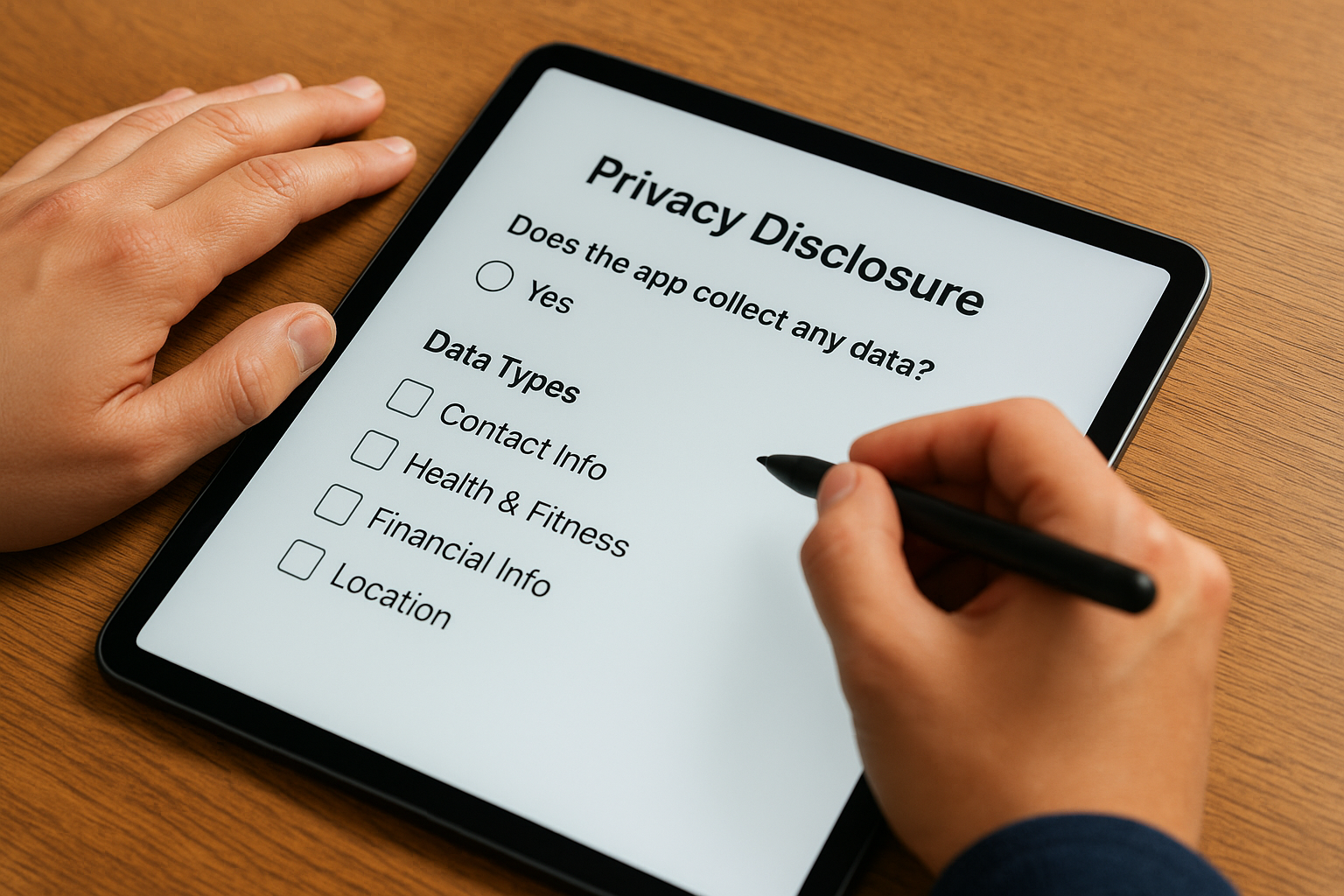
Start by indicating whether your app collects any data at all. If you select yes, you'll work through 12 data type categories including contact info, health and fitness, financial info, location, and user content. For each category you mark, you'll specify the exact data types collected, whether the data links to the user's identity, and your purpose for collecting it. Apple provides dropdown menus with standardized purposes like analytics, product personalization, and app functionality to ensure consistency across all privacy labels.
Accurate answers prevent rejection during review and protect you from removal after launch.
Your answers generate the privacy label that appears on your App Store product page. You can preview this label before submitting by clicking the preview option at the bottom of the questionnaire. This preview shows exactly what users will see, letting you verify that your disclosures match your actual data practices before the review team tests your app.
Reviewing before submission
Compare your completed questionnaire against your app's actual behavior and code. Check third-party SDKs you've integrated, as these often collect data you might not track directly. Review your analytics tools, advertising networks, and crash reporting services to ensure you've disclosed all data they collect on your behalf. Submit the questionnaire only after confirming every disclosure accurately reflects your app's data practices.
Apple's key terms: collected, linked, tracking
Apple uses three specific definitions that determine how you categorize data in your privacy questionnaire. These terms carry precise meanings that differ from everyday usage, and misunderstanding them causes most rejection issues during app review. You need to know exactly what Apple considers collected, when data becomes linked to identity, and what qualifies as tracking to complete your disclosure accurately. Getting these definitions right protects both your users and your app's ability to stay on the store.
What "collected" means
Apple defines collected data as any information your app or third-party code accesses, transmits, or stores from a user's device. You collect data even if you only access it temporarily without saving it to servers. Crash logs, analytics events, and temporary diagnostic information all count as collected data that requires disclosure. Your app collects location data the moment it requests GPS coordinates, regardless of whether you store those coordinates or use them once for a single feature calculation.
Collection happens at the point of access, not at the point of storage.
Understanding "linked to you"
Data links to a user when you connect it to their identity, account, or device in a way that makes the information identifiable. Email addresses naturally link because they identify specific people, but device IDs also link when you associate them with user profiles across sessions. Apple app privacy details require you to mark data as linked if you can trace it back to an individual user through any identifier. Anonymous crash reports remain unlinked, but the same crash report becomes linked data the moment you attach it to a user account for support purposes.
Defining "tracking"
Tracking occurs when you share user data with third parties for targeted advertising or measurement purposes, or when you combine data from your app with information from other companies to profile users. Installing an advertising SDK that shares device identifiers with ad networks constitutes tracking. You're not tracking if you share data solely for fraud prevention, security, or compliance, but you are tracking when that same data helps advertisers target users across multiple apps and websites.
Common mistakes and how to avoid them
Developers make predictable errors when completing apple app privacy details that lead to rejection or post-launch removal. The most common problems stem from incomplete third-party SDK audits, confusion about linked data classification, and failing to update disclosures when code changes. You can avoid these pitfalls by understanding where mistakes typically occur and implementing verification steps before submission. Each error pattern has a straightforward solution that takes minutes to implement but saves hours of back-and-forth with App Review.
Underdisclosing third-party SDK data
Your app collects data through every SDK you integrate, not just the code you write directly. Analytics tools like Firebase, advertising networks, and crash reporting services all collect information that requires disclosure. Developers frequently submit apps with accurate disclosures for their own code while completely missing the data collection from third-party libraries. This creates a mismatch between your privacy label and your app's actual behavior that reviewers catch immediately.
Third-party SDKs often collect more data than your core app functionality requires.
Check each SDK's documentation for its privacy manifest or data collection details before completing your questionnaire. Most major libraries now publish exactly what they collect to help you complete your disclosures accurately. Remove any SDKs you don't actively use, as dormant code still counts if it has the capability to collect data.
Misclassifying linked vs unlinked data
You create linked data the moment you associate information with a persistent identifier, even if that identifier isn't directly tied to a name or email. Device fingerprints, installation IDs, and session tokens all link data to users when you track them across app sessions. Developers often mark this data as unlinked because it doesn't feel personally identifiable, but Apple's definition focuses on whether you can connect data points to the same user over time.
Your analytics become linked data when you use the same user ID across multiple sessions to track behavior patterns. The same diagnostic information stays unlinked if you send it once without any identifier that connects it to previous or future submissions from that device.
Forgetting to update after code changes
Adding new features or integrating additional SDKs changes your data collection practices and requires updated disclosures. You must revise your privacy questionnaire whenever you modify what your app collects, how it uses data, or whether information links to user identities. App Review rejects updates when your new version collects data not disclosed in your current privacy label, even if the rest of your submission is perfect.
Set a reminder to review your privacy disclosures during every release cycle before you submit to App Store Connect. Audit new code for data access calls and check release notes from any SDKs you've updated since your last submission.
Next steps
You now understand how apple app privacy details work from both perspectives. As a user, you can evaluate apps by checking their privacy labels before installation and comparing data practices across similar tools. As a developer, you know how to complete the privacy questionnaire accurately in App Store Connect, avoiding common mistakes that trigger rejections. Start by auditing any apps you currently use for your events or business, paying special attention to tracking practices and linked data disclosures.
Review your own app's data collection practices if you're building software for attendees or event management. Document every SDK you've integrated and verify that your privacy disclosures match your actual code behavior. Update your questionnaire whenever you release new features or change third-party services.
Event organizers choosing video collection tools should prioritise apps with transparent, minimal data practices. SureShot collects only what's necessary for event video delivery and attendee engagement without invasive tracking. Book a demo to see how privacy-focused event video works in practice.