
Step-by-Step: How to Create a Privacy Policy for an App
You built an app that collects user emails, tracks location, or uses payment data. Apple or Google now requires a privacy policy before you can publish. Without one, your app gets rejected. With a bad one, you risk legal penalties or user distrust. Learning how to create a privacy policy for an app is no longer optional, and figuring out what to include feels like decoding legal gibberish when all you want is to ship your product.
The good news is you don't need a law degree or a $5,000 retainer. A compliant privacy policy follows a clear structure. You map what data you collect. You explain why you collect it. You align with laws like GDPR and CCPA. You disclose third party services. You outline user rights and security measures. Each step is straightforward when you know what to include.
This guide walks you through every step to create a privacy policy that meets Apple App Store and Google Play Store requirements. You'll learn how to identify data types, structure your policy, adapt it for iOS and Android, and choose where to host it. We'll also share templates and real examples so you can build something that works.
Why your app needs a privacy policy
Your app collects data the moment someone opens it. That email address at signup, the location for maps, or the device ID for analytics all count as personal information. Laws across multiple countries require you to disclose what you collect and how you use it. Platform stores like Apple and Google also reject apps without a compliant privacy policy. You can't bypass this step if you want your app published.

Legal requirements make it mandatory
Data protection laws in the European Union, California, and dozens of other regions mandate privacy policies for apps that process personal data. The GDPR applies to any app accessible to EU residents, regardless of where your company operates. California's CCPA and CPRA protect residents of that state with similar transparency requirements. Ignoring these laws exposes you to fines that can reach $7,500 per violation under CCPA or 4% of global annual revenue under GDPR.
Privacy compliance isn't optional when your app handles user data. It's a legal baseline.
COPPA adds another layer if your app targets children under 13 in the United States. You must obtain verifiable parental consent before collecting data from minors. Even if you didn't design your app for kids, accidental collection of their data still triggers COPPA obligations. Laws like Virginia's CDPA and similar statutes in other U.S. states broaden these requirements further.
Platform policies enforce compliance
Apple requires every iOS app to include a privacy policy link in App Store Connect before approval. The policy must detail what data you collect, why you collect it, and how you protect it. Google Play enforces the same rule for Android apps. Both platforms ask you to complete a Data Safety section that summarizes your practices, and your full privacy policy must back up those claims.
Apps without a privacy policy URL get rejected during review. Even if you submit a policy later, the review team checks whether it accurately describes your app's behavior. Misleading statements or missing details lead to removal from the store. Understanding how to create a privacy policy for an app that satisfies both Apple and Google saves you from delays and rejected builds.
User trust depends on transparency
Transparent data practices build credibility with your audience. Users want to know what happens to their information before they grant permissions. A clear privacy policy shows you respect their concerns. Apps that hide their practices or use vague language trigger suspicion, leading to poor reviews and uninstalls.
Authenticity matters when you explain data use. Generic templates that don't match your app's actual behavior damage trust faster than no policy at all. You create confidence by being specific about what you collect, who you share it with, and how users can control their data.
Step 1. Map what data your app collects
The first step in learning how to create a privacy policy for an app starts with documenting every piece of data your app touches. You need a complete inventory before you can write accurate disclosures. This audit covers everything from obvious inputs like email addresses to hidden data like device identifiers and crash logs. Missing even one data type creates compliance gaps that platform reviewers catch during approval.
Identify personal information touchpoints
User-facing features reveal most of your data collection. Walk through every screen where someone enters information or grants permissions. Account creation forms collect names, emails, and passwords. Profile pages might ask for birthdates, photos, or phone numbers. Payment flows require credit card details and billing addresses. Location-based features access GPS coordinates. Any field that accepts user input counts as a data collection point.

Permission prompts signal data access you need to document. When your app requests camera access, you're collecting photos or videos. Microphone permissions mean audio recording. Contact list access pulls names and phone numbers. Push notification permissions collect device tokens. Calendar access reveals event data. Each granted permission translates to a specific data type in your privacy policy.
Document what data flows through your app before you attempt to explain it in legal terms.
Behavioral data happens automatically in the background. Your app likely logs which features users click, how long they spend on each screen, and when they open the app. Analytics tools track session duration and navigation patterns. Error monitoring captures crash reports with device details. These passive collection methods need disclosure just like active data entry.
Create a data collection checklist
Build a structured list that covers every category. You can organise it by source to ensure nothing slips through. Use this template to start your audit:
Data collected directly from users:
- Account credentials (email, username, password)
- Profile information (name, photo, bio, preferences)
- Payment details (card number, billing address)
- User-generated content (posts, messages, videos, photos)
- Communications (support requests, in-app messages)
Data collected automatically:
- Device information (model, OS version, screen size)
- Identifiers (advertising ID, device ID, IP address)
- Usage data (features accessed, time spent, clicks)
- Location data (GPS coordinates, approximate location from IP)
- Performance data (crash logs, error reports, load times)
Data from third parties:
- Social login providers (Facebook, Google, Apple)
- Payment processors (Stripe, PayPal, Apple Pay)
- Analytics platforms (Firebase, Mixpanel)
- Advertising networks (Google Ads, Facebook Ads)
Account for third-party SDKs and services
External services integrated into your app collect data independently. Review every SDK and API in your codebase. Firebase Analytics automatically gathers device data and user interactions. Ad networks track impressions and clicks. Authentication providers receive login attempts. Each third-party tool has its own data practices that you must acknowledge in your policy.
Check the documentation for each service to understand what it collects. Google Analytics tracks page views and user flows even if you didn't explicitly configure those features. Crash reporting tools like Sentry capture stack traces and device states. Map matching tools access location constantly when enabled. Your privacy policy must reflect these automated collection activities.
Step 2. Define how and why you use that data
Understanding what data you collect solves only half the equation when learning how to create a privacy policy for an app. You must also explain the specific reasons behind each collection activity. Privacy laws require you to state a clear, legitimate purpose before you process personal information. Vague statements like "to improve the app" don't meet legal standards. You need explicit connections between data types and the functions they enable.
Match each data type to a legitimate purpose
Every piece of data serves a specific function in your app. Connect each category from your audit to the feature it supports. Email addresses enable account creation and password recovery. Payment information processes transactions. Location data powers map features or location-based recommendations. Device identifiers help you debug crashes on specific hardware configurations. Usage analytics reveal which features users engage with most.
Operational necessity justifies most data collection. You collect names to personalize the experience. You track session data to detect fraudulent activity. You store preferences to remember user settings between app launches. Document these practical connections for every data point. If you can't identify a clear operational reason, you probably don't need that data.
Legitimate purposes create the foundation for legal compliance and user trust.
Marketing and advertising purposes require separate disclosure. Ad networks use device IDs to target campaigns. Email addresses power promotional newsletters. User behavior data shapes personalized recommendations. These secondary uses need explicit mention because they extend beyond core functionality. Some laws require you to offer opt-out mechanisms for marketing purposes.
Document your legal basis for processing
GDPR compliance demands you identify a lawful basis for each processing activity. The six legal bases include consent, contract performance, legitimate interests, legal obligation, vital interests, and public task. Most apps rely on consent, contract, or legitimate interests for their data processing. Choose the basis that fits your situation and document it clearly.
Consent works when you ask permission before collecting optional data. Contract performance applies when data processing fulfills service delivery obligations. Legitimate interests cover operational needs like fraud prevention or service improvement. You can't use legitimate interests for data that users would reasonably expect you to avoid collecting. Each legal basis carries different requirements for user rights and data retention.
Write clear purpose statements
Transform your technical documentation into user-friendly explanations. Avoid legal terminology that confuses readers. Instead of "data processing for transactional obligations," write "we use your payment information to complete your purchases." Replace "service optimization analytics" with "we track which features you use to identify bugs and improve performance."
Specific examples make abstract purposes concrete. Here's how to structure purpose statements:
We collect [data type] to:
- [Primary purpose with specific action]
- [Secondary purpose if applicable]
- [Retention period]

Example:
We collect your email address to:
- Create and maintain your account
- Send order confirmations and updates
- Provide customer support responses
- Store until you delete your account
Group related purposes under clear headings. Separate operational uses from marketing uses. Distinguish between data that enables core features versus optional enhancements. This structure helps users scan your policy and understand exactly why their information matters to your app's functionality.
Step 3. Align with key privacy laws and rules
Privacy laws vary by region, but several major regulations affect most apps regardless of where you operate. GDPR in the European Union, CCPA and CPRA in California, and various state laws across the United States set minimum disclosure standards. You need to identify which laws apply to your user base and build those requirements into your policy. Failing to meet these standards results in enforcement actions and fines that can cripple your business.
Understand which laws apply to your app
Jurisdictional reach determines which privacy laws govern your app. GDPR applies if you offer services to EU residents or monitor their behavior, regardless of where your company operates. California's CCPA affects you when you collect data from California residents and meet revenue or data volume thresholds. The law covers businesses earning over $25 million annually, handling data from 100,000+ California residents, or deriving 50% of revenue from selling personal information.
State laws across Virginia, Colorado, Connecticut, Utah, and other U.S. states introduce additional requirements. Each has unique definitions of personal data and consumer rights. COPPA applies if your app targets children under 13 or knowingly collects their information. International users trigger laws in their home countries. Map your user base to identify all applicable regulations before you draft your policy.
Include GDPR-compliant disclosures
GDPR requires specific policy elements that go beyond basic data collection statements. You must identify your legal basis for processing under one of six categories: consent, contract, legitimate interests, legal obligation, vital interests, or public task. Most apps rely on consent for optional features and legitimate interests for operational necessities. State which basis applies to each processing activity.
Data subject rights form another mandatory disclosure. Your policy must explain how users can access, rectify, erase, restrict processing, object to processing, and port their data. Include the contact method for submitting these requests. Specify your response timeline (typically 30 days under GDPR). If you transfer data outside the EU, disclose the destination countries and protective measures like Standard Contractual Clauses.
Compliance with GDPR's transparency requirements sets a strong baseline for privacy disclosure worldwide.
Retention periods need clear statements for each data category. You can't keep personal data indefinitely. Define how long you store account information, transaction records, and analytics data. Link retention to specific purposes like "we keep purchase history for seven years to meet tax obligations" rather than vague timeframes.
Add CCPA and CPRA requirements
California law demands distinct disclosure language around consumer rights. Your policy must explain the right to know what personal information you collect, the right to delete that information, and the right to opt out of sales or sharing. CPRA added a right to correct inaccurate data and a right to limit use of sensitive personal information. Create a dedicated section titled "Your California Privacy Rights" if CCPA applies.
"Do Not Sell My Personal Information" links must appear prominently if you sell data or share it for cross-context behavioral advertising. Define what constitutes a "sale" under CCPA's broad definition. Many apps that don't think they sell data actually do under this law when they share user information with ad networks. List the categories of personal information you've sold or shared in the past 12 months. Understanding how to create a privacy policy for an app that meets CCPA standards prevents violations that carry $7,500 penalties per intentional breach.
Verify your policy includes data category lists that CCPA requires. Group personal information into categories like identifiers, commercial information, internet activity, geolocation, audio/visual data, and inferences. For each category, state the business purpose, whether you sell or share it, and which third parties receive it. This structured disclosure format helps California residents understand exactly what data flows where.
Step 4. Explain data sharing and third parties
Third-party integrations create the biggest disclosure gap when you learn how to create a privacy policy for an app. Your app doesn't operate in isolation. Analytics platforms, payment processors, cloud storage providers, and advertising networks all receive user data through your app. You must name each service explicitly and explain what data flows to them. Generic statements like "we share data with partners" fail legal scrutiny and platform reviews. Precision matters here.

Identify every third-party service
Audit your codebase for every external SDK and API connection. Check your package dependencies, Firebase integrations, and cloud service configurations. Common third parties include Google Analytics for tracking, Stripe or PayPal for payments, AWS or Google Cloud for storage, and ad networks like Facebook Audience Network. Each service receives specific data types that you must disclose. Don't assume users know which services you use or what data those services collect.
Walk through your data flow architecture to catch indirect sharing. Your payment processor receives transaction details. Your email service provider accesses contact lists when you send notifications. Your CDN provider handles image uploads that contain metadata. Backend services that process user requests technically qualify as data recipients. Document these relationships even when they feel obvious to you as the developer.
Incomplete third-party disclosure creates the fastest path to policy rejection and user complaints.
Structure your third-party disclosures
Create a dedicated section in your policy that lists each service by name with its specific purpose. Avoid burying this information in general privacy statements. Format your disclosures for easy scanning:
Third-party services we use:
Service: Google Analytics
Purpose: Track app usage and performance
Data shared: Device identifiers, usage patterns, crash logs
Privacy policy: https://policies.google.com/privacy

Service: Stripe
Purpose: Process payments
Data shared: Payment card details, billing address, email
Privacy policy: https://stripe.com/privacy
This format gives users clear visibility into your data ecosystem. Include direct links to each third party's privacy policy so users can research those companies independently. Platform reviewers check whether your disclosures match your actual integrations. Accuracy prevents rejection during app review.
State the purpose for each data share
Functional necessity justifies most third-party sharing. You share payment data with processors to complete transactions. You send analytics data to Firebase to identify bugs and measure feature adoption. You transfer images to CDN providers to improve load times. Connect each data share to a specific operational benefit that users can understand. Explain how the sharing enables features they value rather than framing it as arbitrary data transfer.
Marketing relationships require additional transparency. Ad networks use device identifiers to serve targeted advertisements. Email platforms access contact details to send promotional campaigns. Social media integrations share user activity to personalize content feeds. These secondary purposes need separate disclosure from operational necessities. Some laws require you to offer opt-out mechanisms specifically for marketing-related data sharing.
Step 5. Add user rights, security and retention
Privacy laws grant users specific control mechanisms over their personal data. Your policy must explain these rights in plain language and provide instructions for exercising them. You also need to describe the security safeguards you implement to protect data and state how long you keep different information types. These three components (rights, security, retention) form the operational backbone when you learn how to create a privacy policy for an app that meets modern compliance standards.
Outline user data rights
Data access rights let users request a copy of the personal information you hold about them. Your policy should explain the request process, expected response timeline, and delivery format. Most laws require you to respond within 30 days and provide data in a commonly used electronic format like JSON or CSV. Include a contact email address or in-app mechanism where users submit these requests.
Deletion rights (also called the right to erasure) require you to remove user data upon request in most circumstances. State any exceptions where you must retain data due to legal obligations like tax records or fraud prevention. Explain whether deletion is permanent or if you archive data for a limited period. Users need clarity on what happens after they click "delete account" in your app.
Other rights vary by jurisdiction but commonly include correction, portability, and objection. The right to correct lets users fix inaccurate information. Data portability allows users to transfer their data to another service. The right to object lets users refuse certain processing activities like marketing. Structure these rights clearly:
Your data rights:
- Access: Request a copy of your data by emailing privacy@example.com
- Deletion: Delete your account in Settings > Account > Delete Account
- Correction: Update information in your profile settings
- Portability: Request a data export in Settings > Privacy > Export Data
- Opt-out: Disable marketing emails in Settings > Notifications
Clear instructions for exercising rights eliminate friction and demonstrate respect for user autonomy.
Describe security measures
Technical safeguards protect data from unauthorized access and breaches. Your policy should mention specific protections without revealing vulnerabilities. Common measures include encryption in transit (HTTPS/TLS), encryption at rest for sensitive data, secure authentication protocols, and regular security audits. Avoid generic statements like "we take security seriously" that provide no actual information.
Physical and administrative controls complement technical measures. Describe how you limit employee access to personal data through role-based permissions. Mention background checks for staff handling sensitive information. Explain your incident response process if a breach occurs. Users want to know you have plans in place, not just technology.
Define retention periods
Specific timeframes create accountability and comply with data minimization principles. State how long you keep account data, transaction records, analytics information, and support communications. Connect each period to a legitimate business need or legal requirement. For example: "We retain purchase records for seven years to comply with tax regulations" or "We delete inactive accounts after three years of no activity."
Create retention categories that users can understand:
Data retention periods:
- Account information: Until you delete your account
- Payment records: 7 years (tax compliance)
- Usage analytics: 26 months (service improvement)
- Support tickets: 2 years (quality assurance)
- Marketing data: Until you opt out
Automatic deletion policies strengthen your privacy stance. Explain whether you purge data at the end of retention periods or if users must request deletion. Systems that automatically remove expired data reduce storage costs and privacy risks. Your policy should reflect whatever automated processes you implement so users know their information doesn't live forever in your databases.
Step 6. Adapt your policy for iOS and Android
Apple and Google enforce different disclosure standards that go beyond general privacy law requirements. Your policy must satisfy both platforms if you publish on iOS and Android. Each store requires specific formatting, placement, and content elements that reviewers check during the approval process. Understanding these platform requirements when you learn how to create a privacy policy for an app prevents rejection and speeds up your launch timeline.
Apple App Store requirements
iOS developers must complete Apple's App Privacy section in App Store Connect before submitting apps for review. This questionnaire asks about data collection, tracking, and linking across apps or websites. Your answers populate the privacy nutrition label that appears on your app's store page. The information you provide here must match what your full privacy policy states, or reviewers reject your submission.
Apple defines data types in specific categories that you must address accurately. These include contact information, health data, financial data, location, user content, identifiers, usage data, diagnostics, and more. For each type you collect, state whether it links to user identity, tracks users across other companies' apps, or remains separate from identity. Create a mapping table to ensure consistency:
Data Type: Email Address
Linked to Identity: Yes
Used for Tracking: No
Purpose: Account creation, customer support

Data Type: Device ID
Linked to Identity: No
Used for Tracking: Yes
Purpose: Advertising, analytics
Google Play Store requirements
Android apps need a Data Safety section that Google introduced in 2022. You fill this out in the Google Play Console under App Content. The questionnaire covers data collection, sharing, and security practices. Google displays your responses in a standardized format on your app's listing. Users see this information before downloading, so accuracy matters for conversion and compliance.
Google requires you to categorize data into predefined types similar to Apple's system. Location, personal info, financial info, health, messages, photos, files, and app activity all have specific definitions. For each category, specify whether you collect, share, or use data for advertising or analytics purposes. Your privacy policy URL must contain detailed explanations that support these summary disclosures.
Platform-specific adaptations transform your general policy into actionable compliance that satisfies reviewer checklists.
Platform-specific disclosure formats
Create dedicated sections within your policy for iOS and Android users when practices differ between platforms. Payment processing offers a common example where Apple's in-app purchase system handles transactions differently than Google Play billing or direct payment processors on Android. Your policy should acknowledge these platform variations explicitly rather than forcing users to guess which statements apply to their device.
Authentication methods vary by platform too. Sign in with Apple requires different data handling than Google Sign-In. Push notifications use APNs tokens on iOS and FCM tokens on Android. These technical differences merit separate disclosure paragraphs that explain exactly what happens on each platform. Users checking your policy from an iPhone should immediately recognise that your disclosures match their actual experience with your app.
Step 7. Decide where to host and show the policy
Your privacy policy needs a permanent, publicly accessible home that both platform stores and users can access reliably. You can't host it as a PDF or bury it in a help centre. Both Apple and Google require a dedicated URL that displays your policy as a standard web page. This hosting decision affects your app review approval and determines how easily users find the information they need.
Host on a dedicated URL
Create a static web page at a predictable location like yourapp.com/privacy or yourapp.com/privacy-policy. This URL must remain active as long as your app exists in any store. The page should load quickly, display properly on mobile devices, and contain your complete policy text. Avoid hosting platforms that insert ads, require logins, or restrict access by region. Your policy must be viewable by anyone, anywhere, without barriers.
You can host the policy on your main website, create a subdomain specifically for legal documents, or use a simple static site generator. The hosting method matters less than the reliability and accessibility of the final URL. Test the page in multiple browsers and on different devices to confirm it renders correctly. Platform reviewers check these links manually during app submission.
A stable, accessible URL for your privacy policy prevents rejection and builds credibility with users who want to verify your practices.
Place links in required locations
Apple requires you to add the privacy policy URL in App Store Connect during app submission. You paste the link into a specific field in the App Information section. This URL appears on your App Store listing where potential users can review it before downloading. Inside your iOS app, place the policy link in Settings or an About section where users can access it after installation.
Google Play asks for the same URL in the Play Console under Store Presence > Privacy Policy. Your policy link appears on your Google Play listing. Within your Android app, add the link to your settings menu, legal information screen, or account management area. Both platforms verify that these URLs work and contain actual privacy policy content rather than generic placeholder text.
Add additional links at data collection points throughout your app. Place a "Privacy Policy" link next to account creation forms, payment screens, and permission requests. Users often look for policy information when they encounter sensitive data entry fields. Making the policy easy to find at these moments reduces friction and demonstrates transparency.
Additional tools, templates and examples
Creating your privacy policy from scratch feels overwhelming when you face a blank document. Ready-made templates and real-world examples accelerate the process by giving you proven structures to adapt for your specific app. You still need to customise any template with accurate information about your data practices, but starting with a solid foundation eliminates guesswork about formatting and required sections. This section shows you practical resources that simplify the work when you figure out how to create a privacy policy for an app.
Use ready-made policy templates
Privacy policy generators provide structured templates that include all mandatory sections for mobile apps. Many offer free basic versions that cover standard data collection scenarios. You answer questions about what data you collect, which third parties you use, and which laws apply to your users. The generator produces a formatted policy document based on your responses. These tools save hours compared to drafting from scratch, though you must verify the output matches your actual practices.
Static templates give you more control over customization but require more legal knowledge to adapt correctly. Download a Word or Google Doc template that includes standard clauses for data collection, user rights, and security measures. Replace bracketed placeholders with your company details and specific data practices. Templates typically include sections for:
- Company information and contact details
- Types of data collected
- Purposes for data processing
- Legal basis for processing (GDPR)
- Third-party service providers
- User rights and how to exercise them
- Data retention periods
- Security measures
- Changes to the policy
Format the final policy as HTML or Markdown so you can publish it to your website easily. Keep the source document handy for future updates when you add features or integrate new services.
Study real app privacy policies
Large company policies demonstrate how established apps structure their disclosures. Review privacy policies from apps similar to yours in functionality or data collection patterns. Apps like Instagram, Spotify, and Uber provide detailed examples of how to explain complex data flows in accessible language. Notice how they organise information with clear headings, use tables for data categories, and provide specific contact methods for privacy requests.
Well-structured real examples teach you more about privacy policy clarity than generic legal advice ever could.
Platform-approved apps that recently passed review offer current examples of policies that meet Apple and Google standards. Search for apps in your category, open their store listings, and click the privacy policy link. These policies show you exactly what language and structure satisfies current platform requirements. Pay attention to how they describe third-party services, explain data retention, and present user rights.
Leverage platform-provided resources
Apple's developer documentation includes detailed guidance on privacy best practices and App Store requirements. The App Privacy Details page explains each data type category and what qualifies as tracking. Use these definitions to ensure your policy language aligns with what you declare in App Store Connect. Apple provides examples of acceptable and unacceptable privacy practices that help you avoid common rejection reasons.
Google's Play Console Help offers similar resources for Android developers. The Data Safety section documentation clarifies which data types require disclosure and how to categorize sharing practices accurately. Both platforms update their requirements regularly, so bookmark these official resources and check them before each app submission.
Key takeaways
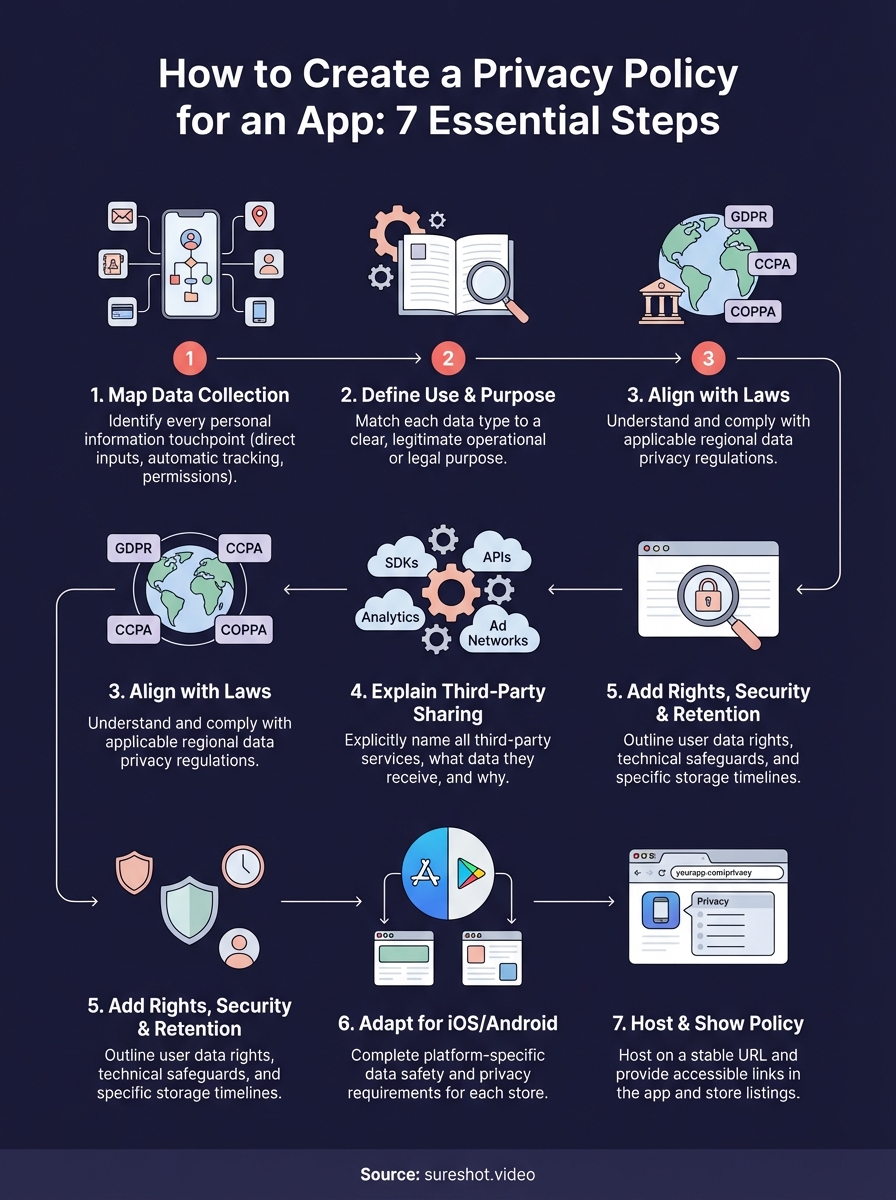
Learning how to create a privacy policy for an app comes down to seven concrete steps. You map every data point your app collects. You define clear purposes for each collection activity. You align with laws like GDPR and CCPA that apply to your user base. You disclose all third-party services by name. You outline user rights, security measures, and retention periods. You adapt your policy for iOS and Android requirements. Finally, you host it on a stable URL that appears in your app and store listings.
These steps protect you from platform rejection and legal penalties while building user trust through transparency. Your policy needs regular updates when you add features or integrate new services. Start with templates and real examples to save time, but customise every section to match your actual data practices.
Generic policies create compliance gaps that reviewers catch immediately. If you need help managing user-generated content while maintaining privacy compliance, book a demo with SureShot to see how event organizers handle attendee data securely.