
OneTrust Consent Management: What It Is and How to Set Up
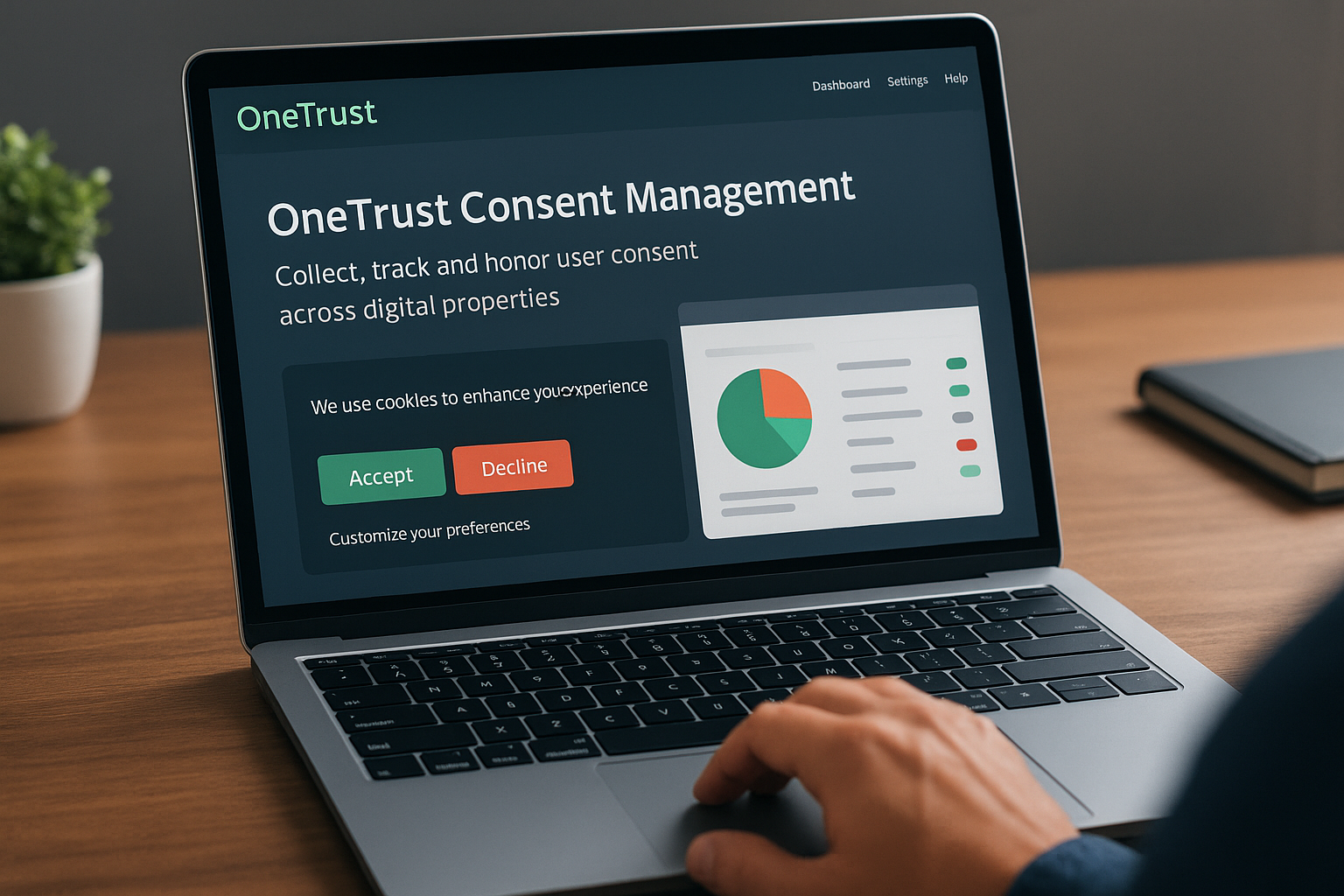
OneTrust consent management is a platform that helps you collect, track, and honour user consent across your digital properties. It acts as a central system where you can manage cookie banners, preference centres, and consent records while staying compliant with privacy regulations like GDPR, CCPA, and similar laws. The platform automates much of the consent workflow, from displaying banners to users through tracking their choices and syncing those preferences with your marketing and analytics tools.
This guide walks you through everything you need to know about OneTrust consent management. You'll learn why it matters for your business, how to set it up from scratch, what features you can leverage, and how to integrate it with your existing tech stack. We'll also cover best practices for creating consent experiences that users actually understand, troubleshooting common issues, and maintaining your consent program over time. By the end, you'll have a clear roadmap for implementing OneTrust to manage user consent effectively and stay on the right side of privacy laws.
Why OneTrust consent management matters
You face serious legal and financial risks if you handle user consent incorrectly. Privacy regulations now carry penalties that can reach millions of dollars for violations, and enforcement has intensified across jurisdictions. OneTrust consent management gives you a structured system to collect, document, and maintain consent records that satisfy regulators. The platform automatically adapts to different privacy laws based on user location, reducing the complexity of managing multiple compliance frameworks simultaneously. Without a proper consent management solution, you rely on manual processes that create gaps in documentation and increase your exposure to regulatory action.

Compliance across multiple regulations
Your organization likely needs to comply with several privacy laws at once, each with its own consent requirements. GDPR demands explicit, granular consent for data processing in the European Union, while CCPA requires opt-out mechanisms for California residents. OneTrust handles these different requirements automatically by detecting user location and displaying the appropriate consent mechanism. You can configure rule sets for each jurisdiction without building separate systems or manually switching between different compliance approaches. The platform maintains detailed audit trails that prove you collected consent properly, which becomes critical evidence during regulatory investigations or audits.
A centralized consent platform eliminates the risk of showing the wrong consent notice to users in different regions.
User trust and business value
Transparent consent practices directly impact how users perceive your brand. When you provide clear choices about data collection and respect user preferences, you build trust that translates into stronger relationships. Users who understand and control how you use their data are more likely to grant consent and remain engaged with your services. OneTrust's preference centres let users manage their choices over time, giving them ongoing control rather than a one-time accept-or-reject decision. This ongoing transparency creates a foundation for authentic user relationships that benefit your business long-term while reducing the friction that comes from unclear or deceptive data practices.
How to set up OneTrust consent management
You can implement OneTrust consent management in a few structured steps that take you from initial setup through to live deployment. The process involves creating your account, configuring your consent notices, setting up geolocation rules, and testing before you go live. Most organizations complete the basic setup within a few days, though complex implementations with multiple domains or custom integrations may take several weeks. The platform provides a guided workflow that walks you through each configuration step, reducing the technical complexity of consent implementation.
Initial account setup and domain configuration
Your setup begins with creating an OneTrust account and verifying your organization details. You need to provide your company information, including legal name, business type, and primary contact details. OneTrust uses this information to generate legally compliant consent notices tailored to your jurisdiction. After account creation, you configure your domain settings by adding each website or application where you'll collect consent. The platform generates a unique script tag for each domain that you embed in your site's header. This script loads the consent banner and tracks user choices without requiring extensive technical modifications to your existing codebase.
You also set your privacy policy URL and designate the data controller information during initial setup. These details appear in your consent notices to satisfy disclosure requirements under various privacy laws. OneTrust pulls this information automatically when generating banners, ensuring consistency across all your consent touchpoints.
Creating your first cookie banner
OneTrust provides templates for cookie banners that you customise to match your brand and compliance needs. You start by selecting a banner style from options like overlay, bottom bar, or side panel depending on your user experience goals. The platform offers visual customization tools where you adjust colours, fonts, button text, and positioning without writing code. You configure the consent categories that appear on your banner, typically including strictly necessary, performance, functional, and targeting cookies. Each category needs a clear description that explains to users what types of cookies fall into that group and why you collect them.

A well-designed consent banner balances legal compliance with user experience by providing clear choices without disrupting the user's primary task.
The banner editor lets you preview how your consent notice appears on different devices and screen sizes. You can create multiple banner versions for A/B testing or to serve different designs based on user location. OneTrust automatically handles the logic of showing or hiding the banner based on whether a user has already made a consent choice, preventing banner fatigue from repeated displays.
Configuring geolocation rules
Geolocation rules determine which consent mechanism appears to users based on their location. You create rules that map specific regions to consent models like opt-in (GDPR), opt-out (CCPA), or notice-only approaches. OneTrust detects user location through IP address lookup and applies the appropriate rule automatically. For European Union visitors, you might configure an opt-in banner that blocks non-essential cookies until users actively consent. California residents see an opt-out mechanism that allows cookies by default but provides a clear path to reject them.
Each geolocation rule can specify different cookie categories, button configurations, and legal text. You define the geographic scope using country codes, states, or custom geographic groupings. OneTrust supports complex rule hierarchies where you can set a default rule for most visitors while creating exceptions for specific jurisdictions with unique requirements.
Testing and publishing your implementation
Before publishing, you test your consent setup in a staging environment that simulates real user interactions. OneTrust provides a preview mode where you can verify that banners display correctly, buttons function as expected, and consent choices properly block or allow cookies. You should test from different geographic locations using VPN services to confirm that geolocation rules trigger the correct consent mechanisms. The platform includes validation tools that check for common configuration errors like missing privacy policy links, incomplete cookie categorization, or incorrect script placement.
Publishing your onetrust consent management setup involves activating your configuration and updating your website's cache. You monitor the first few hours after launch to catch any unexpected issues with banner display or cookie blocking. OneTrust's dashboard provides real-time metrics on banner impressions, consent rates, and any technical errors that occur during user interactions.
Core features of OneTrust consent management
OneTrust consent management includes several core capabilities that work together to collect, store, and enforce user consent across your digital properties. The platform combines cookie scanning, preference management, consent orchestration, and reporting tools into a unified system. Each feature addresses a specific aspect of consent management, from discovering what data you collect through honoring user choices in your downstream systems. Understanding these features helps you leverage the full value of the platform rather than treating it as just a banner deployment tool.
Universal consent repository
The platform maintains a centralized database of all consent records across your organization. Every user interaction with your consent banners, preference centres, or other collection points creates a permanent record that includes the timestamp, consent choices, version of the privacy notice shown, and the user's location. This centralized approach solves the problem of fragmented consent data spread across multiple systems or departments. You can query this repository to retrieve consent status for specific users, generate compliance reports, or sync preferences to your marketing and analytics platforms. The repository supports billions of consent transactions, scaling from small websites to enterprise organizations with hundreds of millions of users.
OneTrust stores consent records with unique identifiers that link to individual users while maintaining flexibility around how you identify those users. You can tie consent to email addresses, customer IDs, cookie identifiers, or other persistent identifiers depending on your technical architecture and use cases.
Automated cookie and tracker scanning
OneTrust's scanner crawls your website to discover cookies and tracking technologies automatically. The scanner identifies which cookies your site sets, categorizes them by purpose, and detects third-party scripts that might drop additional trackers. This automated discovery removes the manual burden of auditing your site's tracking footprint, which becomes especially valuable as your development team adds new tools or marketing tags. The scanner runs on a recurring schedule you define, detecting new cookies as they appear and alerting you to changes that might require updates to your consent notices or privacy policy.
Automated scanning ensures your consent notices accurately reflect the cookies you actually use, reducing compliance gaps that emerge when your tracking changes.
Each discovered cookie receives a classification like strictly necessary, functional, performance, or targeting based on its behavior and origin. You can override automatic classifications when the scanner misidentifies a cookie's purpose, maintaining accuracy in how you present choices to users.
Granular preference centres
Preference centres give users ongoing control over their consent choices after the initial banner interaction. You build preference centres that let users adjust consent by category, by specific vendor, or by individual cookies depending on the level of granularity you want to offer. The centres display the current state of each user's choices and provide toggle controls or checkboxes for making changes. OneTrust automatically syncs preference updates back to the central consent repository and can trigger webhooks or API calls to notify your other systems about the changes. This real-time synchronization ensures that user preferences flow immediately to the tools that need them, like email platforms that must stop sending messages to users who withdraw consent.
Users access preference centres through links in your privacy policy, account settings pages, or directly from your consent banner. The platform supports branded customization so preference centres match your site's visual design and voice.
Consent analytics dashboard
The analytics dashboard provides visibility into how users interact with your consent mechanisms. You track acceptance rates by consent category, geographic trends in opt-in behavior, and which banner variations perform best with your audience. The dashboard shows real-time metrics and historical trends, helping you identify patterns like seasonal changes in consent rates or the impact of design modifications. OneTrust generates audit reports automatically that compile consent statistics, user preference distributions, and evidence of compliant consent collection practices. These reports become essential documentation during regulatory audits or when demonstrating your privacy program's effectiveness to stakeholders.
Using OneTrust for cookie compliance
Cookie compliance represents one of the most immediate applications of OneTrust consent management. The platform helps you identify every cookie your site uses, classify them according to regulatory standards, and block non-essential cookies until users provide consent. You gain automated enforcement of cookie rules rather than relying on manual audits or hoping your development team remembers to check consent status before loading tracking scripts. The system intercepts cookie-setting requests from both first-party and third-party sources, preventing unauthorized data collection that could trigger regulatory penalties.
Cookie categorization and blocking
OneTrust automatically sorts discovered cookies into regulatory categories that align with privacy law requirements. Strictly necessary cookies that enable core website functionality receive automatic approval without requiring user consent. Performance cookies that measure site usage, functional cookies that remember user preferences, and targeting cookies used for advertising all require explicit consent under most privacy frameworks. The platform blocks these cookie categories by default and only allows them to load after users opt in through your consent banner. You can adjust category assignments when the automated scanner misclassifies a cookie, maintaining accuracy in how you present choices.
The blocking mechanism works through script interception that prevents cookie-setting code from executing until consent is granted. OneTrust monitors both document.cookie writes and HTTP Set-Cookie headers, catching cookies regardless of how third-party vendors attempt to place them. This comprehensive blocking protects you from liability even when third-party scripts try to set cookies without checking consent status first.
Meeting jurisdiction-specific requirements
Different privacy laws impose distinct cookie requirements that you must satisfy based on user location. GDPR requires you to block all non-essential cookies until users actively consent, while ePrivacy Directive extends similar requirements across European Union member states. California's CCPA takes a different approach by requiring prominent disclosure and an opt-out mechanism rather than pre-consent blocking. OneTrust handles these regulatory variations automatically by detecting user location and applying the appropriate cookie blocking rules.

Cookie compliance becomes manageable when your platform automatically adapts to each jurisdiction's specific requirements rather than forcing you to maintain separate implementations.
You configure jurisdiction-specific rules once and the platform enforces them consistently across all user sessions. The system updates automatically as regulations evolve, reducing the ongoing maintenance burden of staying current with legal changes.
Vendor management and consent strings
Third-party advertising and analytics vendors need to receive consent signals that tell them whether they can process user data. OneTrust generates standardized consent strings using frameworks like IAB Transparency and Consent Framework that vendors recognise and honour. These consent strings encode user choices into a compact format that travels with ad requests, ensuring that each vendor in the supply chain knows which data processing activities users have approved. The platform maintains a database of registered vendors and their declared purposes, letting you select which vendors operate on your site and what consent categories they require.
Best practices for consent user experience
Your consent mechanisms succeed when users understand their choices and trust your data practices. OneTrust consent management gives you tools to create transparent experiences, but implementation quality determines whether users actually engage with your consent requests or ignore them. You need to balance legal compliance with usability, making consent interfaces that feel helpful rather than obstructive. The best consent experiences present clear options, minimise disruption to the user's primary task, and demonstrate that you respect user decisions across every interaction.
Clear and simple language
You should write consent notices in plain language that users without legal training can understand. Avoid technical terms like "processing activities" or "legitimate interests" unless you immediately explain what those terms mean in practical terms. Each consent category needs a brief description that tells users exactly what happens when they accept: "Performance cookies help us understand which pages you visit most often so we can improve our website" works better than "These cookies enable analytics functionality." Your button labels must clearly indicate what action users take by clicking them. "Accept All" and "Reject All" leave no ambiguity, while vague phrases like "Continue" or "Proceed" confuse users about what they're consenting to.
Minimal disruption to user flow
Your consent banner appears when users arrive at your site, potentially blocking access to the content they came to view. You reduce friction by keeping banner size compact and positioning it where it doesn't completely obscure page content. Bottom bars or corner overlays typically perform better than full-page takeovers that force interaction before users can browse. The banner should load quickly without causing page delays or layout shifts that frustrate users. OneTrust's lazy loading features help by deferring banner display until the main page content renders, improving perceived performance.
Users who feel interrupted or manipulated by consent mechanisms develop negative associations with your brand that extend beyond the immediate interaction.
Respecting user choices consistently
Users lose trust when you ignore their consent decisions or make them repeat choices unnecessarily. OneTrust stores consent preferences with persistent identifiers that recognise returning users and honour their previous selections. You should respect withdrawal requests immediately rather than continuing to use data until some arbitrary end date. If users opt out of marketing cookies, your analytics tags must stop firing on their next page view without delays. Preference centres need to accurately reflect current consent status so users see which choices they made previously, building confidence that their selections actually matter.
Integrating OneTrust with your tech stack
OneTrust consent management connects to your existing marketing, analytics, and data infrastructure to enforce consent decisions across every system that touches user data. The platform provides pre-built integrations with major vendors alongside flexible APIs that support custom connections to proprietary tools. You sync consent status in real time so your downstream systems immediately honour user choices, preventing unauthorized data processing that creates compliance gaps. Integration quality determines whether consent becomes a genuine control mechanism or just a banner that users click through without real enforcement behind their decisions.

Marketing automation platforms
Your email service providers and marketing automation tools need accurate consent signals to avoid sending messages to users who withdrew permission. OneTrust integrates with platforms like Salesforce Marketing Cloud, HubSpot, and Marketo through native connectors that map consent categories to subscriber preferences. When users opt out of marketing communications through your preference centre, the integration automatically updates their status in your email platform within minutes. You configure field mappings that translate OneTrust consent categories into the specific opt-in flags your marketing platform recognizes, ensuring seamless data flow without manual export and import processes.
The integrations support bidirectional sync when you need to import existing preferences from your marketing database into OneTrust. This capability proves essential during initial implementation when you already maintain subscriber consent records in other systems. OneTrust can serve as the master consent repository while keeping your marketing tools updated through continuous synchronization that reflects every preference change users make.
Analytics and tag management
Tag management systems like Google Tag Manager work alongside OneTrust to conditionally fire tracking tags based on consent status. You wrap your analytics, advertising, and other tracking tags in consent checks that prevent execution until users approve the relevant cookie category. OneTrust exposes a JavaScript API that your tag manager queries to determine which consent categories users accepted. Tags configured to require performance consent only fire after users explicitly opt in to that category, blocking data collection on page loads where consent hasn't been granted.
Integration with tag management creates automatic enforcement that prevents tracking violations even when your development team adds new tags without considering consent requirements.
Customer data platforms and warehouses
Customer data platforms and cloud data warehouses like Snowflake receive consent metadata through OneTrust's data export features. You configure scheduled exports that deliver consent records in formats your data warehouse accepts, typically CSV or JSON files dropped into cloud storage buckets. These exports include the full consent history for each user, letting your analytics teams segment audiences by consent status and avoid processing data from users who withdrew permission. OneTrust also supports webhook notifications that trigger when consent changes occur, enabling real-time updates to your CDP without waiting for the next scheduled export.
Troubleshooting and ongoing governance
You encounter technical and operational challenges even after successful OneTrust consent management deployment. Consent banners may fail to load properly, cookie blocking might miss new trackers, or preference updates may not sync to downstream systems as expected. Your governance program needs structured processes for identifying problems early and maintaining configuration accuracy as your website evolves. Regular audits catch drift between your documented consent practices and actual implementation, while proactive monitoring alerts you to technical failures before they create compliance gaps. Ongoing governance transforms consent from a one-time setup project into a sustained operational capability that adapts to changing requirements.
Common technical issues
Banner display problems represent the most frequent technical issue you'll troubleshoot. The consent banner may load late, causing a flash of unconsented content, or fail to appear entirely on certain pages. You verify that your OneTrust script loads in the document head before other tracking scripts that depend on consent status. Cache issues often prevent updated banner configurations from appearing, requiring you to clear CDN caches and browser storage during testing. Integration failures with tag management systems typically stem from incorrect consent category mappings or race conditions where tags fire before the OneTrust SDK initializes. You add explicit wait conditions in your tag manager that delay tag execution until consent data becomes available.
Regular consent audits
You should scan your website monthly to detect new cookies and tracking technologies that your development team added. OneTrust's automated scanner identifies these changes, but you need to manually review each discovered cookie to verify its categorization and update consent notices accordingly. Audit logs help you track which team members made configuration changes and when those modifications went live. You compare consent rates across periods to spot sudden drops that might indicate banner problems or user experience issues. Geographic variations in consent rates reveal whether your geolocation rules function correctly or if certain regions see inappropriate consent mechanisms.
Keeping configurations current
Privacy regulations evolve continuously, requiring you to update consent notices and cookie blocking rules as new requirements take effect. You subscribe to regulatory updates from privacy authorities in jurisdictions where you operate, translating legal changes into configuration adjustments within OneTrust. Your vendor list needs regular maintenance as you add or remove third-party services from your website. Each new vendor requires evaluation to determine which consent categories apply and whether additional disclosures belong in your privacy policy.
A documented review schedule prevents consent configurations from becoming outdated as your technology stack and regulatory obligations change.
Key takeaways on OneTrust consent
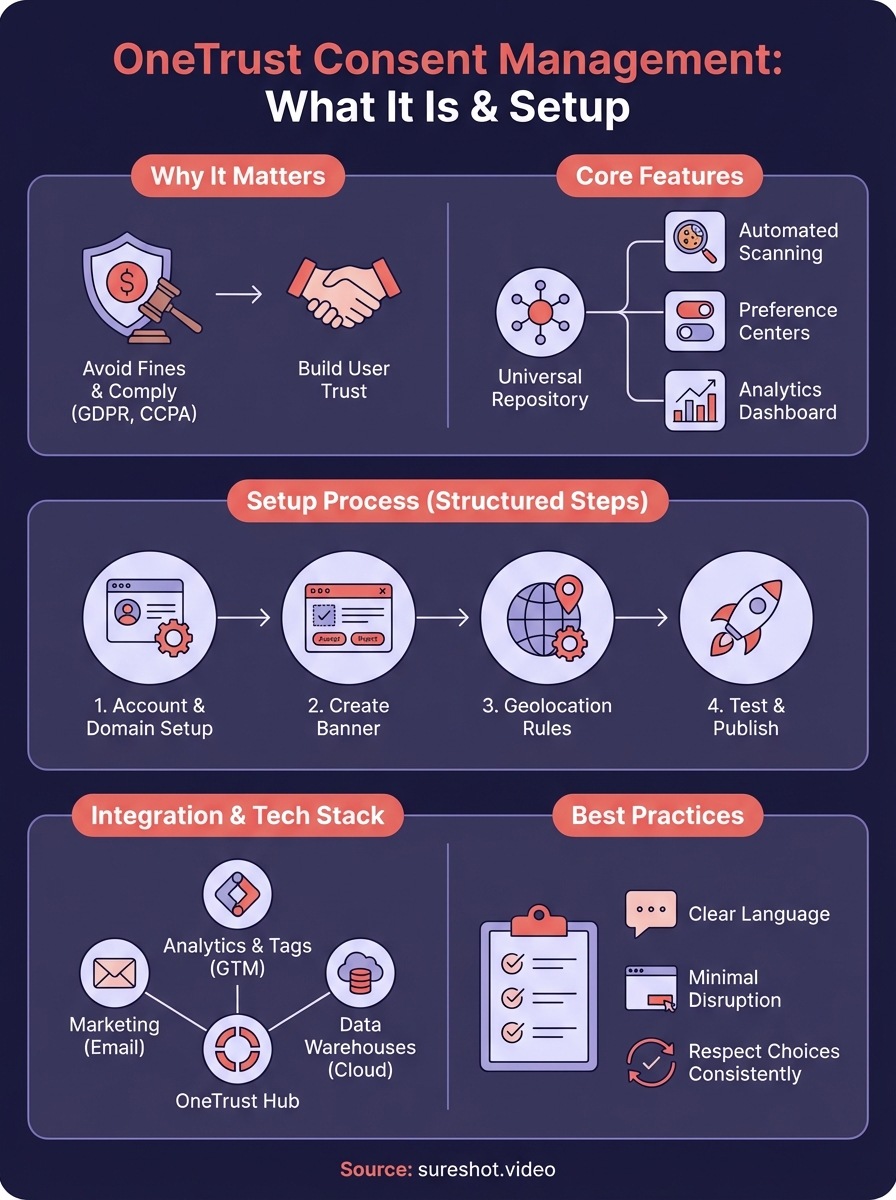
OneTrust consent management gives you a complete system for collecting, storing, and enforcing user consent across your digital properties. The platform handles cookie compliance, preference management, and consent orchestration through automated workflows that reduce manual effort while maintaining regulatory compliance. You gain centralized visibility into every consent interaction and can prove your compliance through detailed audit trails that satisfy regulators.
Your implementation succeeds when you combine technical setup with thoughtful user experience design. Users need clear language, minimal disruption, and confidence that you honour their choices consistently across every system. Regular audits and proactive monitoring keep your consent program current as regulations evolve and your technology stack changes.
If you're managing event content and need privacy-compliant video collection from attendees, book a demo with SureShot to see how we handle consent for user-generated content.