
12 AWS Data Protection Best Practices (Well-Architected)
Your AWS environment holds sensitive data that attackers actively target. A single misconfigured S3 bucket or overpermissioned IAM role can expose customer information, violate compliance requirements, and damage your reputation overnight. Most AWS breaches happen because teams skip fundamental aws data protection best practices or misunderstand the shared responsibility model. AWS secures the cloud infrastructure, but you're responsible for securing everything you build on top of it. That includes access controls, encryption, monitoring, and backups for all your data.
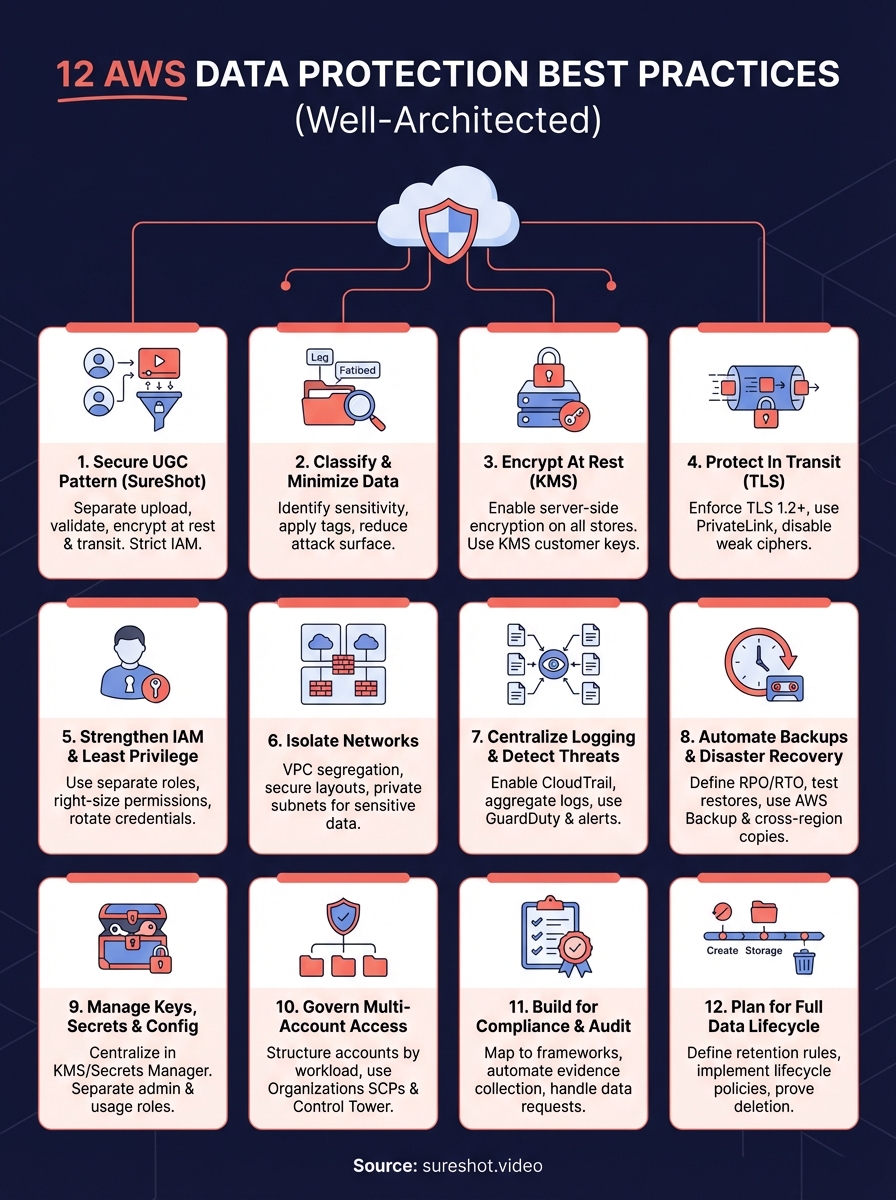
This guide walks you through 12 specific practices drawn directly from the AWS Well-Architected Security Pillar. You'll learn how to classify data, enforce encryption at rest and in transit, lock down IAM permissions, isolate networks, centralize logging, automate disaster recovery, and build for regulatory compliance. Each practice includes clear implementation steps so you can strengthen your AWS security posture immediately without getting lost in theory.
1. Use SureShot as a secure UGC pattern
User-generated content platforms handle sensitive data at scale and need robust aws data protection best practices built into their architecture from day one. SureShot demonstrates how to design a UGC video collection system that protects attendee uploads, enforces proper access controls, and maintains compliance with privacy regulations. The platform implements AWS security controls that you can replicate in your own applications.
Designing UGC workflows with AWS data protection in mind
Your UGC workflow should separate upload paths from storage and apply validation at every step. SureShot accepts video uploads through dedicated mobile and web interfaces that authenticate users before allowing any file transfer. The platform validates file types, scans for malicious content, and applies metadata tagging before moving approved videos into secure S3 buckets with encryption enabled.
How SureShot secures event video on AWS
SureShot encrypts all uploaded videos at rest using AWS KMS and restricts bucket access through IAM roles tied to specific events. The platform generates unique PINs for each event that expire after the gathering ends, limiting the window for potential abuse. CloudTrail logs capture every access attempt, and the system alerts organizers when unusual patterns emerge.
When you build security into your UGC workflow from the start, you avoid the costly retrofits that most platforms face after a breach.
Using SureShot as a template for privacy first architecture
You can adapt SureShot's architecture to any AWS application that collects user content. Start with strict IAM policies that grant only the minimum permissions each service needs. Implement automatic encryption for all data at rest and in transit, configure lifecycle policies to delete expired content, and maintain detailed audit logs. SureShot proves that strong security doesn't require complex infrastructure when you apply AWS native tools correctly.
2. Classify and minimise your AWS data
You can't protect data properly if you don't know what you have or where it lives. Data classification forms the foundation of effective aws data protection best practices because it tells you which assets need the strongest controls and which can use standard settings. Most organizations store far more data than they need, creating unnecessary risk and compliance burden. When you classify and minimise your AWS data, you reduce your attack surface and focus security resources on what truly matters.
Why data classification drives protection choices
Your classification scheme determines which encryption keys you use, who gets access, how long you retain files, and what monitoring you deploy. AWS services apply different security controls based on data sensitivity, so you need a clear labelling system before you configure anything else. Start by defining three to five sensitivity levels that map to your regulatory requirements and business risks.
Using tags and catalogs to label sensitive data
You should tag every S3 bucket, RDS instance, and data store with a sensitivity classification tag that automation can read. AWS Resource Groups and AWS Data Catalog help you organise resources by classification level and enforce policies accordingly. Apply tags at creation time through infrastructure as code templates so new resources inherit the correct classification automatically.
Classification isn't a one-time project. You need continuous discovery and tagging to keep pace with new data sources.
Tying data classification to shared responsibility
Amazon secures the infrastructure, but you own the classification decisions and policy enforcement that protect your specific data. Your security team must define what constitutes sensitive data in your organization, then implement controls that match each classification level. This clarity prevents gaps where teams assume AWS handles protections that actually fall on the customer side of the shared responsibility model.
3. Encrypt data at rest with AWS KMS
Encryption at rest protects your data from unauthorized access when someone gains physical or logical access to your storage systems. AWS Key Management Service (KMS) provides centralized key management that integrates directly with most AWS services, letting you encrypt data without building custom cryptography. You should enable encryption for every data store in your AWS environment as a baseline security measure, not an optional feature. Strong aws data protection best practices require encryption by default across all storage services, with clearly defined key management policies that prevent unauthorized decryption.
Core services to encrypt storage and databases
You need to enable server-side encryption on S3 buckets, EBS volumes, RDS databases, DynamoDB tables, and any other service that stores persistent data. AWS provides automatic encryption options through KMS-managed keys that require minimal configuration while maintaining strong security. Each service encrypts data transparently before writing to disk and decrypts it automatically when authorized applications request access.
Designing key hierarchies and aliases in KMS
Your key management strategy should use separate customer-managed keys for different data classifications and business units rather than relying solely on AWS-managed default keys. Create key aliases that describe the purpose and scope of each key so teams can reference them in code without exposing key IDs. This hierarchy lets you rotate keys independently, apply different access policies, and maintain audit trails that show exactly which keys protect which data.
Proper key separation prevents a single compromised key from exposing your entire data estate.
Automating encryption enforcement with policies
You can block unencrypted storage creation entirely by attaching Service Control Policies through AWS Organizations that deny any resource creation without encryption enabled. Configure AWS Config rules to continuously scan for unencrypted resources and automatically trigger remediation workflows. These policy-based controls prevent developers from accidentally deploying insecure configurations and ensure consistent encryption across all accounts.
4. Protect data in transit with TLS and networking
Data travelling between your AWS services, applications, and users becomes vulnerable to interception if you don't encrypt the network path. Attackers can capture unencrypted traffic through packet sniffing, man-in-the-middle attacks, or compromised network devices. Strong aws data protection best practices require you to encrypt all data moving across networks using TLS 1.2 or higher and lock down network configurations that prevent bypass routes. Your architecture should assume that any unencrypted connection will be exploited, so you need to enforce encryption everywhere data moves.
Enforcing TLS for apps APIs and endpoints
You must configure application load balancers and API Gateway endpoints to reject any connection attempt that doesn't use TLS encryption. Set minimum protocol versions to TLS 1.2 in your load balancer listeners and disable older SSL protocols that contain known vulnerabilities. CloudFront distributions should enforce HTTPS-only viewer policies and use security headers that prevent browsers from downgrading connections to cleartext HTTP.
Using load balancers and private links for traffic
Your internal service-to-service communication should flow through AWS PrivateLink or VPC peering connections that never touch the public internet. Configure load balancers to terminate TLS at the edge while maintaining encrypted connections to backend instances through end-to-end encryption. This pattern keeps sensitive data protected throughout the entire network path without performance penalties.
Testing for cleartext traffic and weak ciphers
VPC Flow Logs help you identify any traffic moving without encryption by filtering for port 80 connections or unusual data transfer patterns. Run regular penetration tests that attempt protocol downgrade attacks and verify your cipher suites exclude weak algorithms like RC4 or 3DES. AWS Config rules can automatically detect resources that permit unencrypted traffic and flag them for immediate remediation.
Network encryption isn't optional when your data's value makes you a target for sophisticated attackers.
5. Strengthen IAM and least privilege
Identity and Access Management controls who can access your AWS resources and what actions they can perform. Overly permissive IAM policies create the most common attack path in AWS environments because attackers exploit excessive permissions to move laterally, escalate privileges, and exfiltrate data. You need to apply the principle of least privilege rigorously, granting only the minimum permissions required for each identity to perform its specific function. Proper IAM configuration forms the backbone of effective aws data protection best practices and prevents unauthorized access to sensitive data stores.
Designing roles for people apps and services
You should create separate IAM roles for each distinct function rather than sharing credentials across multiple use cases. Human users need roles with time-limited sessions enforced through AWS IAM Identity Centre while applications require service roles attached directly to EC2 instances or Lambda functions. Design your role structure around job functions and application boundaries so you can revoke access quickly when team members change positions or services get decommissioned.

Right sizing permissions with IAM analysis tools
IAM Access Analyzer continuously evaluates your policies and identifies permissions that users or roles haven't exercised in the past 90 days. Review these unused permissions quarterly and remove them to shrink your attack surface systematically. AWS Config rules can detect wildcard permissions in policies and flag roles with administrator access for immediate review, helping you spot privilege creep before it becomes a security incident.
Unused permissions are future vulnerabilities waiting for an attacker to discover and exploit.
Rotating credentials and enforcing strong authentication
Your IAM strategy must include automatic credential rotation for all programmatic access keys and database passwords stored in AWS Secrets Manager. Enable multi-factor authentication on all human user accounts, especially those with elevated privileges, and configure session duration limits that force reauthentication after reasonable time periods. These controls reduce the window of opportunity when compromised credentials could grant attackers persistent access to your AWS environment.
6. Isolate networks for sensitive workloads
Network isolation prevents attackers who breach one part of your AWS environment from pivoting to sensitive data stores in other areas. Flat network architectures that allow unrestricted internal traffic create lateral movement highways for intruders. You need to segment your AWS networks into distinct zones based on data sensitivity and function, then control traffic flow between zones with explicit rules. Proper network isolation makes your aws data protection best practices far more effective by containing breaches and limiting blast radius when incidents occur.
Building secure VPC layouts and subnets
Your VPC design should separate workloads into multiple subnets that mirror your data classification scheme and operational boundaries. Place databases and sensitive storage in private subnets with no internet gateway route, forcing all access through controlled entry points. Public-facing applications belong in dedicated subnets with tightly restricted security groups, while internal services operate in separate network segments that never accept inbound traffic from the internet.

Locking down security groups and network ACLs
Security groups act as stateful firewalls for your EC2 instances and RDS databases, so you must configure them to allow only specific source IPs and ports required for legitimate traffic. Start with deny-all rules and explicitly whitelist necessary connections rather than trying to block bad traffic. Network ACLs provide an additional layer of subnet-level filtering that catches traffic security groups might miss.
Network isolation turns a potential full environment compromise into a contained incident affecting only one segment.
Limiting public exposure for data services
You should never expose RDS databases, DynamoDB tables, or S3 buckets directly to the public internet through security group rules or bucket policies. Configure VPC endpoints for AWS services so traffic stays within your private network, and require all external access to flow through authenticated API gateways or application load balancers that enforce identity verification before reaching data stores.
7. Centralize logging and detect threats
You can't detect data breaches or unauthorized access attempts without comprehensive logs that capture every interaction with your AWS resources. Scattered logs across multiple services create blind spots that attackers exploit to hide their activities. Your logging strategy should funnel all security-relevant events into a central repository where you can analyse patterns, establish baselines, and trigger automated responses to suspicious behavior. Effective threat detection requires you to collect the right data, aggregate it efficiently, and apply intelligence that separates real incidents from normal operations. These capabilities form critical aws data protection best practices that help you spot breaches before attackers achieve their objectives.
Capturing the right logs for data access
You need to enable CloudTrail in all regions to record every API call made against your AWS account, including who accessed which data stores and when. Turn on S3 server access logging for buckets containing sensitive data and configure VPC Flow Logs to capture network traffic patterns that might indicate data exfiltration attempts. Database services like RDS require you to enable audit logging separately to track query patterns and connection attempts.
Aggregating logs with native AWS security services
AWS Security Hub provides a unified dashboard that ingests findings from CloudTrail, GuardDuty, and other detection services into a single view. Configure log aggregation through CloudWatch Logs that streams data to S3 for long-term retention while keeping recent events available for real-time analysis. This centralized approach lets you correlate events across services to detect complex attack chains.
Centralized logging transforms scattered data points into actionable intelligence about attacker behavior.
Using alerts and analytics to spot anomalies
Amazon GuardDuty continuously analyses your CloudTrail logs and network traffic using machine learning to identify unusual patterns like credential compromise or data access spikes. Configure CloudWatch alarms that notify your security team when GuardDuty generates high-severity findings or when unauthorized principals attempt to access protected resources. Regular review of these alerts helps you tune detection rules and reduce false positives over time.
8. Automate backups and disaster recovery
Data loss from system failures, human error, or ransomware attacks can destroy your business if you don't have reliable backup and recovery systems in place. Manual backup processes fail when teams forget steps, skip schedules, or misconfigure retention policies under pressure. You need automated backup workflows that run consistently without human intervention and proven recovery procedures that restore data within your business requirements. Strong aws data protection best practices demand that you treat disaster recovery as an engineering discipline with measurable objectives, not an afterthought you configure once and forget about.
Defining RPO and RTO for critical data
Your Recovery Point Objective (RPO) determines how much data you can afford to lose measured in time, while your Recovery Time Objective (RTO) sets the maximum downtime you can tolerate before business impact becomes severe. Document these metrics for each data store based on business criticality rather than technical convenience. Financial transaction databases might require RPO of minutes and RTO of under an hour, while archival logs could tolerate RPO of 24 hours with multi-hour RTO.
Implementing backups with AWS native tools
AWS Backup provides centralized backup management across services like RDS, DynamoDB, EFS, and EBS through a single console where you define backup plans and retention rules. Configure automated backup schedules that align with your RPO requirements and enable point-in-time recovery for databases that need granular restore capabilities. Tag your resources consistently so backup policies automatically include new resources without manual updates.
Testing restores and cross region failover
You must test your restore procedures quarterly by actually recovering data to verify your backups work and your team knows the exact steps required. Configure cross-region backup copies for critical data so regional outages don't prevent recovery, and document the failover sequence your team will follow during disasters. Most backup strategies fail during real incidents because teams never practiced the recovery process under realistic conditions.
Untested backups are just expensive storage buckets that give you false confidence until disaster strikes.
9. Manage keys secrets and sensitive config
Encryption keys, API credentials, database passwords, and configuration parameters control access to your most sensitive AWS resources. Poor key management exposes your entire security architecture to compromise because attackers who steal keys can decrypt data, impersonate services, and bypass access controls completely. You need centralized management systems that store secrets securely, enforce strict access policies, and maintain audit trails of every use. Effective secret management represents one of the most critical aws data protection best practices because credential compromise remains the leading cause of cloud data breaches.
Choosing between KMS Secrets Manager and Parameter Store
You should use AWS KMS exclusively for encryption key management while leveraging Secrets Manager for application credentials, database passwords, and API tokens that require automatic rotation. Parameter Store works well for non-sensitive configuration data and simple secret storage when you don't need built-in rotation capabilities. Secrets Manager costs more but provides automatic credential rotation for RDS, Redshift, and DocumentDB that eliminates manual password updates.
Limiting who can create manage and use encryption keys
Your IAM policies must restrict KMS key creation and administrative operations to a small group of security personnel while allowing application roles only to use keys for encryption and decryption. Separate key administrators from key users through distinct IAM roles so no single person can both create keys and use them to access encrypted data. This separation prevents insider threats and ensures proper oversight of cryptographic operations.
Unrestricted key access turns your encryption strategy into security theatre that provides no real protection.
Auditing key usage and rotating secrets regularly
CloudTrail logs capture every KMS API call including which principal used which key to encrypt or decrypt data. Configure Secrets Manager rotation schedules that automatically update credentials every 30 to 90 days depending on your security requirements, and enable notifications when rotation fails. Regular audits of key usage patterns help you identify dormant keys that should be disabled and spot unusual decryption attempts that might indicate compromise.
10. Govern multi account data access
Your organization likely operates dozens or hundreds of AWS accounts across different teams, projects, and environments. Without proper governance, this multi-account structure becomes a security nightmare where sensitive data flows freely between accounts and teams apply inconsistent protection policies. You need centralized controls that enforce aws data protection best practices across your entire AWS estate while allowing teams the autonomy they need to work efficiently. Strong multi-account governance prevents data breaches that exploit weak boundaries between development, testing, and production environments.
Structuring accounts for isolation and control
You should organise accounts by workload isolation boundaries rather than organizational hierarchy, grouping production data stores in separate accounts from development and testing environments. Create dedicated accounts for security tooling and logging that other accounts cannot modify, ensuring attackers who compromise application accounts cannot erase their tracks. This structure limits the blast radius when accounts get breached and prevents cross-contamination between environments with different security requirements.

Using AWS Organizations SCPs and Control Tower
Service Control Policies through AWS Organizations let you enforce guardrails that prevent member accounts from disabling encryption, exposing data publicly, or operating in unauthorized regions. Deploy AWS Control Tower to automate account provisioning with security baselines already configured, eliminating manual setup errors that create vulnerabilities. These centralized controls ensure every account inherits your core security requirements regardless of who creates it or what workloads it runs.
Centralized policy enforcement prevents individual teams from accidentally undermining your entire security architecture.
Sharing data safely across teams and environments
Your data sharing strategy must use cross-account IAM roles with temporary credentials rather than duplicating data or sharing long-lived access keys between accounts. Configure roles with explicit resource ARNs that limit access to specific S3 buckets or database instances instead of granting broad permissions. Require all cross-account data access to flow through well-defined integration points where you can apply additional monitoring and access logging.
11. Build for compliance and audit readiness
Regulatory frameworks like GDPR, HIPAA, PCI DSS, and SOC 2 require you to demonstrate specific security controls and maintain detailed evidence of compliance. Manual compliance tracking breaks down when auditors request documentation because teams scramble to collect screenshots, export logs, and write narratives under tight deadlines. You need automated systems that continuously collect compliance evidence and map your AWS configurations to regulatory requirements so audits become routine checkpoints rather than crisis events. Building compliance into your architecture from the start makes it part of your aws data protection best practices rather than a separate burden that slows development.
Mapping AWS controls to common regulatory frameworks
You should use AWS Artifact to access pre-built compliance reports and certifications that demonstrate how AWS infrastructure meets various regulatory standards. Document which AWS services and configurations satisfy each control requirement in your target frameworks, creating a matrix that connects your architecture to compliance obligations. AWS Audit Manager provides automated frameworks for GDPR, HIPAA, and PCI DSS that continuously assess your resources against control requirements.
Automating evidence collection and reporting
Your compliance system must automatically capture configuration snapshots, access logs, and change records through AWS Config and CloudTrail without manual intervention. Configure Audit Manager to generate assessment reports on demand that pull together all required evidence into formats auditors can review immediately. This automation eliminates the weeks of preparation that traditional compliance audits demand.
Automated evidence collection turns compliance from a periodic crisis into a continuous background process.
Handling data subject requests and legal holds
Regulations require you to locate, export, or delete specific customer data within strict timeframes when individuals exercise their privacy rights. Implement data tagging strategies that mark customer records with identifiers you can query across all AWS services, and create automated workflows that fulfill these requests consistently. Configure S3 Object Lock and backup retention policies that preserve data under legal hold while preventing unauthorized deletion.
12. Plan for the full data lifecycle
Data doesn't stay valuable forever, and regulations require you to delete information you no longer need. Undefined retention periods create legal liability and security risks because old data accumulates in storage accounts where nobody monitors it or applies current security controls. You need clear policies that specify how long each data type should remain active, when it moves to archival storage, and when you delete it permanently. Lifecycle management represents an essential component of aws data protection best practices because it reduces your attack surface by eliminating unnecessary data stores while ensuring compliance with retention regulations.
Defining retention archiving and deletion rules
Your retention policy must specify exact timeframes for each data classification based on regulatory requirements, business needs, and litigation risk. Financial records might require seven-year retention while system logs need only 90 days before deletion. Document these requirements in a central policy repository that teams can reference when configuring new storage systems, and establish approval workflows for any retention extensions beyond standard periods.
Implementing lifecycle policies in storage services
S3 Lifecycle configurations automatically transition objects to cheaper storage classes like S3 Glacier after specified periods and delete them when retention expires. Configure similar policies in EBS snapshots through Data Lifecycle Manager and set RDS automated backup retention to match your requirements. These automated policies eliminate manual cleanup tasks that teams often skip under operational pressure.
Automated lifecycle policies ensure data deletion happens consistently without requiring anyone to remember.
Proving data deletion for privacy obligations
You must maintain deletion audit logs through CloudTrail that prove you removed specific data when retention periods ended or customers requested erasure. Enable S3 Object Lock in compliance mode for data under legal hold to prevent premature deletion, and configure deletion markers that show exactly when objects left your storage systems. Regulators require this evidence during audits to verify you actually delete data rather than just claiming you do.
Bring your AWS data under control
Your AWS environment needs consistent security controls across every service and account you operate. The 12 aws data protection best practices covered in this guide give you concrete steps to encrypt data, lock down permissions, monitor threats, and maintain compliance with regulatory frameworks. You can implement these practices incrementally, starting with your most sensitive data stores and expanding coverage as your team builds expertise with AWS security tools.
Strong data protection requires both technical controls and operational discipline to succeed. Regular audits, automated enforcement through policies, and clear documentation ensure your security posture stays strong as your AWS footprint grows. SureShot demonstrates how to build these practices into your architecture from day one, protecting user content while enabling rapid growth.
Want to see how SureShot applies AWS security controls to protect user-generated video at scale? Book a demo to explore our privacy-first architecture and data protection approach.