

Curata Content Curation: How to Evaluate Pricing & Features
You need authentic content to promote your events and engage your audience. But evaluating content curation software means sorting through marketing claims, vague pricing pages, and feature lists that all sound the same. Most platforms promise to streamline your workflow, yet you still can't tell if Curata actually fits your specific needs or budget.
Curata offers content discovery, organization, and publishing tools built around machine learning. The platform integrates with your existing marketing stack and promises to reduce content production time. But understanding what you actually get for your money requires looking past the sales pitch.
This guide walks you through a practical evaluation framework. You'll learn what Curata actually does, how to match its features to your workflow, what the real costs look like beyond the sticker price, and which alternatives might work better for your situation. By the end, you'll know whether Curata deserves your investment or if another solution makes more sense.
Understanding Curata content curation
Curata positions itself as a content marketing platform that combines curation and analytics into one system. The software focuses on helping marketing teams discover third-party content, organise it by topic, and distribute it across multiple channels. You get a dashboard that aggregates content from various sources based on keywords and topics you define, then lets you add your perspective before publishing.
What Curata actually does
The platform operates through three main functions. First, it scans content sources you specify (blogs, news sites, social feeds) using natural language processing to identify relevant articles. Second, it provides a workspace where you organise and annotate that content with your own commentary. Third, it distributes your curated posts to your website, social channels, or email lists through built-in integrations.

You can set up multiple content streams for different topics or audience segments. Each stream becomes a dedicated microsite or feeds into your existing blog. The system automatically pulls in new content based on your criteria, but you still manually approve what gets published. This prevents irrelevant or low-quality content from appearing under your brand.
The machine learning component
Curata's discovery engine learns from your choices over time. When you approve or reject suggested articles, the system adjusts its recommendations to match your preferences. The more you use it, the better it gets at surfacing content that aligns with your brand voice and audience interests.
The learning curve for training the AI varies, but most teams report needing three to four weeks of consistent curation before the recommendations become reliably accurate.
This means your initial time investment is substantial. You will spend considerable effort teaching the system what good content looks like for your specific needs. The payoff comes later when the platform requires less manual filtering.
Integration and workflow structure
Curata connects with common marketing tools through native integrations and API access. You can publish directly to WordPress, push content to HubSpot or Marketo, and schedule social posts to Buffer or Hootsuite. The analytics dashboard pulls data from these connected platforms to show which curated content drives traffic, engagement, and conversions.
Your team works within Curata's editorial calendar to plan and review content before it goes live. Multiple users can collaborate with role-based permissions that control who can discover, edit, approve, or publish. This workflow structure suits teams where several people contribute to content curation but one person maintains final approval authority.
Step 1. Define your content goals and use cases
Before you evaluate Curata content curation or any alternative, you need to clarify what you actually want to accomplish. Most teams skip this step and end up paying for features they never use or missing capabilities they desperately need. Your content goals and use cases determine whether Curata fits your workflow or wastes your budget.
Identify what content curation means for your team
You need to define how curated content fits into your broader content strategy. Some teams use curation to fill publishing gaps between original content pieces, while others build entire microsites around curated industry news. Your approach changes which features matter and which pricing tier makes sense.
List your specific curation objectives:
- Fill your email newsletter with relevant third-party articles
- Build a resource hub that positions your brand as an industry authority
- Supplement blog posts with external perspectives and data
- Maintain consistent social media activity without constant content creation
- Provide sales teams with sharable industry insights for prospect engagement
Each objective requires different functionality. Newsletter curation needs email integration and scheduling. Resource hubs need customizable microsites and taxonomy management. Social media curation demands seamless platform connections and bulk scheduling.
Document your content distribution requirements
Your distribution channels determine which Curata features you actually need. You might curate content for a dedicated website, your main blog, social platforms, email lists, or all of the above. Each channel adds complexity and potential cost.
Write down every place you plan to publish curated content:
- Company blog (specify CMS: WordPress, HubSpot, custom)
- Standalone microsite for specific topics
- LinkedIn, Twitter, Facebook company pages
- Weekly or daily email newsletters
- Internal knowledge base for team education
Match each channel to your publishing frequency. If you curate five articles daily for social media but only one weekly newsletter, you need different workflow support than someone publishing two blog posts weekly. This frequency directly impacts how much time you save with automation versus how much you spend on the software subscription.
Your distribution requirements expose hidden costs like additional user seats for team collaboration or API calls for high-volume publishing.
Step 2. Map Curata features to your workflow
You need to match Curata content curation features against your actual content production process. Most teams evaluate software based on feature lists rather than workflow fit, which leads to buying capabilities you never use. Your goal is to identify which specific features solve your actual problems and which ones just inflate the price.
Create your feature requirement checklist
Start by documenting your current curation workflow step by step. Write down every action you take from content discovery to publication. This exposes where automation helps and where manual oversight remains necessary.
Your checklist should separate features into three categories:
| Priority | Description | Example Features |
|---|---|---|
| Must-have | Features you use daily; workflow breaks without them | Content discovery, publishing to your CMS, team collaboration |
| Nice-to-have | Features that save time but you can work around | AI-powered recommendations, analytics dashboard, social scheduling |
| Unnecessary | Features you pay for but never use | Microsites if you only need blog integration, newsletter tools if you use a dedicated email platform |
Map each Curata feature to one of these categories. The platform includes content discovery, a self-learning engine, microsites, social media scheduling, email newsletter creation, CMS integrations, workflow approval processes, and analytics. You might need content discovery and WordPress publishing but never touch the microsite builder or newsletter tool.
Match features to your content production process
Walk through your workflow and assign Curata features to each step. If your process involves finding articles (discovery engine), adding commentary (editorial workspace), getting manager approval (workflow tool), and publishing to WordPress (CMS integration), you know exactly which features matter.
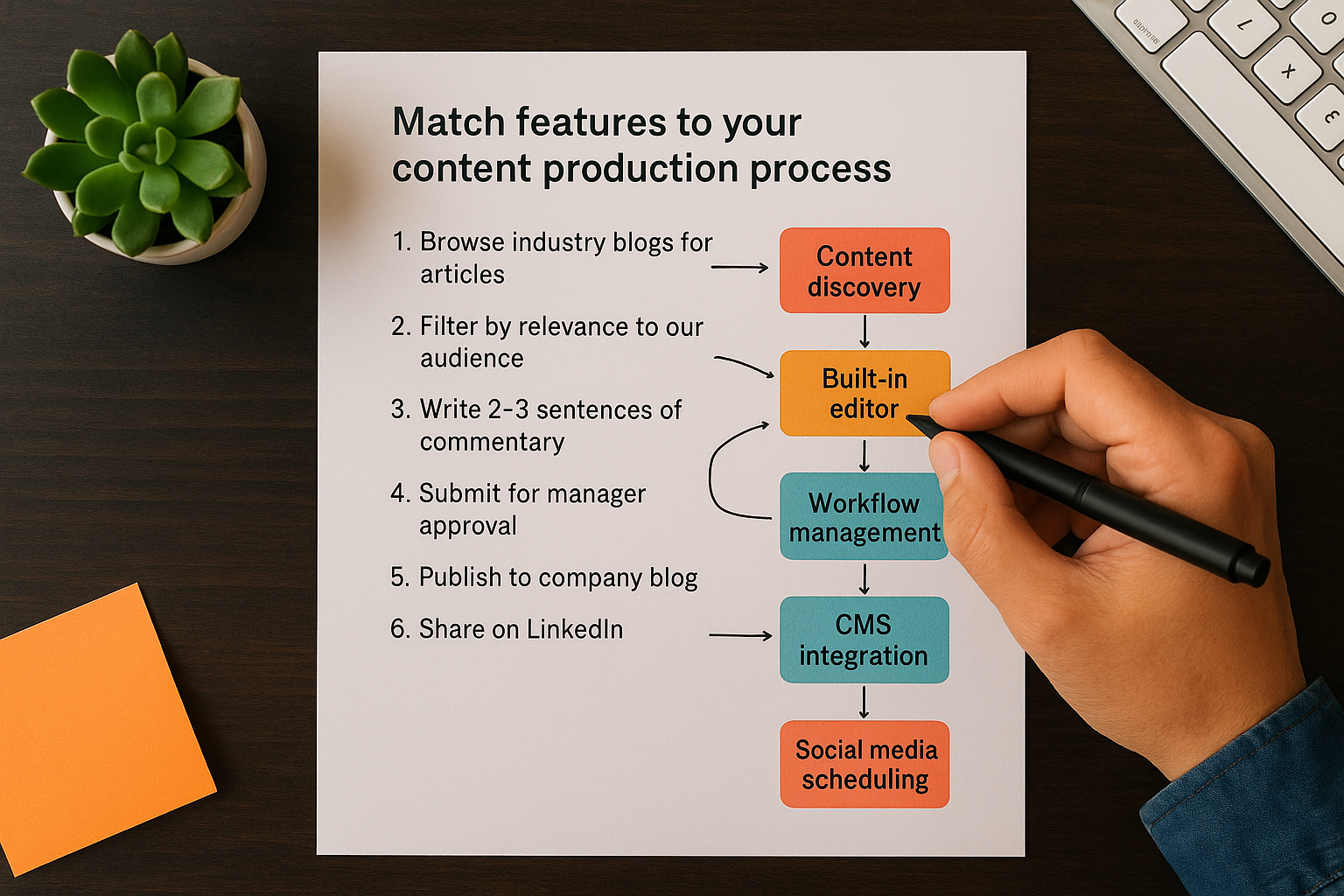
Document this mapping:
Your Process → Required Curata Feature
1. Browse industry blogs for articles → Content discovery engine
2. Filter by relevance to our audience → Smart recommendations + manual review
3. Write 2-3 sentences of commentary → Built-in editor
4. Submit for manager approval → Workflow management
5. Publish to company blog → WordPress integration
6. Share on LinkedIn → Social media scheduling
This mapping reveals gaps where Curata either duplicates tools you already use or lacks capabilities you need. If you already have a robust social media management tool, paying for Curata's social features wastes money. If you need advanced SEO optimization for curated posts, Curata might not provide it.
Test critical integrations first
Request a trial or demo focused on your essential integrations. Most teams skip this and discover integration problems after purchasing. You need to verify that Curata connects properly with your existing tools before committing.
Test these specific scenarios during evaluation:
- Publish a curated post from Curata to your CMS and verify formatting remains intact
- Pull analytics data from your connected platforms into Curata's dashboard
- Sync your team members and confirm role-based permissions work correctly
- Schedule social posts and check if they appear correctly on each platform
- Send test content to your marketing automation system
Pay attention to data flow limitations. Some integrations only work one direction or require manual exports. Others have API call limits that restrict high-volume publishing. You need to know these constraints before your workflow depends on them.
Integration failures surface only under real-world usage conditions, so test with your actual content and volume requirements, not demo data.
Step 3. Evaluate Curata pricing and total costs
You cannot find Curata content curation pricing on their website, which means you face a sales process before learning actual costs. This opacity makes budgeting difficult and forces you to invest time in demos before knowing if the platform fits your budget. Your evaluation needs to uncover the real total cost, not just the subscription fee that appears in your contract.
Request transparent pricing breakdown
Contact Curata's sales team and demand a detailed cost structure broken into line items. You need to see exactly what drives your monthly or annual bill. Most software pricing includes base fees, user seats, usage limits, and feature tiers that add up quickly.
Ask for specific numbers on these components:
- Base platform fee (monthly or annual)
- Per-user seat cost (how many team members need access)
- Content volume limits (posts published per month, API calls, storage)
- Integration fees (charges for specific CMS or marketing automation connections)
- Support tier (cost difference between email-only and priority phone support)
- Contract length discount (annual vs monthly pricing)
Request a sample invoice showing exactly how costs appear when multiple team members publish content across various channels. If you plan to curate 50 pieces monthly across blog, social media, and email, get pricing for that specific scenario. Avoid vague "starts at" figures that balloon once you add necessary features.
Calculate hidden implementation costs
The subscription fee represents only part of your investment. You face substantial setup and training costs that sales presentations rarely mention. Implementation typically requires technical configuration, team training, and ongoing management time.
Document these additional expenses:
| Cost Category | Estimation Method | Example |
|---|---|---|
| Initial setup | Hours × hourly rate of technical staff | 20 hours × $75/hr = $1,500 |
| Team training | Training hours × number of users × hourly rate | 4 hours × 3 users × $50/hr = $600 |
| Content migration | Hours to transfer existing curated content | 10 hours × $60/hr = $600 |
| Ongoing management | Monthly hours × hourly rate × 12 months | 5 hours × $60/hr × 12 = $3,600/year |
Factor in the opportunity cost of learning the system. Your team spends three to four weeks training the AI and learning the workflow before productivity increases. Calculate lost productivity during this ramp period by estimating how much content you produce during that time using current methods versus reduced output while learning Curata.
Your first-year cost includes the annual subscription plus all implementation expenses, which often doubles the total investment compared to the advertised platform fee.
Build your total cost projection
Create a three-year cost model that accounts for price increases and scaling needs. Most contracts include annual price adjustments of 3-5%, and your usage grows as your content operation expands. You need to project these changes to understand the real financial commitment.

Use this calculation framework:
Year 1 Total Cost:
+ Base subscription: $X
+ User seats (3 × cost): $Y
+ Implementation: $Z
+ Training: $A
+ Lost productivity: $B
= Total Year 1

Year 2 Total Cost:
+ Base subscription (5% increase): $X × 1.05
+ User seats (added 1 user): 4 × $Y
+ Ongoing management: $3,600
= Total Year 2

Year 3 Total Cost:
+ Base subscription (5% increase): $X × 1.05 × 1.05
+ User seats (same): 4 × $Y
+ Ongoing management: $3,600
= Total Year 3

Three-Year Investment = Year 1 + Year 2 + Year 3
Compare this projection against your content production budget to determine if Curata represents good value. If the three-year cost equals or exceeds hiring a dedicated content curator, you might achieve better results with additional staff rather than software.
Step 4. Compare Curata with alternatives
You cannot make an informed decision without comparing Curata content curation against other platforms that serve similar purposes. Your research should focus on direct competitors that offer content discovery, curation, and publishing, not tangential tools like social media schedulers or basic RSS readers. This comparison reveals whether Curata's specific feature set and pricing justify the investment or if another platform delivers better value for your workflow.
Build your comparison framework
Create a standardized evaluation matrix that measures each platform against your specific requirements. You need consistent criteria that reflect your actual needs rather than generic feature checklists that vendors provide. Your matrix should prioritise features you actually use over impressive capabilities you never touch.

Structure your comparison using these evaluation dimensions:
| Criterion | Weight | Curata | Alternative 1 | Alternative 2 |
|---|---|---|---|---|
| Content discovery quality | 25% | Score 1-10 | Score 1-10 | Score 1-10 |
| Essential integrations | 25% | Score 1-10 | Score 1-10 | Score 1-10 |
| Workflow automation | 20% | Score 1-10 | Score 1-10 | Score 1-10 |
| Analytics depth | 15% | Score 1-10 | Score 1-10 | Score 1-10 |
| Total cost (3 years) | 15% | Score 1-10 | Score 1-10 | Score 1-10 |
| Weighted Total | 100% | Calculate | Calculate | Calculate |
Assign weights based on your priorities from Step 1. If content discovery matters most for your workflow, give it higher weight than analytics. Score each platform honestly after testing trials or demos. Calculate the weighted total to identify which platform objectively fits your needs best.
Research direct competitors
Identify platforms that compete directly with Curata's core functionality. You want tools that combine content curation and publishing automation, not separate point solutions you would need to stitch together. Look for platforms that serve similar audiences and solve comparable problems.
Request trials from these alternatives and test them using the same scenarios you used for Curata. Publish the same curated content through each platform to your actual channels. Track how long each workflow takes, what friction points emerge, and which platform produces better results. Document specific problems like formatting issues, broken integrations, or poor content recommendations.
Most teams evaluate alternatives superficially using vendor demos rather than testing their actual workflow, which leads to expensive mistakes after purchasing.
Calculate value differences
Compare the return on investment each platform delivers rather than just comparing subscription fees. A cheaper platform that requires more manual work costs you more in staff time than a pricier tool that automates effectively. Calculate the total value by measuring time saved, content quality improvements, and audience engagement increases.
Build this calculation for each alternative:
Platform Value Score:
(Time saved per month × hourly rate × 12 months)
- Total annual cost
= Net annual value

Example:
(10 hours × $75/hr × 12) - $12,000 subscription = $9,000 - $12,000 = -$3,000
Platforms with negative net value cost more than they save. You would achieve better results spending that money on additional staff or keeping your current manual process. Only platforms showing positive net value deserve serious consideration, and the one with the highest positive value typically represents your best choice.
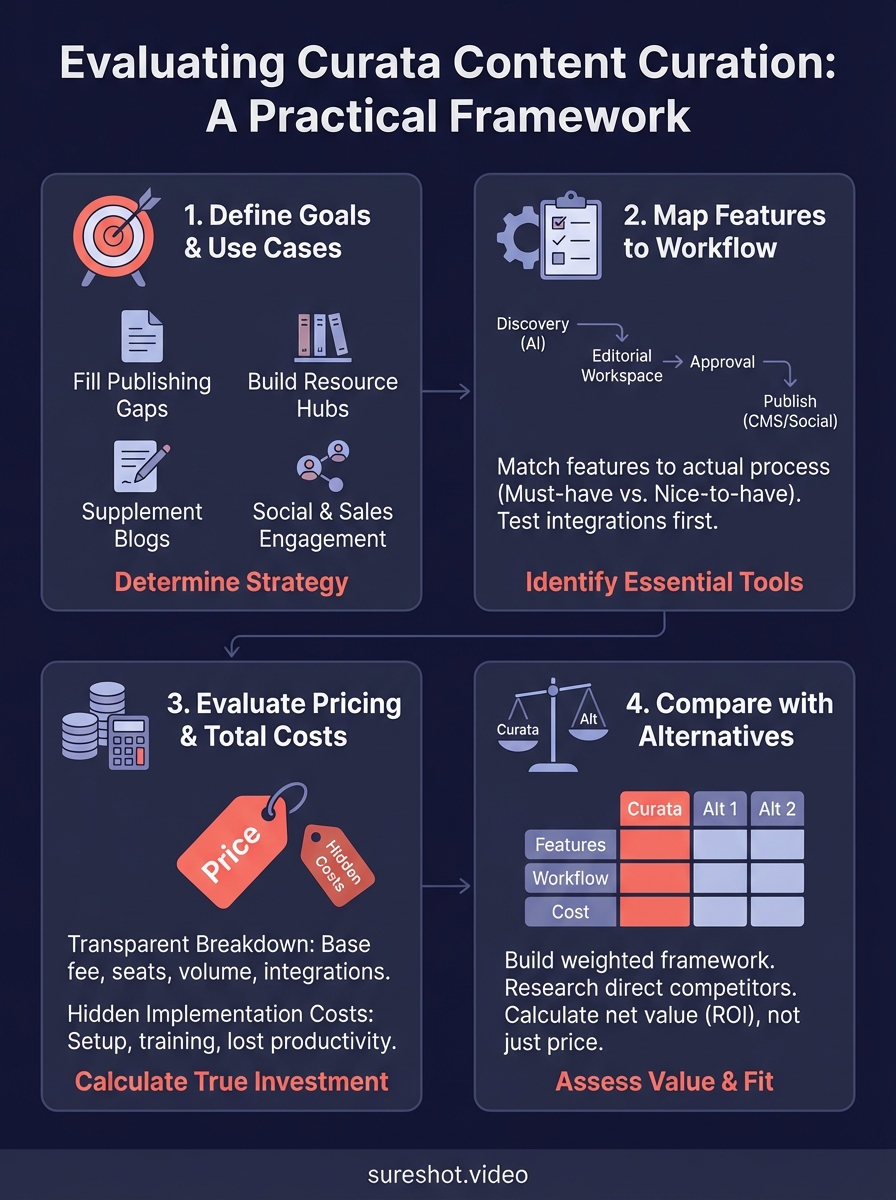
Making your choice
Your evaluation should now reveal whether Curata content curation fits your budget and workflow. You have mapped features to your specific needs, calculated total costs including hidden expenses, and compared alternatives using weighted criteria. The platform that scores highest in your comparison matrix deserves your trial signup, but remember that software evaluations mean nothing until you test with real content and your actual team workflows.
If your content strategy extends beyond article curation into video content from events, you need specialized tools built for that purpose. SureShot helps event organizers collect and manage authentic video content directly from attendees, solving a different content challenge than written curation platforms address. Video content offers engagement opportunities that curated articles cannot replicate.
Book a demo to see how user-generated video content can complement your curated written content strategy.