





You've probably sent, downloaded, or uploaded hundreds of MP4 files without thinking twice. They just work. But when you're dealing with user-generated content from events, knowing what makes clips MP4 tick actually matters. It affects upload times, storage costs, playback quality, and whether your attendees' videos actually get shared on social media. Let's dig into what you need to know.
What Makes MP4 the Default Choice
The MP4 file format became the standard for a reason. It balances quality and file size better than most alternatives, works on practically every device made since 2010, and handles video, audio, and metadata in one tidy package.
When event attendees capture moments on their phones, they're almost certainly creating clips MP4 by default. Apple, Samsung, Google – they all default to MP4 because it's the safe bet. The format uses MPEG-4 Part 14 compression, which means you get decent quality without files that take an hour to upload over patchy event Wi-Fi.
Why Events Love MP4 Clips
Here's what actually matters when you're collecting video from dozens or hundreds of attendees:
- Universal playback: Works on iOS, Android, Windows, Mac, and every social platform
- Manageable file sizes: A 30-second clip typically runs 20-50MB depending on quality
- Fast processing: Most editing tools handle MP4 without conversion delays
- Social media ready: Instagram, TikTok, Facebook all prefer MP4 natively
The alternative formats exist, sure. But when you're asking regular people to upload video clips from their phones, MP4 is what you'll get 95% of the time. Fighting that isn't worth it.

The Technical Bits That Actually Matter
You don't need to become a video codec expert. But understanding a few specifics helps when you're managing user-generated content at scale.
MP4 is a container format. Think of it as a box that holds different types of data. Inside your clips MP4 files, you've typically got:
| Component | What It Does | Why You Care |
|---|---|---|
| Video stream | The actual moving pictures, usually H.264 or H.265 | Affects quality and file size dramatically |
| Audio stream | Sound, typically AAC format | Poor audio kills good video every time |
| Metadata | Information about the file | Helps with organisation and searchability |
| Subtitles/captions | Optional text tracks | Accessibility and engagement |
The video codec inside matters more than you'd think. H.264 vs H.265 is an ongoing debate, but most phones still use H.264 because it's got broader compatibility. H.265 (also called HEVC) offers better compression but can cause playback issues on older devices.
Compression and Quality Trade-offs
Every clips MP4 file involves compromise. Higher quality means bigger files. Smaller files mean longer upload times for your attendees and more storage costs for you.
Here's the practical reality: most people can't tell the difference between a 1080p video at 8 Mbps and one at 15 Mbps on their phone screen. But they definitely notice when their upload fails because the file's too large.
Bitrate guidelines for event content:
- Standard quality (720p): 3-5 Mbps – fine for most social sharing
- High quality (1080p): 6-10 Mbps – the sweet spot for professional use
- Premium (1080p): 12-20 Mbps – only if you're archiving or need broadcast quality
- 4K: 25-50 Mbps – rarely worth it unless you're doing cinema displays
When you're curating video content, you'll likely need to re-encode anyway. Starting with reasonable quality clips MP4 from attendees makes that process faster and cleaner.
Managing MP4 Clips From Multiple Sources
This is where theory meets reality. You've got fifty people at your event, all filming on different devices with different settings. Now you need to collect, organise, and actually use those clips MP4 files.
The Mozilla media container guide goes deep on compatibility, but here's what you'll encounter in practice:
Common Format Variations
Not all MP4 files are created equal. iPhones shoot in a slightly different flavour than Android devices. Cameras use different profiles. The files all say ".mp4" but behave differently.
iPhone clips: Usually H.264 video with AAC audio, variable frame rate, sometimes with HEVC on newer models
Android clips: More varied – typically H.264 but settings depend on manufacturer
Action cameras: Often higher bitrates, sometimes unusual aspect ratios
DSLR/mirrorless: Professional codecs, larger files, better quality
The good news? Modern content curation tools handle most of this automatically. You don't need to manually convert every file anymore.

Optimising MP4 Clips for Different Platforms
You've collected brilliant authentic moments from your event. Now you need to share them. Each platform has its own preferences, and clips MP4 need tweaking to perform well.
Platform-Specific Requirements
| Platform | Ideal Format | Aspect Ratio | Max Length | Notes |
|---|---|---|---|---|
| Instagram Feed | MP4, H.264 | 1:1 or 4:5 | 60 seconds | Square performs best |
| Instagram Stories | MP4, H.264 | 9:16 | 60 seconds | Full screen vertical |
| TikTok | MP4, H.264 | 9:16 | 10 minutes | Vertical only |
| MP4, H.264 | Various | 240 minutes | 1:1 for feed, 16:9 for watch | |
| YouTube | MP4, H.264 | 16:9 | Unlimited | Higher bitrates accepted |
The best video format for web use is still MP4 with H.264 encoding. It's not the most efficient theoretically, but it works everywhere reliably.
Sometimes you'll need to convert horizontal video to vertical for Stories or Reels. This isn't ideal – you lose content or add letterboxing – but it's reality if someone filmed the wrong orientation.
File Size and Upload Considerations
Here's a truth nobody advertises: the technical specs matter less than whether your attendees can actually upload their clips MP4 without giving up.
Event Wi-Fi is usually rubbish. Mobile data at festivals is worse. If your average clip takes five minutes to upload, you'll get maybe 20% participation. If it takes thirty seconds, you'll get 80%.
Practical upload optimisation:
- Target 720p resolution for user submissions
- Keep bitrates between 3-5 Mbps for initial uploads
- Allow users to upload over time, not just during the event
- Provide clear feedback on upload progress
- Enable background uploads that survive app switches
The GeeksForGeeks MP4 overview covers the technical specifications, but what matters operationally is user experience. A slightly lower quality clip that actually gets uploaded beats a pristine file that never makes it off the phone.
Editing and Processing MP4 Clips
Once you've got your clips MP4 collected, you'll want to do something with them. Basic editing doesn't require expensive software anymore, but understanding the workflow helps.
The Editing Pipeline
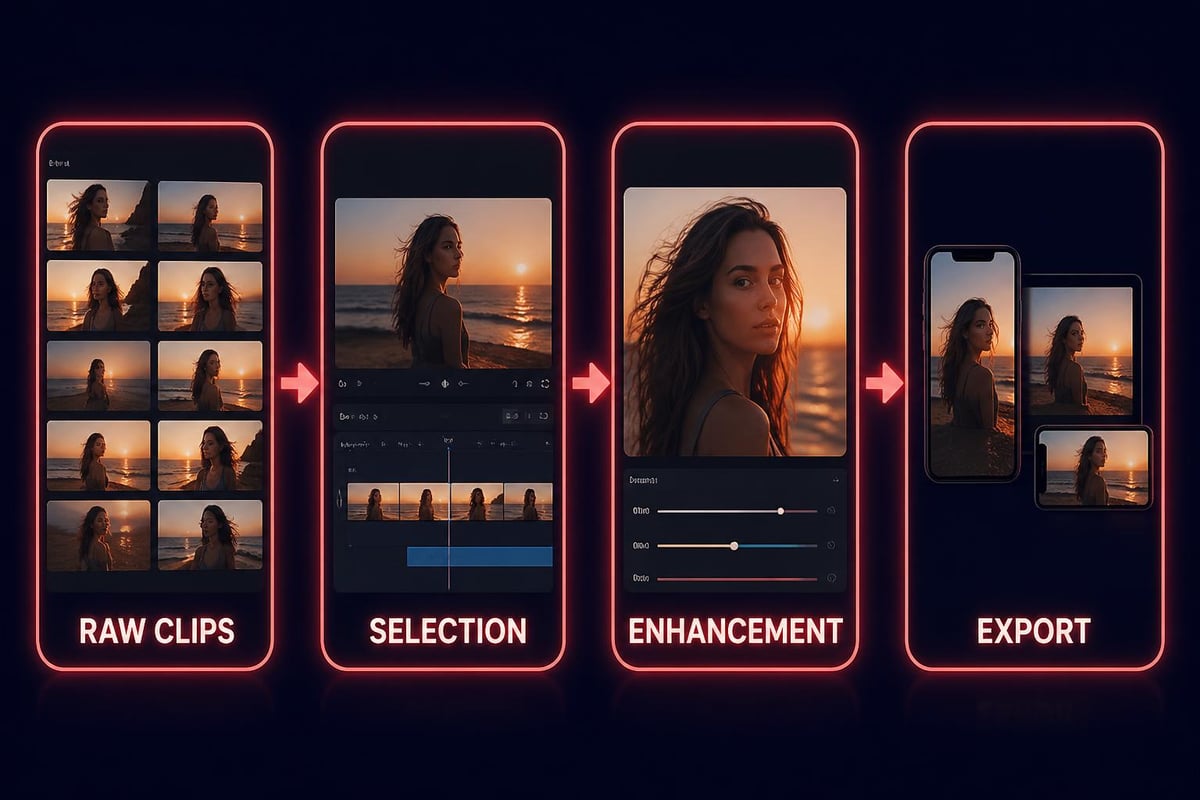
Most user-generated content needs some cleanup. You're cutting out the shaky starts, trimming dead space, maybe adding captions or music. The editing workflow for MP4 videos typically follows this pattern:
- Import and organise: Sort clips by event segment, quality, or content type
- Select the best moments: Not every clip deserves to make the cut
- Trim and sequence: Remove fluff, arrange for flow
- Enhance: Colour correction, audio levels, stabilisation if needed
- Export for destination: Match platform requirements
Modern AI tools can help with the tedious bits. Research on AI-assisted video editing shows promise for automating selection and basic cuts, but you still need human judgement for storytelling.
The key is maintaining quality through the process. Every time you re-encode clips MP4, you lose some fidelity. Ideally, you edit at the highest quality available and only compress for final distribution.
Batch Processing Multiple Clips
When you're dealing with dozens of user-generated clips MP4 from a single event, individual editing isn't practical. You need workflows that scale.
Automated processing helps with:
- Normalising audio levels across different recording devices
- Applying consistent colour grading or filters
- Adding watermarks or branding elements
- Converting to multiple output formats simultaneously
- Generating thumbnails and preview clips
The goal isn't to make everything look identical. The charm of user-generated content is its authenticity. But basic consistency in technical quality makes the compilation watchable.
Storage and Management Strategies
You'll accumulate clips MP4 faster than you expect. One decent-sized event generates hundreds of gigabytes. Multiple events per year? You're looking at serious storage needs.
Cloud vs Local Storage
Both have roles. The VODPOD MP4 overview discusses format evolution, but storage strategy is about cost and access.
Cloud storage benefits:
- Access from anywhere, crucial for distributed teams
- Automatic backups and redundancy
- Scales infinitely (at a price)
- Enables collaborative workflows
Cloud storage drawbacks:
- Ongoing costs that grow with your archive
- Upload/download times for large files
- Dependent on internet connectivity
- Privacy and control concerns
Local storage is cheaper long-term but requires more active management. Many operations use a hybrid approach: cloud for active projects and recent content, local archives for older material that's rarely accessed.
The Mobile Consideration
Most clips MP4 you'll deal with come from phones. That shapes everything about format, quality, and workflow. The 3GPP MP4 specification focuses on mobile compatibility, which matters more than desktop specs these days.
Mobile Recording Reality
People hold phones vertically. They film with one hand while doing something else. They don't worry about focus, exposure, or composition. And that's fine – that's what makes the content authentic.
What you need to work with:
- Variable quality: Depends on phone model, lighting, how steady they held it
- Inconsistent orientation: Mix of vertical, horizontal, and accidentally diagonal
- Background noise: Events are loud, phones have tiny microphones
- Spontaneous framing: Not composed, just captured
This isn't a problem to fix. It's the nature of community videos and what makes them valuable. Your job is working with this reality, not fighting it.
Optimising for Mobile Playback
Since most viewing also happens on phones, optimise your final clips MP4 for that experience:
Mobile playback priorities:
- Fast loading over highest quality
- Clear audio (people often watch without headphones in loud places)
- Readable text if you add captions (large, high contrast)
- Vertical orientation for social platforms
- Short duration – attention spans are brief on mobile
The MP4 file format standard supports adaptive streaming, which helps with mobile playback. The video quality adjusts based on connection speed, keeping playback smooth.
Content Licensing and Rights Management
This gets overlooked until it becomes a problem. When you're collecting clips MP4 from event attendees, you need clear rights to use that content. Not just legally – ethically too.
Permission and Consent
People need to know how you'll use their videos before they submit them. Vague "we might post this" doesn't cut it. Be specific:
- Which platforms you'll share on
- Whether you'll edit or modify the clips
- If you'll use them for promotional purposes
- How long you'll retain the content
- Whether you'll credit creators
The best UGC platforms build consent management directly into the upload process. Nobody should be surprised to see their clip MP4 in your marketing six months later.
Creating Value From Event Clips
Collecting clips MP4 is pointless if they just sit in storage. The value comes from using them to extend your event's reach and impact.
Distribution Strategies
Immediate sharing during events: Post highlights in near real-time to social media, creating FOMO and excitement
Post-event recap videos: Compile the best moments into a 2-3 minute highlight reel
Segmented content series: Break clips into themes or sessions for ongoing content
Attendee highlights: Feature individual contributors, encouraging participation next time
B-roll for future marketing: Use authentic event footage in promotional materials
The content curation strategy matters as much as the technical handling. Great clips MP4 poorly distributed get less impact than decent clips strategically shared.
Measuring Success
Track what actually matters:
- Engagement rates: Are people watching, sharing, commenting?
- Reach expansion: How many non-attendees see the content?
- Cost per piece: What's your content acquisition cost vs professional production?
- Future ticket sales: Does UGC content drive event registrations?
If you're creating video content that performs as well as professionally produced material at a fraction of the cost, you're onto something. That's the promise of well-managed user-generated clips MP4.
Tools and Platforms That Actually Work
You don't need expensive software for most operations. But having the right tools prevents bottlenecks.
For collection: Mobile apps that let attendees upload directly, handling format conversion automatically
For organisation: Cloud storage with good search and tagging (Google Drive, Dropbox, or dedicated media asset management)
For editing: DaVinci Resolve (free, professional-grade), Adobe Premiere (if you're already subscribed), or browser-based tools for quick cuts
For distribution: Native platform tools (Instagram, TikTok, YouTube Studio) or scheduling tools like Later or Buffer
Some operations use tools like AdsRaw to create polished video ads that maintain the authentic UGC aesthetic while ensuring consistent quality and messaging. It's a middle ground between pure user content and fully produced media.
The research on instruction-based video editing points toward a future where you can just tell software what you want, and it handles the technical execution. We're not quite there yet, but AI assistance is getting better at the tedious parts.
Quality Control Without Killing Authenticity
This is the balance you're always walking. Clean up the clips MP4 enough that they're watchable, but not so much that they lose their spontaneous charm.
What to Fix vs What to Keep
Fix these technical issues:
- Extreme shakiness that's literally hard to watch
- Audio so distorted it's incomprehensible
- Complete darkness or total overexposure
- Accidental upside-down orientation
Keep these authentic elements:
- Natural background noise and crowd sounds
- Imperfect framing and composition
- Genuine reactions and unscripted moments
- Variable lighting that shows real conditions
People can tell when content's been over-produced. The imperfections signal authenticity. That's what gives user-generated clips MP4 their credibility and emotional impact.
Managing clips MP4 from events isn't technically complex, but doing it well requires thinking about the whole pipeline from capture to distribution. When you make it easy for attendees to contribute and share their authentic moments, you multiply your content creation capacity while building community engagement. SureShot handles exactly this workflow, turning your event attendees into content creators and their smartphones into your production crew, giving you authentic clips that actually get shared and watched.


