
Social Media Content Curation Tool: 11 Top Picks + Reviews
Creating fresh content for your social channels every single day drains time you don't have. You need a steady stream of posts that keep your audience engaged, but producing everything yourself leaves you scrambling. A social media content curation tool solves this by helping you discover, organise, and share relevant content from other sources alongside your original posts. The right tool cuts your content planning time in half while maintaining quality.
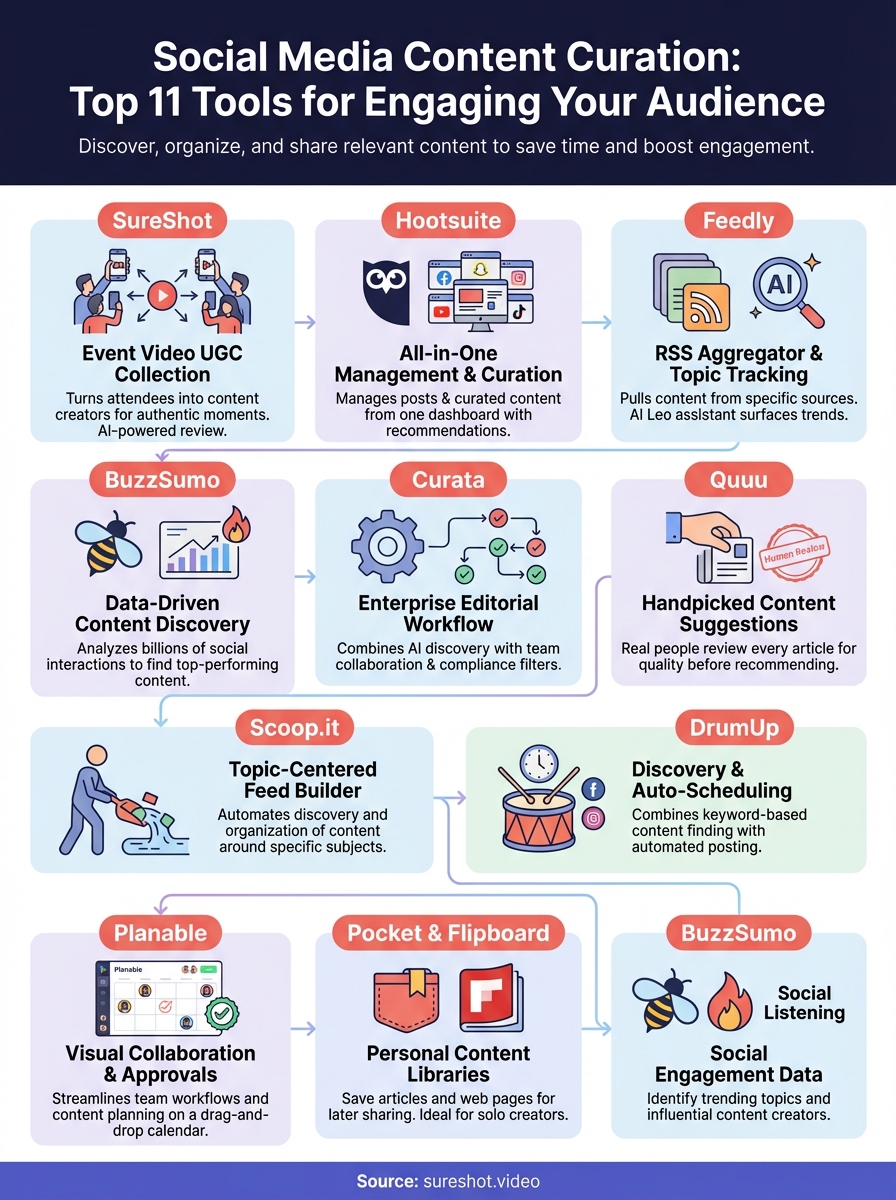
This guide reviews 11 content curation tools with detailed breakdowns of what each does, where it excels, and what limitations you should know. You'll see pricing comparisons, key features, and real use cases that help you pick the tool that matches your needs. Whether you want AI assistance, automated scheduling, or simple content discovery, you'll find options that work.
1. SureShot
SureShot takes a different approach to content curation by turning your event attendees into content creators. Instead of searching for existing articles or videos across the web, you collect authentic video moments directly from the people at your events. This platform works specifically for organizers running festivals, concerts, conferences, sports events, or brand activations who need real footage captured from multiple perspectives.

What it does
SureShot lets you gather user-generated video content from attendees through a dedicated mobile app and web interface. You create an event in the dashboard, generate a unique PIN code, and share it with participants. Attendees use that PIN to upload their video clips, which flow into your centralized content library. The platform handles all the technical complexity of collection while giving you full access to every submission.
Key social curation features
The AI-powered review system automatically scans uploaded clips to identify key moments and highlight the strongest content for your social channels. You don't manually sort through hundreds of submissions because the AI flags compelling footage. Attendees grant you a content licence when they upload, meaning you can edit, share, and repurpose their videos across your marketing channels without legal concerns. This eliminates the rights clearance headaches that typically come with UGC.
SureShot transforms your audience into a distributed video production team that captures angles and moments professional crews miss.
Where it shines
Event organizers who need authentic social proof find SureShot invaluable because attendee footage carries more trust than polished promotional videos. You get diverse perspectives from across your venue without hiring multiple camera operators. The platform particularly excels at large-scale events where capturing every moment would require prohibitively expensive production crews.
Limitations to know
SureShot focuses exclusively on video content from events, so it won't help you curate articles, images, or other content types. You need an active event with willing participants to generate content. The platform requires attendees to download an app or access a web portal, which adds a participation barrier compared to simply sharing publicly.
Pricing
SureShot offers custom pricing based on your event size and frequency. You'll need to contact their team directly for a quote tailored to your specific needs.
2. Hootsuite
Hootsuite operates as a comprehensive social media management platform that includes content curation alongside scheduling, analytics, and team collaboration tools. This tool helps you manage multiple social accounts from a single dashboard while discovering and sharing content that resonates with your audience. You get an all-in-one solution that handles both your original posts and curated content from external sources.
What it does
Hootsuite connects your Facebook, Instagram, Twitter, LinkedIn, YouTube, and TikTok accounts to a unified dashboard where you manage all posting activity. The platform lets you schedule posts in advance, monitor mentions and messages, track performance metrics, and respond to comments without switching between platforms. You see everything happening across your social presence in one place.
Key social curation features
The content recommendations engine suggests articles, videos, and posts based on topics you specify or keywords you monitor. You browse curated feeds within Hootsuite that pull relevant content from across the web, then add that content directly to your posting queue. The platform's streams feature lets you track specific hashtags, mentions, or search terms to find user-generated content and trending discussions worth sharing.
Hootsuite's strength lies in combining content discovery with the scheduling tools you already use for original posts.
Where it shines
Marketing teams managing multiple brands or clients benefit from Hootsuite's workflow approvals and user permissions. You can assign team members to specific accounts, require approval before publishing, and maintain consistent brand voice across all channels. The platform excels when you need robust analytics alongside your curation efforts.
Limitations to know
Hootsuite carries a steeper learning curve than simpler curation tools because it includes extensive features beyond content discovery. The content suggestion algorithm sometimes surfaces generic or outdated articles that require manual filtering. You'll spend time configuring streams and feeds to match your specific needs.
Pricing
Hootsuite starts at $99 per month for the Professional plan covering one user and ten social accounts. Team plans begin at $249 monthly. A 30-day free trial lets you test all features before committing.
3. Feedly
Feedly functions as an RSS aggregator that pulls content from blogs, news sites, and publications into customizable feeds tailored to your interests. This tool helps you track specific topics, industries, or publications without visiting dozens of websites daily. You organise everything into personal streams that deliver fresh content directly to your dashboard.
What it does
Feedly collects articles and blog posts from sources you specify using RSS feeds, then organises them into topic-based streams. You follow specific publications, keywords, or entire categories that match your content needs. The platform updates continuously as new content publishes, giving you a real-time view of what's happening in your industry.
Key social curation features
The AI-powered Leo assistant surfaces trending articles and filters out noise based on priorities you set. You apply keyword filters to focus only on content that matters to your audience while blocking irrelevant topics. Feedly lets you save articles, add notes, and highlight key passages before sharing to your social channels.
Feedly turns content discovery from a time-consuming hunt into an automated feed that delivers exactly what you need.
Where it shines
Publishers and content marketers who need to monitor industry news find Feedly invaluable because it replaces manual website checking with automated delivery. The platform excels at tracking competitor content, industry trends, and niche publications that don't have large social followings. You discover emerging topics before they hit mainstream social feeds.
Limitations to know
Feedly requires you to manually configure RSS feeds and keywords to build useful streams, which takes initial setup time. The free version limits the number of sources you can follow. You won't find social media posts or user-generated content here since Feedly focuses exclusively on published articles and blogs.
Pricing
Feedly offers a free plan for basic RSS reading with limited sources. The Pro plan costs $6 monthly or $35.99 annually, adding advanced search and unlimited feeds.
4. BuzzSumo
BuzzSumo specializes in content discovery through social engagement data, showing you which articles and posts generate the most shares, likes, and comments across platforms. This social media content curation tool helps you identify trending topics before they peak and find proven content that already resonates with audiences. You get data-driven insights that take the guesswork out of what to share.

What it does
BuzzSumo analyses billions of social interactions across Facebook, Twitter, Pinterest, and Reddit to rank content by engagement levels. You enter keywords or topics that match your niche, and the platform shows you the most shared content from the past day, week, month, or year. This lets you spot patterns in what drives engagement and choose content backed by real performance metrics.
Key social curation features
The trending feeds display real-time content gaining traction in your industry, letting you jump on discussions while they're active. You can monitor specific domains to track competitor content performance and see what topics resonate in your space. BuzzSumo's influencer discovery tool identifies content creators and journalists who drive conversations in your niche, helping you find valuable sources to curate from and build relationships with.
BuzzSumo replaces guesswork with concrete engagement data that shows exactly what content performs.
Where it shines
Content marketers and agencies who need to prove content choices with data find BuzzSumo invaluable because it provides engagement metrics that justify curation decisions. The platform excels at identifying evergreen content that maintains consistent sharing over time. You discover content gaps where audience interest exists but quality posts remain scarce.
Limitations to know
BuzzSumo carries a significant price tag that puts it out of reach for small businesses or solo creators. The platform focuses exclusively on published articles and doesn't capture Instagram posts, TikTok videos, or other native social content. You need to manually export or share content to other platforms since BuzzSumo doesn't include scheduling features.
Pricing
BuzzSumo starts at $159 monthly for the Content Creation plan covering one user. Team plans begin at higher tiers. A 30-day free trial lets you test all discovery features before subscribing.
5. Curata
Curata serves as an enterprise-grade content curation platform built for organizations that need advanced editorial workflows and team collaboration. This social media content curation tool combines AI-powered content discovery with comprehensive management features that let you maintain brand consistency across multiple channels. You get sophisticated filtering and approval systems designed for companies managing large content operations.
What it does
Curata uses machine learning algorithms to scan thousands of sources and identify content that matches your specific criteria. The platform scores each piece based on relevance, quality, and engagement potential, then organises everything into feeds you customise. You set parameters around topics, sources, and content types that align with your brand guidelines.
Key social curation features
The editorial workflow system lets you assign roles, require approvals, and track content through multiple review stages before publication. You establish brand-specific filters that automatically exclude topics or sources that don't match your standards. Curata integrates with email platforms, CMS systems, and marketing automation tools like HubSpot, making it simple to push curated content directly to your existing channels. The platform provides detailed ROI reporting that tracks how curated content performs compared to your original posts.
Curata transforms content curation from a solo task into a structured team process with accountability at every step.
Where it shines
Corporate marketing departments managing multiple brands or content verticals benefit from Curata's governance features because you maintain consistency without micromanaging every decision. The platform excels when you need compliance oversight or require multiple stakeholders to approve content before it goes live.
Limitations to know
Curata targets enterprise customers with corresponding price points that exclude small businesses. The platform requires initial setup time to configure workflows and train team members on the system.
Pricing
Curata offers custom pricing based on your organization's size and needs. You contact their sales team directly for a quote.
6. Quuu
Quuu delivers handpicked content suggestions directly to your social media queue through automated curation that combines human review with algorithm filtering. This social media content curation tool focuses on quality over quantity by having real people evaluate every article before the platform recommends it. You select content categories that match your audience interests, and Quuu feeds relevant posts into your connected scheduling tools.
What it does
Quuu scans thousands of articles across hundreds of content categories and sends the best pieces to your Buffer or HubSpot account automatically. The platform's curators manually review submissions to filter out low-quality content, clickbait, and promotional spam. You choose how many posts you want per day and which categories matter to your audience.
Key social curation features
The human review layer ensures every suggested post meets quality standards before it reaches your queue. You connect Quuu directly to Buffer, HubSpot, or other scheduling platforms so curated content flows automatically into your posting calendar. The platform supports LinkedIn, X (formerly Twitter), and Facebook with content tailored to each network's audience expectations.
Quuu eliminates the quality gamble by adding human judgment to automated content discovery.
Where it shines
Solo marketers and small teams who need consistent content without dedicated curation time find Quuu valuable because it runs completely hands-off once configured. The platform excels at filling content gaps between your original posts with relevant industry articles.
Limitations to know
Quuu only works with three social platforms, limiting its usefulness if you manage Instagram, TikTok, or other channels. You sacrifice control over specific content choices since the platform decides what to suggest within your selected categories.
Pricing
Quuu costs $19.79 monthly when billed monthly. Annual subscriptions include two free months.
7. Scoop.it
Scoop.it operates as a content discovery platform that builds topic-centred feeds for both your blog and social media channels. This social media content curation tool automates the process of finding and organising content around specific subjects you care about. You create custom streams that continuously pull in relevant articles, videos, and posts from across the web without manual searching.

What it does
Scoop.it scans thousands of online sources to gather content that matches your chosen topics and industries. You follow specific subjects like "marketing automation" or "event technology," and the platform builds dedicated streams that update automatically. The system learns from your selections to improve recommendations over time.
Key social curation features
The platform's automation capabilities handle both content discovery and social sharing through connected accounts. You publish curated pieces directly to your blog, newsletter, or social channels from within Scoop.it's dashboard. Integration with WordPress and HubSpot lets you push content to your existing publishing systems without switching platforms.
Scoop.it turns scattered web content into organised topic streams that feed all your marketing channels.
Where it shines
Content marketers who need to establish thought leadership in specific niches benefit from Scoop.it's topic-focused approach. The platform excels at building comprehensive resource hubs that position you as a go-to source for industry information.
Limitations to know
Scoop.it's free version removes social sharing capabilities entirely, forcing you to upgrade for basic curation distribution. The platform focuses on articles and blogs rather than capturing native social content.
Pricing
Scoop.it offers a free plan with limited features. Paid plans start at $14.99 monthly when billed annually.
8. DrumUp
DrumUp combines content discovery and social scheduling into a single platform that handles both curation and publishing. This social media content curation tool helps you find relevant articles based on keywords while automatically posting them to your connected accounts. You get a streamlined solution that eliminates the need to juggle separate tools for finding and sharing content.
What it does
DrumUp scans the web for fresh content matching keywords you specify, then organises everything into topic-based streams. You browse these automated feeds to select posts worth sharing with your audience. The platform connects directly to your social media accounts where it schedules and publishes curated content without manual intervention.
Key social curation features
The keyword-based content streams generate continuous feeds of articles and posts tied to specific topics you care about. You set parameters around subjects that matter to your audience, and DrumUp surfaces relevant material automatically. The platform's auto-scheduling feature distributes your selected content across optimal posting times, maintaining consistent activity without requiring you to log in daily.
DrumUp eliminates the gap between discovering valuable content and actually sharing it with your followers.
Where it shines
Small businesses and solo marketers who need minimal time investment benefit from DrumUp's hands-off approach to keeping social channels active. The platform excels at maintaining consistent posting schedules when you lack dedicated staff for social media management.
Limitations to know
DrumUp lacks the advanced filtering capabilities found in enterprise-grade curation tools. You won't find team collaboration features or approval workflows here.
Pricing
DrumUp offers a free plan with basic features. Paid plans start at approximately $19 monthly for additional social accounts and enhanced scheduling options.
9. Planable
Planable serves as a visual collaboration platform that streamlines your content approval process alongside curation management. This social media content curation tool helps you organise curated content on a drag-and-drop calendar while establishing clear review workflows that prevent publishing mistakes. You get the structure needed to manage both your original posts and curated material across nine connected platforms.

What it does
Planable connects your Facebook, Instagram, LinkedIn, X, TikTok, YouTube, Google Business Profile, Threads, and Pinterest accounts to a unified workspace. The platform lets you schedule posts, preview how they'll appear across devices, and collaborate with team members through in-context feedback tools. You manage everything from content planning through publication in one centralized dashboard.
Key social curation features
The colour-coded label system helps you distinguish curated content from original posts at a glance across your calendar. You establish customised approval workflows that require specific team members to review and approve content before it goes live. Planable's media library stores images and videos you plan to use later, while its annotation tools let you leave precise feedback on visual assets without confusion.
Planable transforms content collaboration from endless email threads into clear visual workflows that prevent approval bottlenecks.
Where it shines
Marketing teams and agencies managing multiple client accounts benefit from Planable's permission settings and multi-level approval processes. The platform excels when you need clear accountability and want to ensure every post meets quality standards before publication.
Limitations to know
Planable lacks native social listening features for discovering new content to curate. You need to find content elsewhere and bring it into the platform for scheduling.
Pricing
Planable offers a free plan for up to 50 posts. Paid plans start at $33 monthly per workspace when billed annually.
10. Pocket and Flipboard
Pocket and Flipboard work as personal content libraries that let you save and organise articles, videos, and web pages for later sharing. These free tools take different approaches to the same problem: how to capture interesting content you find throughout your day and turn it into curated posts. You get mobile-friendly platforms that work offline and help you build content reserves without relying on complex scheduling systems.
What they do
Pocket functions as a save-for-later service that bookmarks content from any website or app with a single click. You tag saved items by topic, making it easy to find specific articles when you need them. Flipboard creates digital magazines where you organise content into themed collections that resemble actual publications. Both platforms pull in material from across the web based on your interests and the sources you follow.
Key social curation features
Pocket's tagging system lets you categorize content by social channel, topic, or campaign so you quickly locate the right material when planning posts. Flipboard's magazine format provides a visually appealing way to group curated content around specific themes or subjects. Both platforms support offline access, letting you browse saved content and prepare social posts without internet connectivity.
Pocket and Flipboard transform random bookmarks into organised content libraries that feed your social channels.
Where they shine
Content creators who discover articles sporadically throughout the day benefit from these tools because you capture valuable material immediately without disrupting your workflow. These platforms excel at building evergreen content collections that remain useful long after you save them.
Limitations to know
Neither platform includes direct social media publishing to most major networks. Flipboard only supports sharing to Facebook and X directly.
Pricing
Both Pocket and Flipboard offer completely free core features. Pocket Premium costs $3.95 monthly or $35.99 annually for additional features like permanent library storage.
Final thoughts
Choosing the right social media content curation tool depends on your specific needs and budget. Free options like Pocket and Flipboard work well for solo creators building content libraries, while platforms like BuzzSumo and Curata serve teams that need data-driven insights and approval workflows. Consider how each tool integrates with your existing systems and whether it handles the content types you share most often. The tools in this guide cover everything from automated suggestions to manual discovery, giving you options regardless of your team size or technical expertise.
If you create content for events and want authentic video moments that traditional curation can't provide, SureShot offers a unique approach. You turn your attendees into content creators who capture genuine experiences from angles professional crews miss. Book a demo with our team to see how SureShot collects, organises, and helps you share user-generated video content that builds trust and engagement across your social channels.