
You've probably searched for videos clips download options more times than you'd care to admit. Maybe you needed footage for an event recap, a social campaign, or just something authentic that didn't look like every other stock video on the internet. The thing is, most people approach this completely backwards. They hunt for clips when they should be creating systems that generate the content they actually need. Let's talk about what works.
Why Most Videos Clips Download Approaches Miss the Point
Here's what typically happens: you need video content, so you search stock libraries, spend ages finding something halfway decent, download it, and realize it doesn't quite fit. It's too polished. Too generic. Nobody believes it's real because it isn't.
The alternative? Build a system where the content comes to you. User-generated video from actual people at actual events beats stock footage every single time. It's authentic, it's free (or close to it), and it spreads organically because real people actually want to share it.
The Real Cost of Downloaded Clip Libraries
Stock video platforms charge anywhere from £30 to £500 per clip. That adds up fast when you're producing regular content. More importantly, you're paying for something that doesn't differentiate you. Your competitors have access to the same libraries.
Consider this instead:
- User-generated content costs: basically nothing
- Authenticity factor: actually real
- Distribution: people share their own content
- Volume: dozens or hundreds of clips from a single event
The maths isn't complicated. One event with 50 attendees filming gives you more unique content than you'd get spending thousands on stock footage.
When Downloaded Video Clips Actually Make Sense
Look, there are legitimate uses for videos clips download from established sources. Historical footage, specific technical demonstrations, or content you literally cannot create yourself. SCoTENs maintains a solid list of educational video sources that are actually useful for specific contexts.
You might also need professional footage as a baseline or for legal reasons. Fair enough. But even then, you're probably overestimating how much you actually need.
The Copyright Trap Nobody Talks About
Here's what happens: you download a clip, use it in your content, and six months later you get a takedown notice. Or worse, an invoice. The guidelines on avoiding copyright issues are clear, but people still mess this up constantly.
The safest path? Content you control completely. User-generated video from your events belongs to your ecosystem. With proper permissions (which isn't complicated), you've got clean rights to everything.
| Source Type | Cost Per Clip | Copyright Risk | Authenticity | Shareability |
|---|---|---|---|---|
| Stock libraries | £30-500 | Medium | Low | Low |
| User-generated | £0-5 | Very low (with permissions) | Very high | Very high |
| Professional shoot | £500-5000+ | None | Variable | Medium |
Building a System That Generates Clips Automatically
This is where it gets interesting. Instead of searching for videos clips download options every time you need content, you create a system that produces clips continuously. Events are perfect for this because people are already filming anyway.
Give them a reason to share with you. A dedicated hashtag isn't enough anymore (it's 2026, everyone knows that trick). You need a platform that makes contribution effortless and rewarding.
What Actually Motivates People to Share Video
Forget incentives and prizes. Those work once, maybe twice. What works long-term:
- Instant gratification: they see their content live immediately
- Social proof: their video appears alongside others, creating FOMO
- Quality output: you edit their raw footage into something they'd actually want to share
- Zero friction: upload takes seconds, not minutes
The editing part is crucial. People film on phones. The footage is shaky, poorly framed, and way too long. But the moments are real. Your job is extraction and curation, not creation from scratch.
The Technical Side Nobody Explains Properly
You've got two paths for handling videos clips download and management: manual or automated. Manual works until you hit about 20 clips. Then it's a nightmare.
Automated systems do three things:
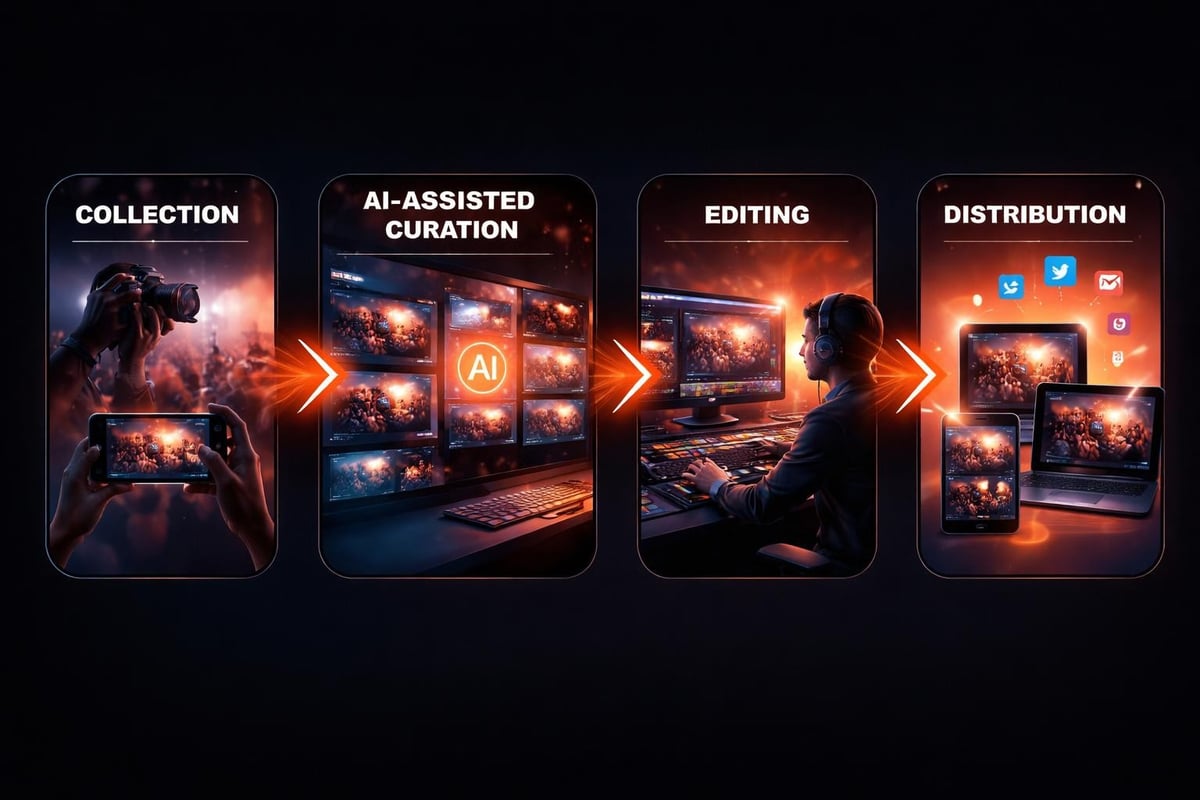
- Collect footage from multiple sources (phones, cameras, uploads)
- Organise by event, timestamp, or custom tags
- Enable quick search and retrieval when you need specific moments
Deakin's guide covers the basics of sourcing video content, but they're focused on academic use. For events and social content, you need something more dynamic.
Format and Quality Considerations
Most user-generated content comes in at 1080p from modern phones. That's fine for social media, which is where 90% of this content lives anyway. You don't need 4K for Instagram stories.
What matters more:
- Aspect ratio flexibility: vertical, square, and horizontal from the same source
- Quick exports: waiting 20 minutes for a render kills momentum
- Batch processing: edit once, export for multiple platforms
- Mobile-first optimization: if it doesn't look good on a phone, it doesn't matter
Storage is cheap now. Processing power isn't the bottleneck anymore. The bottleneck is organizational-knowing what you have and finding it when you need it.
Converting Legacy Formats to Digital
Here's something people forget: the best event content often sits on old formats. Someone filmed your 2010 conference on MiniDV. Another person has VHS footage from your company's founding. That content has value, especially for anniversary events or nostalgia marketing.
If you're sitting on analogue formats, VHS to digital conversion isn't optional anymore-it's archival work. The tapes degrade. The playback hardware dies. Convert now or lose it permanently.
The process is straightforward:
- Inventory what you have (formats, quantity, condition)
- Prioritise by historical or emotional value
- Use proper conversion equipment (not a cheap USB capture device)
- Store digitally with proper metadata
- Integrate into your current content library
Once digitized, that old footage becomes searchable, editable, and usable alongside modern content.
Curating Versus Creating: The AI Role
AI doesn't create authentic content. It can't. But it's exceptional at finding the good moments in hours of raw footage. That's where it belongs in your workflow.
Think of AI as your first-pass editor. It identifies:
- Faces and expressions
- Movement and action
- Audio quality issues
- Duplicate or near-duplicate clips
- Optimal cut points
You still make the creative decisions. You decide what tells your story. AI just eliminates the tedious sorting that would otherwise take hours.
The Editing Workflow That Scales
Here's what doesn't scale: manually reviewing every second of footage. Here's what does:
| Manual Step | AI-Assisted Alternative | Time Saved |
|---|---|---|
| Watch all footage | AI flags highlights | 80-90% |
| Find usable clips | Auto-identify quality moments | 70-80% |
| Check audio levels | Automated quality analysis | 60-70% |
| Sort by relevance | Smart tagging and categorization | 75-85% |
You're not removing human judgment. You're removing human drudgery. Big difference.

Distribution Matters More Than Collection
You can have terabytes of videos clips download and ready to use, but if nobody sees them, what's the point? Distribution strategy matters more than people think.
User-generated content has a built-in distribution advantage: the creators share it. They tag friends. They repost to stories. They send it in group chats. That's organic reach you cannot buy.
But you've got to make sharing easy and desirable. Auto-generate shareable versions. Tag contributors. Give them something worth posting. If their footage looks better in your edit than on their phone, they'll share your version over theirs.
Platform-Specific Optimization
Different platforms need different treatments. Stop posting the same video everywhere.
- Instagram: vertical or square, 30-60 seconds, captions essential
- LinkedIn: horizontal, 60-90 seconds, professional context
- TikTok: vertical, 15-45 seconds, fast cuts, trending audio
- YouTube: horizontal, 2-5 minutes, proper intro/outro
One piece of source footage should generate four to six platform-specific versions. Not manually-through templates and automation.
What the Stock Footage Industry Won't Tell You
Stock platforms like Storyblocks have their place, especially for establishing shots or generic b-roll. But they've built their business on a problem that's increasingly solvable without them.
The dirty secret: most stock footage sits unused. Companies download it, think they'll use it someday, and never do. You're paying for possibility, not results.
Compare that to user-generated content from your actual events. Every clip has context. Every moment is relevant. Nothing goes to waste because it's all specific to your story.
The Quality Question
"But stock footage looks professional!" Sure. It also looks like everyone else's content. Professional polish matters less than authentic connection in 2026. People can spot stock footage instantly, and they mentally tune out.
User-generated content looks real because it is real. Minor imperfections signal authenticity, which builds trust more effectively than pixel-perfect compositions.
That doesn't mean post garbage. Curate carefully. Edit thoughtfully. But stop chasing the aesthetic of professional stock when your audience responds better to genuine moments.
Building Your Content Library the Right Way
Whether you're doing videos clips download from external sources or collecting user-generated content, organization matters. Here's the structure that actually works:
By event/date:
- Immediate context
- Easy chronological search
- Natural archival system
By content type:
- Testimonials
- Product demos
- Behind-the-scenes
- Audience reactions
By usage rights:
- Full permissions
- Limited use
- Attribution required
- Internal only
By quality tier:
- Publish-ready
- Needs minor edits
- Raw footage only
- Archive (low quality but historically significant)
Proper metadata saves hours every week. Tag everything at input, not later when you're desperately searching for that one clip.
The Permission Framework Nobody Uses (But Should)
Here's where people mess up: they collect content, use it, and then get surprised when someone objects. Get permissions upfront. Make it part of the process, not an afterthought.
Simple framework:
- Clear opt-in: people know their content might be used
- Specific rights: what platforms, what duration, what context
- Easy opt-out: anyone can request removal
- Credit when possible: tag creators, build community
This isn't complicated legal stuff. It's basic respect and clear communication. Most people are happy to contribute when they understand how their content will be used.
Real Numbers From Real Events
Let's talk actual data from events using attendee-generated content systems:
- Average clips per attendee: 3-7
- Usable content rate: 40-60% (with AI curation)
- Cost per usable clip: £2-8 (platform costs divided by output)
- Organic reach multiplier: 3-5x (versus event organizer's own posting)
Compare that to professional video teams (£2000-5000 per event) or stock footage purchases (£30-500 per clip). The economics aren't even close.
More importantly, the content performs better. Higher engagement, longer watch times, more shares. Authentic moments beat polished productions in social algorithms.
Videos clips download isn't really about downloading anymore-it's about building systems that generate the content you need from the people already creating it. Stock libraries and professional shoots have their place, but user-generated content from actual events gives you authenticity, volume, and organic distribution that you simply can't buy. If you're running events and need a better way to capture and curate authentic moments from attendees, SureShot ApS turns your participants into your content team, giving you the footage that actually resonates while spreading naturally across social channels.